How to Set Up AI Chatbots with Tidio — Freelance Service Guide
This guide contains affiliate links. If you sign up through our links, we may earn a commission at no extra cost to you. We only recommend tools we've thoroughly researched.

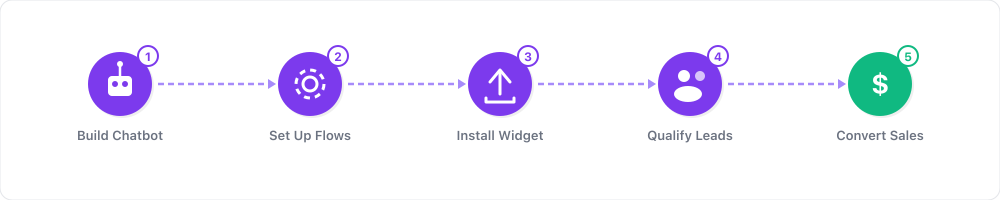
Why AI Chatbot Services Are Booming in 2026
E-commerce is a $6+ trillion global market, and every online store has the same problem: customer service is expensive, slow, and hard to scale. A single full-time customer support agent costs $35,000–50,000/year. Most small and mid-size Shopify stores can't afford that — but they also can't afford to leave customer questions unanswered, because unanswered questions mean lost sales.
AI chatbots solve this problem at a fraction of the cost. Tidio's Lyro AI agent, powered by Anthropic's Claude, can resolve up to 67% of customer inquiries automatically — handling questions about shipping times, return policies, product availability, and order status without any human involvement. For a store receiving 200 support tickets per month, that's 134 conversations handled automatically, saving 30–50 hours of human labor every month.
The market opportunity for freelancers is massive because of a critical gap: the technology is ready, but most store owners don't know how to implement it. Tidio has 300,000+ businesses on its platform, but the vast majority haven't configured their chatbot beyond the default settings. They've installed the widget, but they haven't trained the AI, built automation flows, or optimized the conversation experience.
That gap between "installed Tidio" and "Tidio generating ROI" is exactly where your freelance business lives. You become the person who bridges that gap — and you charge $300–5,000 per project to do it, plus $200–400/month for ongoing management.
The numbers back this up. Procosmet saw a 23% increase in sales after implementing Tidio's chatbot. Eye-oo generated EUR 177,000 in additional income through automated chat conversations. ADT Security achieved a 17% boost in sales with their chatbot deployment. These aren't hypothetical projections — they're published case studies from Tidio's own resources.
What You Need to Get Started
- A Tidio account — free plan available with 50 live chat conversations/month
- A test website — use a free Shopify trial or WordPress site to build your demo
- Basic understanding of e-commerce — you need to know how online stores work, what customers ask, and why support matters
- A way to find clients — Upwork, Fiverr, cold outreach, or local networking
- A portfolio or demo — a working chatbot on a test store that you can show prospects
- A payment method — PayPal or Stripe for collecting client fees
- Time investment: 10–15 hours to learn the platform, then 4–8 hours per client project
- Budget: $0 to start (Tidio's free plan is enough for learning and demo building)
No coding skills required. Tidio's flow builder is drag-and-drop, and Lyro learns from text-based knowledge base entries. If you can write clear FAQ answers and click through a visual interface, you can do this work.
Step 1: Master Tidio in One Week

Before offering chatbot services to clients, you need to know every feature inside out. A client will ask unexpected questions — "Can it handle refunds?" "Does it work on Instagram?" "Can we see what's in the customer's cart?" You need to answer confidently.
Day 1–2: Install and explore. Sign up for Tidio's free plan. Install the chat widget on a test Shopify trial store or free WordPress site. Click through every section of the dashboard — Conversations, Flows, Lyro, Analytics, Settings, Channels.
Day 3–4: Build automation flows. Create these 5 essential flows using the visual builder:
- Welcome message — greets new visitors after 5 seconds on site
- Abandoned cart recovery — triggers when a visitor with items in their cart navigates to the exit
- Lead capture — asks for email address in exchange for a discount code
- FAQ responder — answers the top 5 questions (shipping time, return policy, sizing, payment methods, contact info)
- After-hours message — informs visitors the team is offline and collects their email for follow-up
Day 5: Configure Lyro AI. Write 15–20 knowledge base entries covering common e-commerce topics. Test Lyro by asking it questions as a customer would. Identify where it gives weak answers and refine the entries. Configure the handoff threshold so Lyro passes complex questions to a human operator.
Day 6: Set up multi-channel. Connect email and Facebook Messenger to the Tidio inbox. Send test messages from each channel and verify they arrive correctly. Practice responding from the unified inbox.
Day 7: Build your demo. Polish everything. Make sure the chat widget looks professional, flows trigger correctly, Lyro gives accurate answers, and the handoff experience is smooth. This demo store is your primary sales tool — prospects who see a working chatbot in action are 10x more likely to hire you.
Step 2: Create Your Service Packages
Package your services into clear tiers. Prospects should be able to look at your offerings and immediately know which package fits their needs.
| Package | What's Included | Price | Time Investment |
|---|---|---|---|
| Essential Setup | Widget installation, 3 automation flows (welcome, FAQ, after-hours), basic Lyro training (10 KB entries), 1 channel | $300–500 | 2–4 hours |
| Professional Setup | Widget installation, 8+ automation flows, full Lyro training (25+ KB entries), multi-channel inbox (chat + email + social), analytics configuration, 2 revision rounds | $800–1,500 | 5–8 hours |
| Enterprise Setup | Everything in Professional + custom automation flows, advanced Lyro training (50+ KB entries), Shopify deep integration (cart preview, order lookup), team training session, strategy document | $2,000–5,000 | 10–20 hours |
| Monthly Management | Performance monitoring, KB updates, flow optimization, conversation log review, monthly analytics report | $200–400/mo | 2–4 hours/mo |
Your bread-and-butter package is the Professional Setup at $800–1,500. This covers everything a typical Shopify store needs and takes 5–8 hours of work once you have a repeatable process. At $100–300/hour effective rate, this is excellent freelance income.
Always offer the Monthly Management upsell. Setup projects are one-time revenue. Management retainers are recurring revenue. Frame it as: "Your chatbot needs ongoing optimization — new products mean new FAQ entries, seasonal changes require updated flows, and conversation logs reveal opportunities to improve. I handle all of that for a flat monthly fee so you can focus on growing your store."
Step 3: Find Clients Who Need Chatbot Help
Your ideal client is a Shopify or WooCommerce store owner who gets 50–500+ customer inquiries per month and is handling them manually or poorly. Here are the best channels to find them:
Shopify App Store reviews. Browse reviews for chat apps (including Tidio competitors). Store owners leaving 1–3 star reviews are frustrated with their current solution. Reach out directly: "I noticed your review about [chat tool]. I specialize in chatbot configuration for Shopify stores — I could set up a solution that handles 60-70% of your customer questions automatically. Would a 15-minute demo be helpful?"
Upwork and Fiverr. Create a specialized profile focused exclusively on chatbot setup — not as one of twenty services you offer. Search for existing jobs under "chatbot setup," "Shopify live chat," "customer service automation," and "Tidio setup." The competition for Tidio-specific services is surprisingly thin.
E-commerce Facebook groups and subreddits. Shopify Entrepreneurs, WooCommerce Communities, r/shopify, r/ecommerce — these are full of store owners asking "What chat tool should I use?" and "How do I set up automated customer service?" Answer questions genuinely, demonstrate expertise, and mention your services when relevant. Don't spam — be helpful first.
Cold outreach to Shopify stores. Visit stores in niches you understand. Browse their site on mobile — do they have a chat widget? Is it configured beyond the default? Does it answer basic questions? Most don't. Reach out via their contact form with a personalized message referencing their specific store and niche.
Local businesses. Dentists, real estate offices, home service companies, fitness studios, and spas all benefit from lead-capture chat widgets. Walk in with your phone showing a working demo. "I built this for a business like yours — it captures leads 24/7 even when you're closed. Can I set it up for you this week?"
Step 4: Deliver a Professional Chatbot Setup
Once you land a client, follow this repeatable process:
Phase 1: Discovery (30 minutes). Get on a call with the client and ask: What are the top 10 questions your customers ask? What's your biggest customer service pain point? How many inquiries do you get per month? What does success look like — fewer tickets, faster responses, more sales? Take detailed notes — these answers become your knowledge base entries and automation triggers.
Phase 2: Installation and configuration (30 minutes). Install the Tidio widget on their site. Shopify is a one-click app install. WordPress is a plugin. Custom sites need a JavaScript snippet in the header. Configure the widget appearance — colors, position, greeting text, business hours, operator avatar.
Phase 3: Automation flows (2–3 hours). Build every flow based on the discovery call answers. At minimum, every client needs:
- Welcome message that greets visitors after 5 seconds
- Abandoned cart recovery triggered by exit intent with items in cart
- Lead capture flow offering a discount in exchange for email
- FAQ responses for the top 10 customer questions
- After-hours message collecting contact info for follow-up
- Order status check flow (for Shopify stores with order tracking)
- Product recommendation trigger based on browsing behavior
Phase 4: Lyro AI training (1–2 hours). Build the knowledge base from the client's FAQ page, help center, return/refund policy, shipping information, and product details. Write entries in clear, conversational language. Test extensively — ask Lyro 20–30 questions as a customer would and refine any weak answers.
Phase 5: Multi-channel setup (30 minutes). Connect Facebook Page, Instagram Business, email, and WhatsApp (if applicable) to the unified Tidio inbox. Test each channel end-to-end.
Phase 6: Testing and QA (1 hour). Go through every flow as a customer on both desktop and mobile. Test edge cases — what happens when someone asks something unexpected? Verify that handoff to human operators works smoothly. Check that notifications reach the client's phone and email.
Phase 7: Client handoff (30 minutes). Walk the client through the dashboard via screen share. Show them: how to read conversations, how to respond to live chats, how to check analytics, and how to add simple FAQ entries. Record a Loom video walkthrough they can reference later.
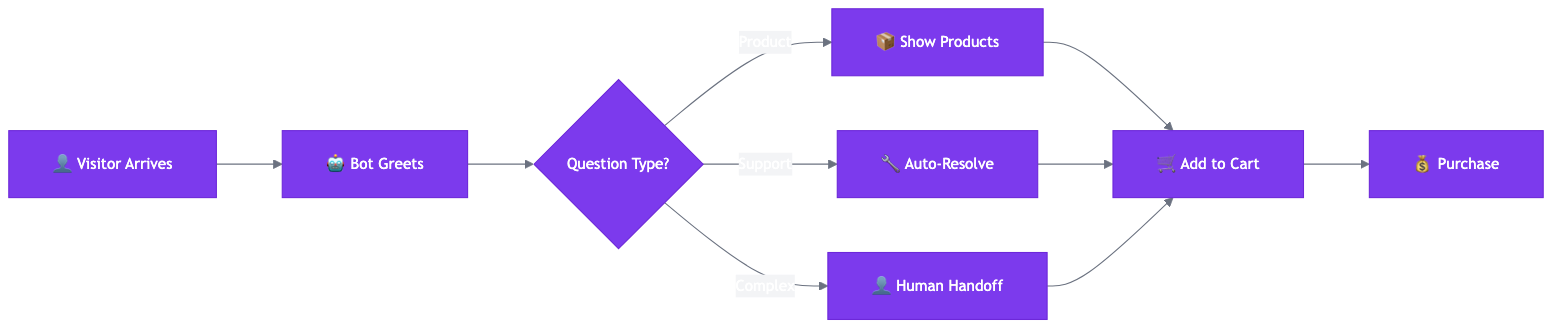
Chatbot Conversation Flow Template:
Greeting (triggers after 5 seconds on site): "Hey there! Welcome to [Store Name]. I'm here to help with any questions about our products, shipping, or orders. What can I help you with?"
Quick Reply Buttons:
- "Track my order"
- "Shipping & returns"
- "Product questions"
- "Talk to a human"
Qualification Flow (for lead capture): Bot: "I'd love to help you find the perfect [product category]. Can I ask a couple of quick questions?" → "What are you looking for today?" [Product category buttons] → "What's your budget range?" [Price range buttons] → "Great picks for you! Here are our top recommendations:" [Product cards] → "Want me to send you a 10% welcome discount? Just drop your email below." → [Email capture field] → "Awesome! Check your inbox for your discount code. Anything else I can help with?"
Handoff to Human: Bot: "That's a great question — let me connect you with our team for the best answer." → [If during business hours]: "Connecting you now. [Agent name] will be with you in about 2 minutes." → [If after hours]: "Our team is currently offline. Leave your email and we'll get back to you within [X] hours. In the meantime, here are some helpful links: [FAQ] [Shipping info] [Return policy]"
Step 5: Scale to $5,000+/Month with Retainer Clients
The real money in chatbot services isn't in one-time setups — it's in monthly management retainers. Here's how to build a retainer-based business:
What monthly management actually involves (2–4 hours per client):
- Review conversation logs weekly to identify new questions Lyro can't answer
- Update the knowledge base with new products, seasonal promotions, and policy changes
- Optimize automation flows based on performance data — which flows convert? Which get abandoned?
- Send a monthly report showing: conversations handled, AI resolution rate, response time, customer satisfaction, and conversion impact
- Recommend improvements based on trends — "Your abandoned cart flow recovered $2,400 this month. I recommend adding a follow-up email sequence to capture the remaining 30%."
Retainer pricing structure:
| Client Size | Monthly Conversations | Retainer Fee | Your Time/Month |
|---|---|---|---|
| Small store | 50–200 | $200/mo | 2 hours |
| Mid-size store | 200–500 | $300/mo | 3 hours |
| Growing store | 500–1,000 | $400/mo | 4 hours |
| High-volume store | 1,000+ | $500–800/mo | 5–6 hours |
Revenue scaling with retainers:
| Month | Setup Projects | Retainer Clients | Monthly Revenue |
|---|---|---|---|
| 1–2 | 2 × $800 | 0 | $1,600 |
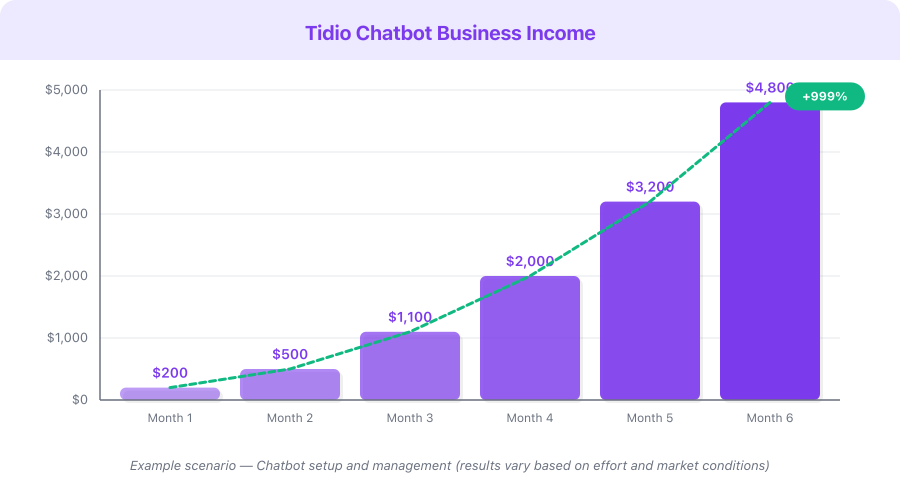
| 3–4 | 2 × $1,000 | 3 × $250 | $2,750 |
| 5–6 | 2 × $1,200 | 6 × $250 | $3,900 |
| 7–9 | 1 × $1,500 | 10 × $300 | $4,500 |
| 10–12 | 1 × $2,000 | 15 × $300 | $6,500 |
Notice how retainer revenue becomes the foundation as your client base grows. By month 12, retainers generate $4,500/month of your $6,500 total — that's predictable, recurring income that doesn't depend on constantly finding new projects.
SaaS / Freelance Client Proposal Template:
Subject: AI Chatbot Setup for [Store Name] — Handle 67% of Customer Questions Automatically
Hi [Name],
I help e-commerce stores like [Store Name] automate customer service using AI chatbots — so you can focus on growing your business instead of answering the same questions every day.
The problem: Your team spends [X] hours/week handling customer inquiries manually. Most of these are repetitive — shipping times, return policies, order status, product availability.
The solution: I'll set up an AI chatbot that handles 60–70% of these conversations automatically, 24/7. Your customers get instant answers, your team handles only the complex issues, and you recover sales that would've been lost to slow response times.
What I'll deliver:
- Tidio chatbot installation and configuration
- 8+ custom automation flows (welcome, FAQ, abandoned cart recovery, lead capture, after-hours)
- Lyro AI training with 25+ knowledge base entries covering your products, policies, and common questions
- Multi-channel inbox setup (live chat + email + Facebook + Instagram)
- Full testing on desktop and mobile
- 30-minute training session for your team
- 2 rounds of revisions
Results you can expect: Based on published case studies, stores using this setup see 17–23% increases in sales conversion and 50–70% reduction in manual support tickets.
Investment: $[price] one-time setup. Optional $[monthly]/month ongoing optimization. Timeline: 5 business days from kickoff to live chatbot.
I've attached a 2-minute video showing a chatbot I configured for a similar store. Happy to set up a 15-minute call to discuss your specific needs.
Best, [Your name]
Step 6: Add Advanced Revenue Streams
Once you've established your chatbot business, expand into adjacent services that leverage the same skills and client relationships:
E-commerce customer service consulting ($500–2,000 per engagement). Audit a store's entire customer service workflow — response times, resolution rates, channel coverage, staffing costs. Identify where automation can replace manual work and present a strategy document with projected ROI. Then implement the solution using Tidio.
Lead generation chatbot funnels for local businesses ($500–1,500 setup + $100–300/month). Dentists, real estate agents, lawyers, home service companies, and fitness studios all need lead capture on their websites. Build Tidio chat funnels that greet visitors, ask qualifying questions, and capture contact information 24/7. Local businesses love this because it works while they sleep.
Multi-location chatbot deployments ($3,000–10,000). Franchise businesses and multi-location retailers need consistent chatbot experiences across all their sites. You configure a master template and deploy it across locations with local customizations. The project size justifies premium pricing.
Real-World Examples and Case Studies
These are published case studies from Tidio's own resources, demonstrating real results from real businesses:
Procosmet — 23% sales increase. Procosmet, a beauty and cosmetics brand, implemented Tidio's chatbot to handle product questions and guide customers through their selection process. The result was a 23% increase in sales, driven by faster response times and 24/7 availability. The chatbot answered common questions about ingredients, usage, and compatibility — freeing the support team to handle complex consultations.
Eye-oo — EUR 177,000 in additional income. Eye-oo, an online eyewear retailer, used Tidio's chatbot and automation flows to engage website visitors and guide them through the purchasing process. The result was EUR 177,000 in additional income directly attributed to chatbot-driven conversations. Key flows included product recommendations based on face shape, frame size guidance, and prescription verification support.
ADT Security — 17% sales boost. ADT Security deployed Tidio to handle initial customer inquiries about security systems and packages. The chatbot qualified leads by asking about property type, security needs, and budget — then handed qualified prospects to sales agents. Result: a 17% increase in sales conversion, driven by faster lead qualification and 24/7 availability.
Source: tidio.com/resources/case-studies
Example Scenario: Freelance Chatbot Specialist. A freelancer in Chicago specializes in Tidio setup for Shopify fashion brands. She charges $1,200 for Professional Setup and $300/month for management. In her first year, she completes 18 setup projects and builds a roster of 12 retainer clients. Annual revenue: $21,600 (setups) + $43,200 (retainers) = $64,800. Her total working hours average 25 per week — leaving time for other work or scaling further.
Revenue Projections
| Business Model | Monthly Volume | Revenue/Unit | Monthly Revenue | Annual Revenue |
|---|---|---|---|---|
| Setup projects only | 3 projects | $1,000 avg | $3,000 | $36,000 |
| Retainers only | 15 clients | $300/mo | $4,500 | $54,000 |
| Mixed (setup + retainer) | 2 projects + 10 clients | $1,000 + $300/mo | $5,000 | $60,000 |
| Scaled (premium + retainer) | 2 projects + 20 clients | $2,000 + $350/mo | $11,000 | $132,000 |
This is a hypothetical example based on publicly available data, not a guarantee of results. Individual results vary significantly.
Monetization Strategies
1. Chatbot Setup Freelancing ($300–5,000 per project)
The core service. Install and configure Tidio for Shopify, WooCommerce, and WordPress stores. Build automation flows, train Lyro AI, and deliver a working chatbot that handles the majority of customer inquiries. Most projects take 4–8 hours of actual work — making your effective hourly rate $75–625.
2. Monthly Chatbot Management ($200–800/month per client)
The recurring revenue engine. Monitor performance, update knowledge bases, optimize flows, and send monthly reports. Once the initial setup is solid, this is 2–4 hours of work per client per month. Build a roster of 10–20 retainer clients for $2,000–16,000/month in predictable income.
3. E-Commerce Customer Service Consulting ($500–2,000 per engagement)
Position yourself as a customer service strategist, not just a chatbot installer. Audit a store's entire support workflow, identify automation opportunities, and implement solutions. Higher-value engagements attract larger stores with bigger budgets.
4. Lead Generation Funnels for Local Businesses ($500–1,500 + $100–300/month)
Set up Tidio chat funnels for dentists, real estate agents, lawyers, gyms, and home service companies. The chatbot qualifies leads 24/7 — capturing contact info, asking qualifying questions, and booking appointments. Local businesses pay premium prices because every qualified lead has direct revenue value.
5. Tidio Affiliate Income ($8.85–$17.70/month per referral)
Earn 30% lifetime recurring commission on every customer you refer to Tidio. A single referral on the Growth plan ($59/month) earns you $17.70/month — every month they remain a customer. With a 30-day cookie window, referrals from blog posts, YouTube tutorials, and social content generate ongoing passive income. 50 active referrals at an average of $15/month = $750/month.
Pricing Breakdown
What your clients will pay for Tidio:
| Plan | Monthly Cost | Key Features | Best For |
|---|---|---|---|
| Free | $0 | 50 live chat conversations, 1 operator | Testing, very low traffic stores |
| Starter | $29/mo | 100 conversations, visitor tracking | Small stores just getting started |
| Growth | $59/mo | 2,000 conversations, no Tidio branding | Most small-mid stores (your typical client) |
| Lyro AI add-on | $39–140/mo | 50–300 AI conversations | Required for AI chatbot functionality |
| Flows add-on | $29–99/mo | 2,000–40,000 automation triggers | Required for automated sequences |
| Typical total | $105–150/mo | Growth + Lyro + Flows | What most clients actually pay |
Your freelance ROI: A $1,000 Professional Setup project takes 5–8 hours. Your Tidio account is free. Your effective hourly rate is $125–200/hour.
Affiliate rate: 30% lifetime recurring commission, 30-day cookie. For every client you set up who signs up through your link, you earn ~$30–45/month passively — on top of your setup and management fees.
Common Mistakes
-
Skipping the discovery call. Every store has different products, customers, and pain points. A chatbot configured for a skincare brand fails completely for a hardware store. Spend 30 minutes understanding the client's business, top customer questions, and support workflow before building anything. This investment saves hours of rework.
-
Over-complicating the initial setup. Start with 5–8 essential automation flows. You can always add more later, and clients get overwhelmed when the chatbot tries to handle every possible scenario on day one. Launch with the core flows, gather data for 2–4 weeks, then add flows based on actual conversation patterns.
-
Ignoring the human handoff experience. When Lyro can't answer a question, the transition to a human operator must be seamless. A clunky handoff — long wait times, losing conversation context, or asking the customer to repeat information — is worse than no chatbot at all. Test the handoff thoroughly on every project.
-
Not being transparent about total costs. Tidio's base plans look affordable, but most businesses need the Lyro and Flows add-ons, bringing the real cost to $105–150/month. If you quote a low price and the client discovers the true cost later, you lose trust. Be upfront about the total investment and justify it with the ROI data.
-
Undercharging for ongoing management. $200/month feels expensive when you're starting out, but compare it to the cost of a part-time support agent ($1,500+/month). Your management service saves the client thousands while keeping their chatbot optimized. Don't discount your ongoing value.
-
Forgetting mobile testing. Over 65% of e-commerce traffic is mobile in 2026. Always test the chat widget, every automation flow, and the Lyro experience on phones and tablets before delivering a project. A chatbot that works perfectly on desktop but breaks on mobile fails for the majority of visitors.
-
Not tracking ROI for clients. The easiest way to justify your fees — and earn referrals — is showing measurable results. Track conversations handled, AI resolution rate, response time improvement, and revenue attributed to chatbot interactions. Include these metrics in your monthly management reports. Clients who see clear ROI never cancel.
Quick-Start Checklist
- Sign up for Tidio's free plan and explore every feature over 5–7 days
- Install the widget on a test Shopify or WordPress store to build your demo
- Build 5 essential automation flows — welcome message, abandoned cart, lead capture, FAQ, after-hours
- Configure Lyro AI with 15–20 knowledge base entries and test thoroughly
- Set up multi-channel inbox with at least email and one social platform
- Create 3 service packages with clear pricing (Essential, Professional, Enterprise)
- Record a 2-minute Loom demo video showing your test store chatbot in action
- Post your chatbot setup service on Upwork and Fiverr with portfolio screenshots
- Identify 15 Shopify stores without chat widgets and send personalized cold outreach
- Land your first client, deliver an excellent setup, and ask for a testimonial and referral
- Upsell monthly management to every setup client for recurring revenue
- Join the Tidio affiliate program and include your referral link in all client proposals
FAQ
How long does it take to set up a chatbot for a client?
A basic setup with 3–5 automation flows takes 2–4 hours. A full professional setup with Lyro AI training, multi-channel inbox, and 8+ flows takes 5–8 hours. Enterprise deployments with advanced customization and team training can take 10–20 hours spread over 1–2 weeks. Most standard projects can be delivered within 5 business days of kickoff.
Do I need technical skills to offer chatbot services?
No coding is required. Tidio's flow builder is drag-and-drop, and Lyro learns from text-based knowledge base entries that you write in plain English. The main skills you need are understanding e-commerce customer journeys, writing clear and helpful chatbot responses, and communicating professionally with clients. If you can write a good FAQ answer, you can train a chatbot.
What's the realistic earning potential in the first year?
Most freelancers who focus on chatbot services earn $2,000–5,000/month within 6 months. This comes from a combination of setup projects ($800–2,000 each) and monthly retainers ($200–400/client). By month 12, with 10–15 retainer clients and steady new projects, $5,000–8,000/month is realistic. Top performers serving enterprise clients and managing 20+ retainer accounts earn $10,000+/month.
How do I handle clients who already have a chatbot installed but it's not working well?
This is actually your best prospect type. They already understand the value of chatbots, they've invested money in the tool, and they're frustrated because it's not delivering results. Offer a "chatbot audit" — review their current configuration, identify what's wrong, and present a plan to fix it. Charge $300–500 for the audit, then $800–1,500 for the rebuild. These clients convert at higher rates than cold prospects.
What if a client's chatbot gets questions wrong?
This is normal and expected. No AI handles 100% of queries perfectly. Set client expectations during the setup process — Lyro handles approximately 67% of inquiries, with the remaining 33% passed to human operators. Your ongoing management service includes reviewing conversation logs to identify gaps and continuously improving the knowledge base. Position errors as optimization opportunities, not failures.
What's Next
- Read our Tidio Review for a detailed breakdown of features, Lyro AI, and pros and cons
- Check the Tidio Pricing Guide to understand base plans, add-on costs, and real-world pricing scenarios
- Explore Lovable for building custom SaaS tools that complement your chatbot services
- Browse Mixo for creating landing pages to market your freelance chatbot business