How to Make Money with AI Captions Using Submagic in 2026
This guide contains affiliate links. If you sign up through our links, we may earn a commission at no extra cost to you. We only recommend tools we've thoroughly researched.

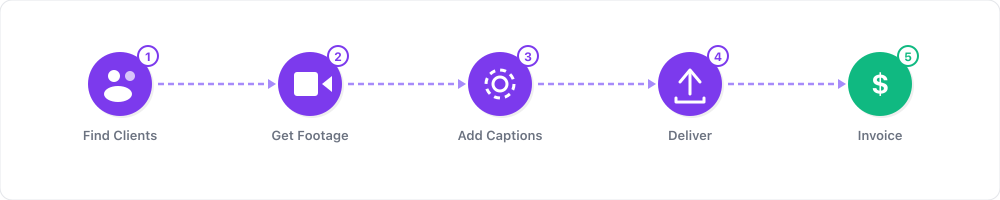
Why AI-Powered Short-Form Video Is the Biggest Service Opportunity in 2026
Short-form video has gone from a novelty to the dominant content format on the internet. YouTube Shorts generates over 70 billion daily views. TikTok surpassed 1.5 billion monthly active users. Instagram Reels drives more organic reach than any other format on the platform. Every creator, coach, brand, and business needs short-form video content — and the vast majority of them cannot produce it fast enough.
This gap between demand and production capacity is where the money is. And Submagic sits right in the middle of it.
Here is why the opportunity is massive right now:
- Chris Hanna's agency saw a 300% revenue increase after implementing Submagic into their short-form video production workflow. The speed advantage allowed them to take on more clients without hiring additional editors (source: submagic.co/customer-stories)
- A content creator hit 5 million views in a single month using Submagic's AI captions and editing features to dramatically increase their posting volume (source: submagic.co/customer-stories)
- The short-form video editing market is projected to reach $2.1 billion by 2027
- 92% of marketers say video gives them a positive ROI, but most cite "lack of time" as the biggest barrier to producing more video content
- The average cost of hiring a freelance video editor is $30-100 per short clip — Submagic produces the same output in under 2 minutes for a flat $19/month
The math is compelling: a single person using Submagic can produce 20-40 client-ready short clips per day. At $50-100 per clip, that is $1,000-4,000 in daily revenue capacity. Even at a fraction of that throughput, the margins are extraordinary.
Whether you want to build a Shorts editing agency, grow your own channels, or offer content repurposing as a service, Submagic gives you a production speed advantage that is nearly impossible to replicate with manual editing.
What You Need to Get Started
| Item | Cost | Purpose |
|---|---|---|
| Submagic account (free trial) | $0 | Test the platform with 3 free videos |
| Source videos (yours or client content) | $0 | Long-form content to transform into Shorts |
| Social media accounts | $0 | Distribution platforms for your content |
| Portfolio samples (3-5 before/after clips) | $0 | Demonstrate your editing quality to prospects |
| Submagic Pro plan | $19/mo | Unlimited exports, all caption styles |
| Scheduling tool (optional) | $0-15/mo | Buffer, Later, or native platform scheduling |
Total startup cost: $0 to test, $19/month to operate. The free trial gives you 3 videos to build initial samples. The Pro plan at $19/month provides unlimited exports — making it one of the most cost-effective production tools available.
Time investment: 10-20 hours per week for a part-time agency serving 3-5 clients. 30-40 hours for a full-time operation serving 8-12 clients.
Skill level: No video editing experience required. If you can upload a video and click a button, you can use Submagic. The AI handles captions, B-roll, zoom effects, and cuts automatically. Your job is quality control and client management — not technical editing.
Step 1: Master the Submagic Workflow

Before you take on a single client, master the tool. Process 10-15 videos until the workflow feels automatic. Here is the exact process:
- Upload or paste a link — Submagic accepts YouTube URLs, direct uploads, Google Drive links, and Zoom recordings
- AI processes the video (under 2 minutes) — it generates animated captions, identifies key moments, adds B-roll, and applies zoom effects
- Review the output — check caption accuracy, B-roll relevance, and clip start/end points
- Make light adjustments — fix any misheard words in captions, swap B-roll clips that do not fit, trim start/end points if needed
- Export — choose 9:16 for Shorts/Reels/TikTok, 1:1 for Instagram feed, or 16:9 for YouTube
Time per video after you are proficient: 3-5 minutes including review. The AI does 90% of the work. Your job is the quality-control pass that ensures every clip is client-ready.
What makes Submagic's captions different:
- Word-by-word animated highlighting that matches viral content trends
- Keyword emphasis with bold colors and emoji accents
- Multiple caption styles optimized for different platforms and audiences
- Automatic speech detection with high accuracy across accents and speaking speeds
YouTube Shorts Script Template (Caption-Focused)
Use this template when creating original Shorts content optimized for Submagic's caption engine:
HOOK (0-3 seconds) — The Scroll Stopper: "[Bold, surprising statement that makes viewers stop scrolling]"
- Write this as a single, punchy sentence
- Submagic will highlight the key words automatically
- Examples:
- "This $19 tool replaced my $3,000/month editor."
- "I made $2,400 last month from 5-minute videos."
- "Stop editing Shorts the hard way."
PROBLEM (3-10 seconds) — The Pain Point: "[Describe the problem your audience faces in 2-3 sentences]"
- Keep sentences short — Submagic's captions look best with concise phrases
- Each sentence should be a standalone visual moment
SOLUTION (10-35 seconds) — The Walkthrough: "[Show or explain the solution step by step]"
- Break into 3-4 clear steps
- Speak at a steady pace — Submagic's caption timing works best at 140-160 words per minute
- Include specific numbers or results ("went from 500 to 15,000 followers")
PROOF (35-45 seconds) — The Evidence: "[Share a result, case study, or before/after]"
- One concrete example is more powerful than three vague claims
CTA (45-55 seconds) — The Next Step: "Follow for more [topic] tips" OR "Link in bio to try [tool]"
- Keep CTAs to one sentence — Submagic will highlight it as the final caption moment
Step 2: Build Your Portfolio with Before/After Samples
No client will hire you without seeing your work. Build a portfolio of 5-8 compelling before/after samples.
How to build samples without clients:
- Find public content — YouTube videos from creators in your target niche who do not currently post Shorts
- Process through Submagic — generate 3-5 clips from each source video
- Create comparison posts — side-by-side showing the raw footage vs. the Submagic-edited clip
- Post your samples — share them on Twitter/X, LinkedIn, Instagram, and TikTok with captions explaining the transformation
- Tag the original creators — many will respond, share, or even become clients
Portfolio presentation tips:
- Show the raw, unedited clip alongside the Submagic-enhanced version
- Highlight the caption quality, B-roll insertions, and zoom effects
- Include view counts if your sample clips gain traction
- Create a simple portfolio page (Carrd.co or Notion) with your best 5 samples
Step 3: Price Your Services and Package Your Offer
Pricing is where most new agencies stumble. Price too low and you burn out. Price too high and you cannot land first clients. Here is a proven pricing structure:
Service packages:
| Package | Videos/Month | Includes | Monthly Price | Per Video |
|---|---|---|---|---|
| Starter | 8 | AI captions, B-roll, zoom effects | $500 | $62.50 |
| Growth | 16 | Everything in Starter + posting schedule | $900 | $56.25 |
| Scale | 30 | Everything in Growth + analytics report | $1,500 | $50.00 |
| Premium | 50+ | Custom work, priority delivery, strategy calls | $2,500+ | $50.00 |
Why these prices work:
- For clients: hiring a freelance editor for the same output would cost $30-100 per clip ($240-3,000+ per month). Your pricing saves them 50-75%.
- For you: Submagic costs $19/month for unlimited exports. Even on the Starter package, your tool cost is 3.8% of revenue. Margins are 90%+.
What to include in every package:
- AI-captioned clips with keyword highlighting
- B-roll insertion and zoom effects
- Platform-optimized exports (9:16 for Shorts/Reels/TikTok)
- Caption accuracy review and corrections
- 48-hour turnaround on delivery
Content Calendar Template for Shorts Clients
Week 1:
- Monday: Process client's latest long-form video through Submagic
- Tuesday: Deliver 4-5 clips with captions and effects
- Wednesday: Client reviews and approves (or requests minor adjustments)
- Thursday-Friday: Schedule approved clips across YouTube Shorts, TikTok, Instagram Reels
Week 2:
- Repeat with next source video
- Post 2 clips from Week 1 backlog to fill gaps
Week 3-4:
- Continue cycle
- Review analytics from Weeks 1-2
- Identify highest-performing clip styles and double down
Monthly deliverables:
- 16-20 finished clips delivered
- Posted across 2-3 platforms per clip
- Monthly analytics summary (views, engagement, follower growth)
- Recommendations for next month's content focus
Step 4: Find and Close Your First 3 Clients
The fastest path to revenue is direct outreach to creators and businesses who clearly need short-form content but are not producing it.
Where to find ideal clients:
-
YouTubers with 10K-100K subscribers who do not post Shorts — they have the content library but lack the time or tools to clip it. Search YouTube, filter by subscriber count, and check if they have any Shorts. If not, they are a prospect.
-
Podcasters — every podcast episode contains 10-20 potential short clips. Most podcasters post zero clips from their episodes. Find them on Apple Podcasts, Spotify, or Twitter.
-
Business coaches and consultants — they create webinars, training videos, and keynotes that are perfect source material for Shorts. Find them on LinkedIn and Instagram.
-
SaaS companies — they produce product demos, webinars, and customer interviews. Their marketing teams are stretched thin and will pay premium rates for consistent short-form content.
Outreach strategy that works:
- Find a prospect who matches your criteria
- Process one of their public videos through Submagic
- Send them 2-3 finished clips with a message like:
"Hi [Name], I noticed you have great long-form content but no Shorts. I created these 3 clips from your latest [video/episode] using my AI editing workflow. They are ready to post. If you like them, I can deliver 8-16 clips like these every month for $500-900. Want to chat?"
Conversion benchmarks: Expect a 10-20% response rate and a 30-50% close rate from respondents. Sending 20 outreach messages should yield 2-4 conversations and 1-2 clients.
Step 5: Scale Your Agency
Once you have 3-5 clients and a proven workflow, scaling becomes straightforward.
Scaling milestones:
| Clients | Monthly Revenue | Weekly Hours | Next Step |
|---|---|---|---|
| 1-2 | $500-1,800 | 5-10 | Refine workflow, build more samples |
| 3-5 | $1,500-4,500 | 10-20 | Systematize delivery, add scheduling |
| 5-8 | $4,500-7,200 | 20-30 | Hire a VA for uploads and communication |
| 8-12 | $7,200-12,000 | 25-35 | Train VA on Submagic, focus on sales |
| 12+ | $12,000+ | 15-20 (your time) | Full delegation, focus on growth |
How to scale without burning out:
- Batch process — do all clips for all clients in one or two sessions per week
- Hire a virtual assistant ($400-800/month) to handle client communication, uploads, and scheduling
- Train your VA on Submagic — the tool is simple enough that anyone can learn it in a day
- Add premium services — content strategy, analytics, thumbnail design, and posting optimization
- Build a referral system — offer existing clients a free month for every referral who signs up
Real-World Examples and Case Studies
Chris Hanna — 300% Agency Revenue Increase Chris Hanna's content agency implemented Submagic to automate their short-form video production workflow. The result: a 300% increase in revenue. The speed advantage was the key driver — they could produce clips in minutes instead of hours, allowing them to take on significantly more clients without hiring additional editors. The quality of Submagic's AI captions matched what their human editors were producing, but at 10x the speed (source: submagic.co/customer-stories).
Creator — 5 Million Views in One Month A content creator using Submagic hit 5 million views in a single month by dramatically increasing their posting volume. Before Submagic, they posted 2-3 Shorts per week. After implementing the tool, they scaled to 3-5 Shorts per day across multiple platforms. The volume increase, combined with Submagic's engagement-optimized captions, triggered algorithmic promotion that snowballed views (source: submagic.co/customer-stories).
The Service Business Model The most successful Submagic users are not just creating content for themselves — they are selling the output as a service. The tool's speed advantage creates an arbitrage opportunity: charge $50-100 per clip for work that takes under 5 minutes. At 10 clips per day, that is $500-1,000 in daily revenue capacity from a $19/month tool.
Revenue Projection Table
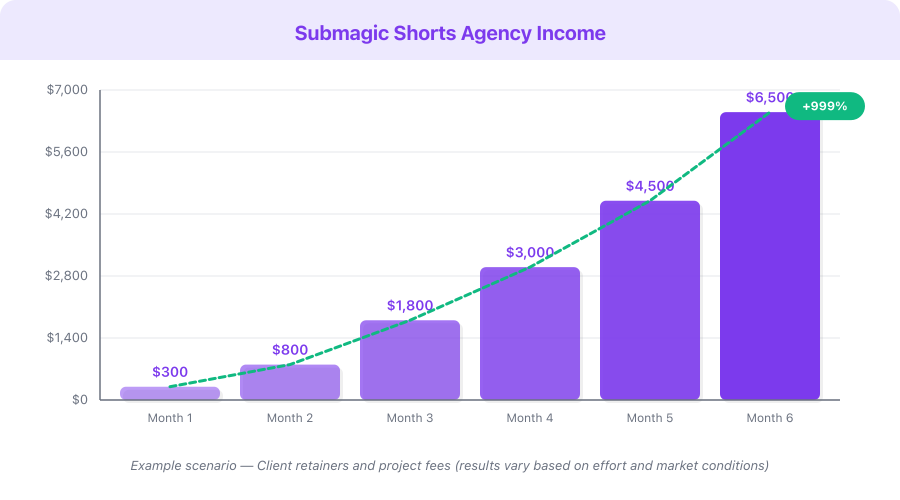
Disclaimer: The following table presents an Example Scenario for illustrative purposes only. Actual results vary significantly based on niche, content quality, consistency, audience engagement, and market conditions. These figures are not guarantees or promises of income.
This is a hypothetical example based on publicly available data, not a guarantee of results. Individual results vary significantly.
| Scenario | Clients | Clips/Month | Agency Revenue | Own Channel Revenue | Total Monthly |
|---|---|---|---|---|---|
| Conservative (part-time, 3 clients) | 3 | 24-48 | $1,500-2,700 | $0-200 | $1,500-2,900 |
| Moderate (full-time, 6 clients + own channel) | 6 | 48-96 | $3,000-5,400 | $200-800 | $3,200-6,200 |
| Aggressive (scaled agency, 12 clients + VA) | 12 | 120-240 | $7,200-12,000 | $500-2,000 | $7,700-14,000 |
Revenue sources include agency retainer fees, per-video charges, own channel ad revenue, and affiliate commissions. Ranges reflect package mix and client retention rates.
Monetization Strategies

1. Shorts Editing Agency ($1,500-12,000/month)
The highest-margin opportunity. Charge clients $500-2,000/month for monthly clip packages. With Submagic handling production, your per-clip cost (time + tool) is under $2. Even the cheapest package ($500/month for 8 clips) generates $462 in profit after Submagic's $19 fee and roughly $19 worth of your time. Scale to 10+ clients for five-figure monthly revenue.
2. Per-Video Freelance Work ($50-150/clip)
List your services on Fiverr, Upwork, and PeoplePerHour. Charge $50-150 per clip for one-off projects. Process time: 3-5 minutes per clip. At $50/clip and 5 clips per day, that is $250/day or roughly $5,000/month working part-time hours.
3. Own Channel Growth (Ad Revenue + Sponsorships)
Use Submagic to scale your own short-form content output. Post 3-5 Shorts per day across YouTube, TikTok, and Instagram. At 500,000 monthly Shorts views, expect $1,000-3,000/month in combined ad revenue. Add sponsorships at 10,000+ followers for an additional $200-2,000 per deal.
4. Submagic Affiliate Commissions (30% Lifetime)
Every creator or agency you refer to Submagic earns you 30% of their subscription for the lifetime of their account. If you refer 20 Pro plan users ($19/month each), that is $114/month in passive recurring income — growing with every referral and never expiring. Mention Submagic in your content, client conversations, and social media posts.
5. Content Strategy Consulting ($500-2,000/month per client)
Once you have proven results (view counts, follower growth, engagement metrics), offer content strategy as a premium add-on. Analyze what is working, recommend content topics, optimize posting schedules, and provide monthly analytics reports. This elevates you from a video editor to a strategic partner — commanding higher retainers and longer client relationships.
Pricing Breakdown with ROI Calculation
| Plan | Monthly Cost | Videos/Month | Features | Best For |
|---|---|---|---|---|
| Free Trial | $0 | 3 | Basic features, watermark | Testing and samples |
| Pro | $19/mo | Unlimited | All captions, B-roll, exports | Individual creators and freelancers |
| Business | $49/mo | Unlimited | Team access, brand kits, priority | Agencies with multiple team members |
ROI calculation for the Pro plan ($19/month):
- Process 50 client videos per month (well within capacity)
- Charge $60/video average across all packages
- Monthly revenue: $3,000
- Minus Submagic cost: $3,000 - $19 = $2,981 profit
- ROI: 15,689%
Affiliate commission rate: 30% lifetime recurring. This is among the most generous affiliate programs in the AI tools space — you earn 30% of every subscription payment for as long as the referred user remains a paying customer.
Break-even point: A single $50 freelance clip covers the Pro plan for nearly 3 months. The tool pays for itself before you finish your first project.
Common Mistakes to Avoid
-
Posting every clip without review. Submagic's AI is fast and accurate, but not perfect. Always review captions for accuracy (especially names, technical terms, and numbers), check B-roll relevance, and verify start/end points. A 60-second quality check prevents embarrassing errors.
-
Pricing too low out of insecurity. New agencies often charge $20-30 per clip because they feel unproven. The market rate for quality short-form editing is $50-100+ per clip. Your speed advantage with Submagic means higher margins, not lower prices. Start at $50/clip minimum and raise prices after 5 clients.
-
Only serving one platform. Every clip you produce should be posted to YouTube Shorts, TikTok, AND Instagram Reels at minimum. Offering multi-platform distribution as part of your package increases perceived value and justifies higher pricing.
-
Ignoring analytics and iteration. Track which clips perform best for each client. Look at average watch time percentage — not just views. A clip with 5,000 views and 85% retention is more valuable than one with 50,000 views and 12% retention. Use this data to improve clip selection and editing choices.
-
Not building systems early. From your first client, create standard operating procedures: how you receive content, how you process it, how you deliver, how you handle revisions. Systems make it possible to hand off work to a VA later and scale beyond your personal capacity.
-
Trying to compete on editing quality alone. Manual editors will always have more creative control. Your advantage is speed, consistency, and volume. Position yourself as the high-volume, fast-turnaround option — not the artisanal, custom-edited option. Different market, different value proposition.
-
Neglecting client retention. Acquiring a new client costs 5-10x more than retaining an existing one. Deliver on time, share performance metrics, suggest improvements, and make yourself indispensable. A client who stays for 12 months is worth $6,000-24,000 — far more than any single project.
Quick Start Checklist
- Sign up for Submagic free trial — get 3 free videos to test
- Process 3 test videos through Submagic and review the output quality
- Create 5 before/after sample clips from public YouTube content in your target niche
- Post your best sample clips on Twitter/X, LinkedIn, and Instagram
- Set up a simple portfolio page (Carrd.co or Notion) showcasing your samples
- Identify 20 prospects: YouTubers, podcasters, or coaches who post long-form but no Shorts
- Process one public video from each of your top 5 prospects and send the clips as outreach
- Upgrade to the Pro plan ($19/month) when you land your first client
- Create your standard operating procedure for receiving, processing, and delivering content
- Deliver your first month of client work with a strong focus on accuracy and turnaround speed
- Join the Submagic affiliate program (30% lifetime recurring commission)
- After Month 1, collect a testimonial and use it to close your next 2-3 clients
Frequently Asked Questions
How long does it take to process a video with Submagic?
Submagic processes most videos in under 2 minutes. After processing, a quality review and minor adjustments take 1-3 additional minutes per clip. Total time from upload to export-ready clip: 3-5 minutes. This is roughly 10-20x faster than manual editing with traditional software.
Do I need video editing experience to start an agency?
No. Submagic handles the technical editing — captions, B-roll, zoom effects, cuts, and formatting. Your role is quality control (reviewing output for accuracy and relevance), client communication, and business development. These are business skills, not editing skills.
What types of content work best with Submagic?
Talking-head content produces the best results — podcast interviews, coaching sessions, YouTube tutorials, webinars, and conference talks. The AI needs clear speech to generate accurate captions and identify compelling moments. Content that is mostly visual (B-roll, montages, music videos) is less suited to Submagic's workflow.
Can I white-label Submagic's output for clients?
Yes. The Pro plan removes all Submagic branding from exports. Clients receive clean clips with no indication of what tool was used. You can present the work as your agency's output — because it is. Submagic is your production tool, not your brand.
How do I handle client revisions?
Set clear revision policies in your contracts: 1-2 rounds of revisions included per batch. Most revisions involve minor caption corrections or trimming start/end points — tasks that take 30-60 seconds in Submagic. Unlimited revisions are a trap that erodes your margins.
What's Next
You have the complete blueprint for building a profitable Shorts editing agency with Submagic. Here is your path forward:
- This week: Process 5 test videos and build your sample portfolio
- This month: Send outreach to 20 prospects and close your first 1-2 clients
- Month 2: Refine your workflow, deliver consistently, and collect testimonials
- Month 3: Scale to 5 clients, raise prices based on proven results, and consider hiring a VA
- Month 6+: Grow to 8-12 clients, delegate production, and focus on sales and strategy
Related resources on income.tools:
- Submagic Review — full feature breakdown and honest assessment
- Submagic Agency Guide — detailed agency setup walkthrough
- Opus Clip Guide — complementary tool for AI video clipping
- ElevenLabs Guide — add AI voiceover to your Shorts
The agencies earning $5,000-15,000/month from Shorts editing all started with a single sample clip. The difference between them and everyone else is that they sent it to a prospect — and then sent the next one.
Start with Submagic free — your first AI-captioned clip is 2 minutes away.