How to Create Viral Shorts with Opus Clip — Step-by-Step Guide
This guide contains affiliate links. If you sign up through our links, we may earn a commission at no extra cost to you. We only recommend tools we've thoroughly researched.
Why Video Repurposing Is the Biggest Content Opportunity in 2026
YouTube Shorts generates over 70 billion daily views. TikTok has surpassed 1.5 billion monthly active users. Instagram Reels drives more organic reach than any other format on the platform. Short-form video is not a passing trend — it is the dominant content format of this decade.
But here is the problem every creator and business faces: producing short-form content manually is brutally time-consuming. Watching a 45-minute podcast recording, identifying the 3–5 moments that would work as standalone clips, editing each one, adding captions, reformatting for vertical video, and exporting — that process takes 3–6 hours per source video when done by hand.
Meanwhile, the math on content repurposing is staggering. A single 30-minute YouTube video contains enough material for 15–25 short-form clips. If each clip reaches even 5,000 views, that is 75,000–125,000 additional views from content you already created. At a $10 CPM, that is $750–1,250 in additional revenue from one video you already recorded.
The opportunity is clear: creators and businesses are sitting on libraries of long-form content that could be generating views, leads, and revenue on short-form platforms — but they lack the time and tools to repurpose it. Opus Clip closes that gap entirely.
The market data supports this:
- The short-form video editing market is projected to reach $2.1 billion by 2027
- 73% of consumers prefer short-form video for learning about products and services
- Creators who repurpose long-form into short-form grow their audiences 3.5x faster on average
- The TFTC podcast generated $30,000 in new revenue in a single month after implementing AI-powered video clipping with Opus Clip (source: opus.pro/customer-stories)
Whether you want to grow your own channels, build a clipping agency, or help businesses scale their content output, Opus Clip is the tool that makes video repurposing fast, profitable, and scalable.
What You Need to Get Started
Before you clip your first video, here is everything you need:
| Item | Cost | Purpose |
|---|---|---|
| Opus Clip account (free tier) | $0 | Process your first videos and build sample clips |
| Source videos (yours or client's) | $0 | Long-form content to repurpose |
| Social media accounts (YouTube, TikTok, Instagram) | $0 | Distribution platforms |
| Scheduling tool (Buffer, Later, or native scheduling) | $0–15/mo | Batch-schedule clips across platforms |
| Opus Clip paid plan (when scaling) | $9–49/mo | Higher volume, no watermark, brand kit |
Total startup cost: $0. You can process your first video, generate clips, and post them today without spending a dollar. The free tier gives you 60 minutes of upload per month — enough for 1–2 full podcast episodes or YouTube videos.
Time investment: 30–60 minutes per week to process videos, review clips, and schedule posts. Compare that to 10–20 hours per week doing the same work manually.
Skill level: If you can paste a URL and click a button, you can use Opus Clip. No video editing experience required. The AI handles cuts, captions, reframing, and scoring automatically.
Step 1: Source the Right Content for Maximum Clip Potential

Not all long-form videos produce great clips. The quality of your output depends entirely on the quality of your input. Understanding what makes content "clippable" is the difference between clips that get 200 views and clips that get 200,000.
Characteristics of highly clippable content:
- Strong hooks — statements that grab attention in the first 3 seconds ("The biggest mistake I see entrepreneurs make is...")
- Clear opinions — hot takes, controversial statements, or surprising facts that make people stop scrolling
- Story moments — personal anecdotes, emotional peaks, plot twists, or vulnerable admissions
- Practical advice — step-by-step tips, "do this not that" comparisons, or specific tactical recommendations
- Emotional peaks — laughter, surprise, anger, or passion that creates an authentic connection
Best source formats ranked by clip potential:
| Format | Clip Potential | Why It Works | Clips Per Hour |
|---|---|---|---|
| Podcast interviews | Excellent | Natural conversation creates hooks, stories, and debate | 20–30 |
| YouTube talking-head tutorials | Very good | Step-by-step advice and demonstrations clip well | 15–25 |
| Webinars and presentations | Good | Expert insights, audience Q&A, and case study breakdowns | 12–20 |
| Conference talks | Good | Polished delivery with clear takeaways | 10–18 |
| Coaching calls (with permission) | Very good | Raw, authentic advice moments | 15–25 |
| Vlogs | Medium | Less structured, but emotional moments clip well | 8–15 |
Niches with the highest clip virality potential:
- Business and entrepreneurship (strong opinions, actionable advice)
- Personal finance (surprising facts, contrarian takes)
- Health and fitness (transformation stories, quick tips)
- Technology (product reveals, tutorials, hot takes)
- Self-improvement (motivational moments, life advice)
- Comedy and entertainment (punchlines, reactions)
Pro tip: If you are building a clipping agency, target podcasters and YouTubers in these niches first. Their content naturally produces the most viral clips, which means better results for them and better case studies for you.
Step 2: Process Your Video with Opus Clip
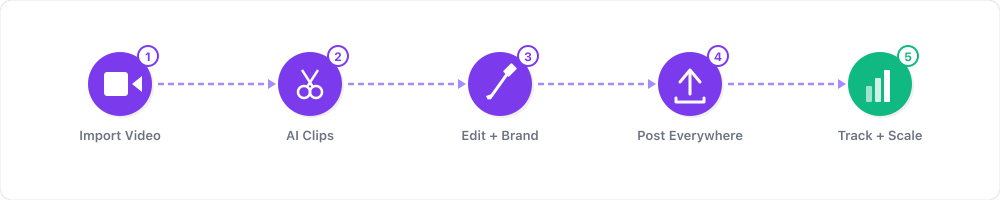
The actual clipping process is almost absurdly simple. Here is the step-by-step:
- Go to Opus Clip and sign up (free, no credit card required)
- Paste your video URL — YouTube, Google Drive, Zoom recording, or upload a file directly
- Configure your preferences:
- Clip length: 30–90 seconds (60 seconds is the sweet spot for most platforms; 30–45 seconds for TikTok)
- Aspect ratio: 9:16 for Shorts, Reels, and TikTok
- Caption style: Choose animated captions that match your brand aesthetic
- Number of clips: Let the AI generate maximum clips — you will curate later
- Click "Get Clips" and wait 2–5 minutes
What the AI does behind the scenes:
- Analyzes speech patterns to find natural start and end points
- Detects emotional peaks, topic transitions, and punchlines
- Identifies hooks — statements likely to grab attention in the first 3 seconds
- Reframes horizontal video to vertical, keeping the speaker centered
- Generates word-by-word animated captions synced to speech
- Assigns a "virality score" to each clip based on engagement potential
Opus Clip typically returns 10–30 clips from a single 30–60 minute video. Each clip is ready to post — captioned, reframed, and trimmed — though light review improves quality.
Step 3: Curate and Polish Your Best Clips
This is the step that separates amateurs from professionals. Do not post everything the AI generates. Curation is where the real value lies.
Sorting and selection process:
- Sort clips by virality score — focus on the top 40–50% initially
- Watch each clip from the first frame — if the first 3 seconds do not grab your attention, skip it
- Check the ending — does the clip resolve cleanly or cut mid-thought? Trim if needed
- Verify caption accuracy — fix any misheard words, especially names and technical terms
- Confirm framing — ensure the speaker's face stays centered in the vertical frame
Quick quality checklist for each clip:
- Does it open with a hook that creates curiosity?
- Is there a clear point, story, or takeaway?
- Does it end cleanly (not mid-sentence)?
- Are captions accurate and readable?
- Is the speaker properly framed?
Most clips need zero editing beyond what the AI provides. About 20% need light trimming — adjusting the start or end point by 2–5 seconds. Rarely will you spend more than 30 seconds per clip on adjustments.
Video Repurposing Idea Generator
Use this framework to identify additional clip opportunities beyond what the AI surfaces:
For every long-form video, look for these 7 clip types:
- The Hot Take — The most controversial or surprising statement in the video. Start the clip right before the statement.
- The Story Hook — A personal anecdote that starts with a relatable setup ("When I first started, I made this massive mistake...")
- The Quick Win — A specific, actionable tip viewers can implement immediately ("Here is the exact template I use for cold outreach...")
- The Myth Buster — A moment where conventional wisdom gets challenged ("Everyone says you need 10K followers to monetize — that is completely wrong.")
- The Emotional Peak — Laughter, surprise, visible passion, or a vulnerable moment that creates authentic connection
- The Data Drop — A surprising statistic or case study result that stops the scroll ("We went from 200 to 15,000 followers in 30 days using this exact strategy.")
- The Cliffhanger — A clip that ends with an unresolved question, driving viewers to the full video for the answer
Aim for 2–3 clips from each category per source video. That gives you 14–21 clips from a single recording.
Step 4: Build Your Multi-Platform Posting Strategy
Random posting does not work. The creators getting millions of views from repurposed content follow systematic posting strategies.
Posting Frequency by Platform
| Platform | Minimum | Recommended | Optimal |
|---|---|---|---|
| YouTube Shorts | 1/day | 2–3/day | 3–5/day |
| TikTok | 1/day | 2–3/day | 3–5/day |
| Instagram Reels | 1/day | 1–2/day | 2–3/day |
| LinkedIn Video | 3/week | 5/week | 1/day |
| Twitter/X Video | 3/week | 1/day | 2–3/day |
Best Posting Times (EST)
| Platform | Morning | Afternoon | Evening |
|---|---|---|---|
| YouTube Shorts | — | 12–3 PM | 7–9 PM |
| TikTok | 10 AM–12 PM | — | 7–9 PM |
| Instagram Reels | 11 AM–1 PM | — | 7–9 PM |
| 8–10 AM | 12–1 PM | — |
Weekly Content Calendar Template
Monday
- YouTube Shorts: Clip 1 (Hot Take), Clip 2 (Quick Win)
- TikTok: Clip 1, Clip 3 (Story Hook)
- Instagram Reels: Clip 2
- LinkedIn: Clip 4 (Data Drop)
Tuesday
- YouTube Shorts: Clip 5 (Myth Buster), Clip 6 (Emotional Peak)
- TikTok: Clip 5, Clip 7 (Cliffhanger)
- Instagram Reels: Clip 6
Wednesday
- YouTube Shorts: Clip 8, Clip 9
- TikTok: Clip 8, Clip 10
- Instagram Reels: Clip 9
- LinkedIn: Clip 11 (Quick Win)
Thursday–Friday: Repeat pattern with new clips from the next source video
Saturday–Sunday: Repost top performers from the week to different platforms
Result: One 30-minute source video fuels an entire week of posting across all platforms — 15–25 posts total from a single recording session.
Title and Caption Strategy
- Titles: Lead with the hook, not the topic. "The $30K mistake nobody warns you about" beats "Business tips episode 47"
- Hashtags: Use 3–5 per post. Mix broad (#shorts, #entrepreneur) with niche-specific (#saasfounder, #podcastgrowth)
- Descriptions: 1–2 sentences with keywords plus a CTA ("Follow for daily business tips" or "Full episode linked in bio")
Step 5: Scale to an Agency or Multi-Channel Operation
Once you have mastered the workflow for your own content, the natural next step is scaling — either by building a clipping agency or running multiple channels.
The Clipping Agency Model:
| Package | Videos/Month | Clips Delivered | Monthly Price | Your Time |
|---|---|---|---|---|
| Starter | 4 | 20–40 clips | $500 | ~4 hours |
| Growth | 8 | 40–80 clips | $1,000 | ~8 hours |
| Scale | 16 | 80–160 clips | $2,000 | ~14 hours |
| Enterprise | 30+ | 150–300+ clips | $4,000+ | ~25 hours |
Finding clients:
- DM YouTubers and podcasters with 10K–100K subscribers who do not post Shorts yet — they are leaving money on the table
- Process one of their public videos for free and send the best 3 clips as a sample
- Post your own clips showcasing the editing quality on Twitter/X and LinkedIn
- List your services on Fiverr and Upwork under "YouTube Shorts editing" and "video repurposing"
- Join creator communities on Discord and Reddit — offer free samples to build word of mouth
The multi-channel model: Instead of serving clients, run 3–5 of your own channels in different niches. Use Opus Clip to repurpose content from each channel's long-form videos into Shorts across platforms. At 3 channels with 50,000+ monthly views each, you are generating $1,500–7,500/month in combined ad revenue.
Real-World Examples and Case Studies
These case studies come from verified sources and demonstrate what is achievable with Opus Clip.
TFTC Podcast — $30,000 in New Revenue in One Month The TFTC (Tales from the Crypt) podcast implemented Opus Clip to repurpose their long-form episodes into short clips for social media. Within the first month, the clips drove $30,000 in new revenue through increased sponsorship interest, podcast downloads, and audience growth. The key was volume — they went from posting occasional clips to publishing 3–5 clips per day across platforms (source: opus.pro/customer-stories).
Ebonie — 70% Increase in Coaching Sales Ebonie, a business coach, used Opus Clip to repurpose her coaching content and workshop recordings into daily short-form clips. The result was a 70% increase in coaching sales, driven by the clips acting as free samples of her expertise. Prospects watched clips, built trust, and enrolled in her programs — all without her spending additional hours on content creation (source: opus.pro/customer-stories).
The Compounding Effect of Repurposing These results are not flukes. They demonstrate a fundamental principle: every piece of long-form content you create has unrealized value locked inside it. Opus Clip extracts that value and distributes it to the platforms where your audience actually spends their time. The creators who win are not necessarily creating more content — they are getting more mileage from the content they already have.
Revenue Projection Table
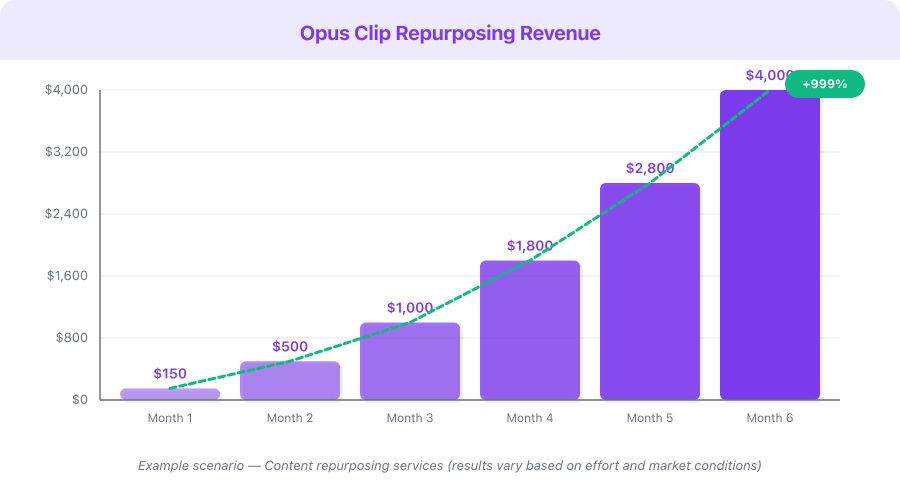
Disclaimer: The following table presents an Example Scenario for illustrative purposes only. Actual results vary significantly based on niche, content quality, consistency, audience engagement, and market conditions. These figures are not guarantees or promises of income.
This is a hypothetical example based on publicly available data, not a guarantee of results. Individual results vary significantly.
| Scenario | Monthly Clips | Monthly Views | Ad Revenue | Service/Affiliate | Total |
|---|---|---|---|---|---|
| Conservative (1 source video/week, own channel) | 40–60 | 50,000–100,000 | $200–500 | $0–100 | $200–600 |
| Moderate (2 source videos/week + 3 agency clients) | 100–200 | 200,000–500,000 | $800–2,500 | $1,500–3,000 | $2,300–5,500 |
| Aggressive (daily source content + 8 agency clients) | 300–500+ | 1,000,000+ | $4,000–10,000 | $4,000–8,000 | $8,000–18,000 |
Revenue sources include YouTube AdSense (Shorts and long-form), TikTok Creator Fund, Instagram bonuses, agency client retainers, and affiliate commissions.
Monetization Strategies
1. YouTube Shorts Ad Revenue ($200–5,000/month)
YouTube now shares ad revenue with Shorts creators who are in the Partner Program. At scale, a Shorts channel posting 3–5 clips daily can generate significant ad revenue. CPM rates for Shorts are lower than long-form ($2–8 vs. $8–30), but the volume of views compensates. A channel getting 500,000 Shorts views per month earns $1,000–4,000 in ad revenue.
2. Clipping Agency Services ($1,500–10,000/month)
The highest-margin opportunity. Charge clients $500–2,000/month to repurpose their long-form content into short clips. With Opus Clip handling the heavy lifting, your per-video time investment is 15–30 minutes. Five clients on $1,000/month retainers generates $5,000/month while working roughly 20 hours total.
3. Opus Clip Affiliate Commissions ($100–1,000/month passive)
The affiliate program pays 25% recurring commission for 12 months with a 60-day cookie. Every client or follower who signs up through your link earns you 25% of their subscription. If you refer 30 Pro users ($19/month each), that is $142.50/month in passive income — growing with each new referral.
4. Channel Growth Services ($500–3,000/month per client)
Go beyond clipping by offering a full channel growth package: content strategy, clip selection, posting schedule optimization, analytics reporting, and thumbnail design for the Shorts. Premium positioning lets you charge $1,500–3,000/month per client.
5. Content Licensing ($50–500 per clip)
High-performing clips can be licensed to brands, news outlets, and media companies. If one of your clips goes viral, brands in the relevant niche will pay to use it in their advertising or social media. This is a bonus revenue stream rather than a primary one, but individual deals can be lucrative.
Pricing Breakdown with ROI Calculation
| Plan | Monthly Cost | Upload Minutes | Clips Generated | Best For |
|---|---|---|---|---|
| Free | $0 | 60 min/month | 40–80 | Testing, building samples |
| Starter | $9/mo | 200 min/month | 130–260 | First paying clients |
| Pro | $19/mo | 600 min/month | 400–800 | Full agency operation |
| Business | $49/mo | Unlimited | Unlimited | Scaling, team access |
ROI calculation for the Pro plan ($19/month):
- Process 10 client videos per month = 150–300 clips
- Charge clients $75/video on average = $750 revenue
- Minus Opus Clip cost: $750 - $19 = $731 profit
- ROI: 3,847%
Affiliate commission rate: 25% recurring for 12 months, with a 60-day cookie window. If you refer users through your content, reviews, or client recommendations, you earn 25% of every subscription payment for a full year.
Break-even point: A single $50 clipping project covers the cost of the Pro plan for nearly 3 months. The tool pays for itself before you finish onboarding your first client.
Common Mistakes to Avoid
-
Posting every clip the AI generates. Opus Clip produces 15–30 clips per video, but not all are post-worthy. Curate ruthlessly — only the top 40–50% deserve to be published. Quality beats quantity in the algorithm.
-
Ignoring the first 3 seconds. If the hook does not grab attention immediately, viewers scroll. Cut any clip that starts with filler, introductions, or slow setup. The best clips begin mid-thought with a bold statement.
-
Only posting on one platform. The same clip works on YouTube Shorts, TikTok, Instagram Reels, LinkedIn, and Twitter/X. You are tripling or quadrupling your reach for zero extra work. Not cross-posting is leaving money on the table.
-
Giving up after 1–2 weeks. Most Shorts accounts take 2–4 weeks of daily posting before the algorithm starts distributing content to new audiences. The first week often feels like posting into a void. Stay consistent — the algorithm rewards persistence.
-
Not learning from analytics. Check which clips performed best every week. Look at watch time percentage, not just views. A clip with 5,000 views and 90% average watch time is more valuable than one with 50,000 views and 15% watch time. Double down on what the data tells you works.
-
Skipping captions entirely. Over 80% of short-form video is watched without sound. Opus Clip generates captions automatically — make sure they are enabled and accurate. Clips without captions lose the majority of potential viewers.
-
Pricing agency services too low. New clipping agencies often charge $20–30 per video out of insecurity. The market rate for quality video repurposing is $50–100+ per video, or $500–2,000/month on retainer. Your speed advantage with Opus Clip means higher margins, not lower prices.
Quick Start Checklist
- Sign up for Opus Clip free — no credit card required
- Find a source video to process (your own content, a client's video, or public content you have rights to clip)
- Paste the URL into Opus Clip and generate clips (60-second length, 9:16 aspect ratio)
- Review clips sorted by virality score — select the top 5–8
- Check hooks, endings, and caption accuracy on each selected clip
- Post the best clip to YouTube Shorts immediately
- Schedule the remaining clips across TikTok, Instagram Reels, and LinkedIn over the next 3 days
- Process a second source video and repeat the process
- Track which clips perform best after 7 days — note the common elements
- Reach out to 3 podcasters or YouTubers offering a free sample clip from their content
- Join the Opus Clip affiliate program (25% recurring for 12 months)
- Set a weekly batch-processing schedule — one session per week to generate an entire week of content
Frequently Asked Questions
How many clips can I expect from a single long-form video?
Opus Clip typically generates 10–30 clips from a 30–60 minute video, depending on the content density. Podcast interviews and tutorials produce the most clips because they contain natural hooks, stories, and advice segments. A well-structured 45-minute podcast can yield 20–25 usable clips after curation.
Do I need the creator's permission to clip their content?
Yes, if you are clipping someone else's content for commercial purposes, you need their permission. For agency work, this is covered by your client agreement. For promotional samples, clip one public video and send it to the creator as a pitch — most will appreciate the free sample and many will hire you on the spot.
Can I use the same clip on YouTube, TikTok, and Instagram?
Absolutely. Cross-posting the same clip to multiple platforms is standard practice and one of the biggest advantages of video repurposing. Each platform has its own audience, so the same clip reaches different people. Some creators add a small watermark or adjust the caption style per platform, but the core content stays identical.
How long before I see results from consistent Shorts posting?
Most accounts see their first viral clip within 2–4 weeks of daily posting. Reaching 1,000 subscribers takes 4–12 weeks for most niches. Monetization through the YouTube Partner Program typically happens within 3–6 months of consistent daily posting. Results accelerate over time as the algorithm learns your content patterns.
Is the free tier enough to start a clipping agency?
The free tier (60 minutes/month) is enough to process 1–2 source videos and create sample clips for potential clients. Once you land your first paying client, upgrade to the Starter plan ($9/month) or Pro plan ($19/month) for the capacity and features needed for professional delivery.
What's Next
You now have the complete framework for building a video repurposing business with Opus Clip. Here is your path forward:
- Today: Process your first video and post 3 clips across YouTube Shorts, TikTok, and Instagram
- This week: Reach out to 5 podcasters or YouTubers with free sample clips from their content
- This month: Land your first 1–2 agency clients and establish a weekly batch-processing workflow
- Month 2–3: Scale to 5+ clients or 3+ channels, join the affiliate program, and build your case study portfolio
Related resources on income.tools:
- Opus Clip Review — full feature breakdown and honest pros/cons
- Opus Clip Pricing — detailed plan comparison and cost analysis
- Submagic Review — alternative AI Shorts editor for comparison
- Fliki Review — AI text-to-video for original content creation
The creators and agencies earning $5,000–15,000/month from video repurposing all started with a single clipped video. The difference between them and everyone else is that they posted it — and then posted the next one, and the next one, and the next one.
Start with Opus Clip free — your first batch of clips is 5 minutes away.