How to Build a Faceless Content Business with ElevenLabs in 2026
This guide contains affiliate links. If you purchase through these links, we may earn a commission at no extra cost to you. This does not affect our editorial independence — we only recommend tools we believe provide genuine value.
Why AI Voice Content Is the Biggest Creator Opportunity in 2026
The faceless content economy is exploding, and AI-generated voice is at the center of it. Creators who never show their faces or use their own voices are building six-figure channels, agencies, and service businesses — all powered by realistic text-to-speech technology.
Here is why this moment matters:
- The creator economy is massive. The global creator economy is valued at over $250 billion in 2026, and faceless content is one of its fastest-growing segments.
- Enterprise adoption is accelerating. 41% of Fortune 500 companies now use ElevenLabs for internal and external audio content, according to ElevenLabs' customer stories. That enterprise demand trickles down to freelancers and agencies who serve smaller businesses.
- ElevenLabs is the market leader. The company has reached $330M in annual recurring revenue, making it the dominant AI voice platform. When you build skills on ElevenLabs, you are building on the platform that enterprises, agencies, and creators all standardize around.
- Cultural institutions are adopting AI voice. The Dali Museum partnered with ElevenLabs to clone Salvador Dali's voice for an interactive exhibit, demonstrating how voice cloning is crossing from tech into mainstream cultural use cases (source: elevenlabs.io/blog/customer-stories).
The window for early movers is still open, but it is closing. Creators who establish themselves now — with systems, workflows, and client bases — will have an enormous advantage over those who start in 2027 or 2028.
The ElevenLabs affiliate program pays 22% recurring commission for 12 months on every referral. This means you earn not just from your own content and services, but from recommending the tool itself.
What You Need to Get Started
Before you create your first piece of content, gather these essentials:
| Item | Cost | Purpose |
|---|---|---|
| ElevenLabs account (free tier) | $0 | Test voices and generate your first samples |
| A script | $0 | Write your own or use an AI writing assistant |
| Video editing software (CapCut or DaVinci Resolve) | $0 | Combine voiceover with visuals |
| Stock footage source (Pexels, Pixabay) | $0 | Free B-roll for your videos |
| YouTube/TikTok account | $0 | Distribution platform |
| ElevenLabs paid plan (when ready to scale) | $5–99/mo | Higher volume, voice cloning, commercial rights |
Total startup cost: $0. You can create and publish your first piece of monetizable content today without spending a single dollar. Upgrade only when you have proof that your content resonates or you have a paying client.
Technical skills required: If you can type, copy-paste, and upload a file, you have everything you need. ElevenLabs handles pronunciation, pacing, emotion, and audio quality automatically.
Step 1: Choose Your Niche and Content Format

Your niche determines your audience size, competition level, and — critically — your revenue per thousand views (CPM). Choose strategically.
High-CPM faceless niches for AI voiceover content:
| Niche | YouTube CPM Range | Content Style | Difficulty |
|---|---|---|---|
| Personal finance & investing | $15–35 | Explainer, listicle | Medium |
| Technology reviews & tutorials | $12–28 | Walkthrough, comparison | Medium |
| Business case studies | $14–30 | Story-driven narration | Medium |
| History & documentaries | $8–18 | Long-form narration | Low |
| True crime & mysteries | $6–14 | Story narration | Low |
| Psychology & self-improvement | $10–22 | Explainer, tips | Low |
| Health & wellness | $10–20 | Educational, tips | Medium |
Choosing your content format:
- YouTube long-form (8–15 min): Highest ad revenue per video. Best for educational, documentary, and story-driven content. One video can earn for years.
- YouTube Shorts / TikTok / Reels (30–90 sec): Fastest audience growth. Lower per-video revenue but excellent for driving traffic to long-form videos and affiliate links.
- Podcasts: Lower barrier to entry, growing market. Monetize through sponsorships and affiliate links.
- Audiobooks: High per-project revenue ($200–1,000+). Sell on Audible, Google Play, and Apple Books.
Beginner recommendation: Start with one niche and one format. A personal finance faceless YouTube channel posting 2–3 long-form videos per week is one of the most proven paths to $1,000+/month.
Step 2: Write Scripts That Hold Attention
The script is the single most important factor in whether your content succeeds. A mediocre voiceover with a brilliant script will outperform a perfect voiceover with a boring script every time.
The proven script structure for faceless videos:
1. Hook (first 10–15 seconds): Open with a surprising fact, bold claim, or intriguing question. This determines whether viewers stay or click away.
Example: "A 24-year-old college dropout is making $14,000 per month from YouTube — and he has never appeared in a single video. Here is exactly how he does it, step by step."
2. Context (30–60 seconds): Why should the viewer care? What will they learn? Set expectations clearly.
3. Body (5–12 minutes): Deliver the core content in clear sections. Use transitions ("Now here is where it gets interesting...") to maintain momentum. Include specific numbers, examples, and actionable steps.
4. Conclusion (30–60 seconds): Summarize key takeaways. Include a call to action — subscribe, comment, check the description for links.
Writing tips for AI voiceover:
- Write conversationally. Read your script aloud — if it sounds stiff, rewrite it.
- Keep sentences short. AI voices handle short, punchy sentences better than long, complex ones.
- Use phonetic spelling for unusual words or names that the AI might mispronounce.
- Aim for 1,500–2,000 words for a 10-minute video (ElevenLabs voices speak at roughly 150–180 words per minute).
YouTube Shorts Script Template (Hook-Body-CTA)
Use this template for any faceless Short, Reel, or TikTok:
HOOK (0–3 seconds): "[Surprising stat or bold claim that creates curiosity]"
Examples:
- "This one trick makes people $200/day and nobody talks about it."
- "I asked AI to narrate a video. The result shocked me."
- "Stop scrolling — this free tool replaces a $500/hour voiceover artist."
BODY (3–45 seconds): [Problem] — "Most people [common mistake or pain point]." [Agitate] — "That means [consequence of the mistake]." [Solution Step 1] — "Instead, [first actionable step]." [Solution Step 2] — "Then [second actionable step]." [Result] — "Now you [desirable outcome]."
CTA (last 5 seconds): "Follow for more [topic] tips" OR "Link in bio to try ElevenLabs free."
Step 3: Generate Your Voiceover with ElevenLabs
This is where the magic happens. A process that used to cost $200–500 per voiceover now takes 2 minutes and costs pennies.
Step-by-step:
- Sign up at ElevenLabs — free, no credit card required
- Click "Text to Speech" in the sidebar
- Paste your script into the text box
- Choose a voice. For narration, try "Daniel" (steady broadcaster), "Adam" (deep narrator), or "Rachel" (warm female). Preview multiple options — the right voice makes a significant difference.
- Adjust settings:
- Stability: Higher = more consistent delivery. Lower = more expressive. Start at 50–65% for narration.
- Similarity Enhancement: Higher = closer to the original voice model. Keep at 70–85%.
- Speed: Adjust if the pacing feels too fast or slow.
- Click Generate and wait 5–15 seconds
- Download the MP3
For longer content (8+ minutes), use the Projects feature instead of Text to Speech. Projects lets you:
- Upload an entire script and generate it as one continuous audio file
- Edit individual sentences without regenerating the entire piece
- Maintain consistent voice quality across long recordings
- Add pauses between sections
Voice cloning (Pro plan, $22/month): If you want your channel to have a unique, recognizable voice, clone your own voice from a 2-minute recording. Your audience will hear "you" without you ever sitting in front of a microphone again. The Dali Museum used this same technology to bring Salvador Dali's voice to life for museum visitors — that is the level of quality available to individual creators.
Step 4: Assemble Your Video
With your voiceover downloaded, combine it with visuals to create a finished video.
Free workflow (zero cost):
- Open CapCut (free, desktop or mobile) or DaVinci Resolve (free, desktop)
- Import your ElevenLabs audio file
- Add stock footage from Pexels or Pixabay (free, no attribution required for most clips)
- Match footage to the narration — change clips every 5–10 seconds to maintain visual interest
- Add subtitles (CapCut auto-generates them)
- Add background music at low volume (YouTube Audio Library is free)
- Export at 1080p
Faster workflow (paid tools): Use Fliki, Pictory, or InVideo to automate the visual assembly. Paste your script, and the tool matches footage to each sentence automatically. This cuts production time from 45 minutes to 10–15 minutes per video.
Production time benchmarks:
| Step | First Video | After 10 Videos |
|---|---|---|
| Script writing | 45–60 min | 20–30 min |
| Voiceover generation | 5 min | 2–3 min |
| Video assembly | 60–90 min | 20–30 min |
| Thumbnail + upload | 20 min | 10 min |
| Total | ~2.5 hours | ~1 hour |
Step 5: Publish, Optimize, and Grow
Creating the video is half the work. How you publish and optimize it determines whether anyone sees it.
YouTube optimization checklist:
- Title: Include your primary keyword near the beginning. Keep it under 60 characters. Make it curiosity-driven without being clickbait.
- Thumbnail: Design a custom thumbnail with large text, high contrast, and a clear visual hook. Never use a random frame from the video.
- Description: Write 200–300 words. Include your primary keyword in the first sentence. Add timestamps, affiliate links (including your ElevenLabs affiliate link), and links to related videos.
- Tags: Add 8–12 relevant tags including your primary keyword and variations.
- End screen: Link to related videos and include a subscribe prompt.
Posting schedule: Consistency matters more than frequency. Three videos per week is ideal, but two per week is sustainable. Upload at the same times each week.
Faceless YouTube Channel Description Template
Use this template for your channel's About section:
[Channel Name] — [One-line description of what viewers get]
We publish [frequency] videos about [topic/niche] to help you [viewer benefit].
What you will find here:
- [Content type 1, e.g., "Step-by-step breakdowns of online income strategies"]
- [Content type 2, e.g., "Real case studies from people earning with AI tools"]
- [Content type 3, e.g., "Honest reviews of the tools that actually work"]
New here? Start with this video: [link to best-performing video]
Subscribe and hit the bell so you never miss an upload.
Business inquiries: [email]
Step 6: Scale with Multiple Revenue Streams
Once your first channel gains traction, layer additional income streams on top.
Multi-platform distribution: The same voiceover content works across YouTube, TikTok, Spotify (for podcast-style content), and your own website. Each platform generates its own revenue from a single piece of production work.
Multilingual expansion: ElevenLabs supports 32+ languages. Take your best-performing English videos and recreate them in Spanish, Portuguese, Hindi, or French. You can even clone your voice and generate content in your own voice in other languages. This effectively multiplies your addressable audience by 5–10x with minimal extra work.
Real-World Examples and Case Studies
These examples illustrate what is possible with ElevenLabs, drawn from verified sources.
The Dali Museum Voice Clone The Salvador Dali Museum partnered with ElevenLabs to clone Dali's voice for an interactive exhibit, allowing museum visitors to hear the artist narrate his own work. This is the same voice cloning technology available on the $22/month Pro plan. If it is good enough for a world-class museum, it is good enough for your YouTube channel (source: elevenlabs.io/blog/customer-stories).
Enterprise Adoption at Scale 41% of Fortune 500 companies now use ElevenLabs for content production, training materials, customer-facing audio, and internal communications. This enterprise demand creates a massive opportunity for freelancers and agencies who offer ElevenLabs-powered services — companies are actively looking for people who can produce high-quality AI voice content (source: elevenlabs.io/blog/customer-stories).
Platform Growth ElevenLabs has reached $330M in annual recurring revenue, making it the fastest-growing AI voice platform. This scale means continued investment in voice quality, new features, and reliability — the platform you build your business on is not going anywhere.
Revenue Projection Table
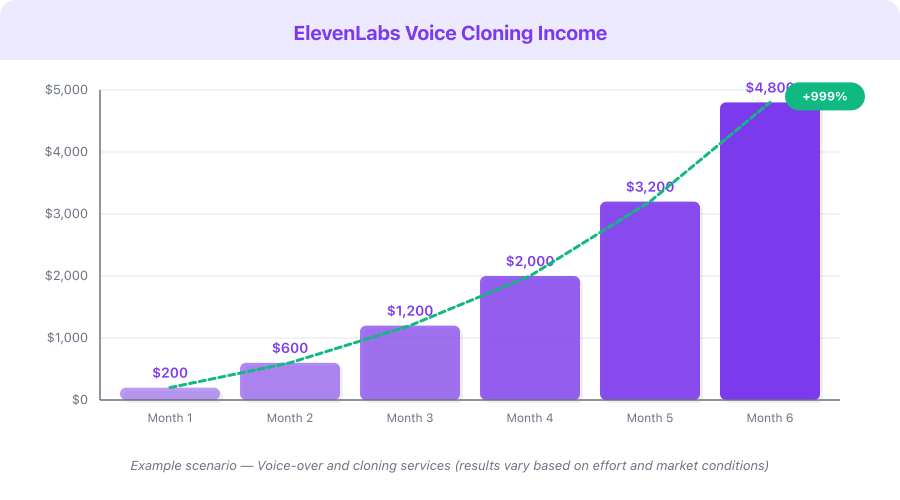
Disclaimer: The following table presents an Example Scenario for illustrative purposes only. Actual results vary significantly based on niche, content quality, consistency, audience engagement, and market conditions. These figures are not guarantees or promises of income.
| Stage | Monthly Output | Subscribers | Monthly Views | Estimated Revenue Range |
|---|---|---|---|---|
| Month 1–2 | 8–12 videos | 100–500 | 2,000–10,000 | $0 (pre-monetization) |
| Month 3–4 | 12–16 videos | 500–2,000 | 10,000–40,000 | $0–100 (affiliate only) |
| Month 5–6 | 12–16 videos | 1,000–4,000 | 30,000–80,000 | $150–500 |
| Month 7–12 | 12–16 videos | 4,000–15,000 | 80,000–250,000 | $500–2,500 |
| Year 2 | 12–16 videos | 15,000–50,000 | 250,000–800,000 | $2,000–8,000 |
Revenue sources include YouTube AdSense, affiliate commissions (including ElevenLabs 22% recurring), sponsorships, and digital product sales. Ranges reflect low-CPM to high-CPM niches.
Monetization Strategies
1. YouTube Ad Revenue (Baseline Income)
Once you hit 1,000 subscribers and 4,000 watch hours, YouTube pays you per 1,000 ad views. CPM rates for faceless channels range from $4–35 depending on your niche, with finance and business channels at the top. A channel getting 100,000 views/month in a finance niche can earn $1,500–3,500/month from ads alone.
2. ElevenLabs Affiliate Commissions (22% Recurring for 12 Months)
Every viewer who signs up through your link earns you 22% of their subscription for a full year. If you refer 50 users on the Pro plan ($22/month), that is $242/month in passive recurring revenue. Include your affiliate link in every video description, pin it in comments, and mention it naturally in your content.
3. Freelance Voiceover Services ($500–3,000/month)
Use your ElevenLabs expertise to sell voiceover services on Fiverr, Upwork, and directly to businesses. You generate the audio in minutes and charge $50–300 per project. A steady flow of 10–20 projects per month generates $500–3,000 with minimal time investment.
4. Content Production Agency ($2,000–10,000/month)
Once you master the faceless content workflow, offer it as a service to businesses and other creators. Package everything — scriptwriting, voiceover generation, video assembly, and publishing — as a monthly retainer. Businesses pay $500–2,000/month for consistent content they do not have to create themselves.
5. Audiobook Production ($200–1,000 per Project)
Use ElevenLabs Projects to produce audiobooks for self-published authors. Traditional audiobook narration costs $2,000–5,000+ per book. You can produce one in a few hours for a fraction of that cost, making this an attractive service for the millions of authors on Amazon who have ebooks but no audiobooks.
Pricing Breakdown with ROI Calculation
| Plan | Monthly Cost | Audio Capacity | Best For | Break-Even Point |
|---|---|---|---|---|
| Free | $0 | ~2–3 min/month | Testing, first samples | No cost to recover |
| Starter | $5/mo | ~8 min/month | First Fiverr gigs | 1 gig at $25 |
| Creator | $11/mo | ~28 min/month | Weekly YouTube videos | 1 monetized video |
| Pro | $22/mo | ~2+ hrs/month | Full-time, voice cloning | 1 client project |
| Scale | $99/mo | ~8+ hrs/month | Agency, audiobooks | 2–3 client projects |
ROI example: On the Pro plan ($22/month), you can produce approximately 10–20 voiceover projects per month. If you charge just $50 per project on Fiverr and complete 5 per month, that is $250 revenue against $22 in costs — a 1,036% ROI. At 10 projects per month, the ROI exceeds 2,000%.
Common Mistakes to Avoid
-
Spending money before earning money. Start with the free tier. Do not upgrade until you have proof — a paying client, a growing channel, or content that clearly resonates. The free plan gives you enough to test everything.
-
Choosing a saturated niche without a unique angle. "Motivational videos" is crowded. "Motivation for software developers" is specific enough to build an audience. Niche down until you feel slightly uncomfortable — that is usually the right level of specificity.
-
Ignoring script quality. The voiceover is only as good as what it says. A realistic AI voice reading a boring script is still boring. Invest 70% of your time in writing great scripts and 30% in production.
-
Regenerating entire scripts when one sentence sounds off. Use the Projects feature to edit individual sentences. This saves characters (which cost money on paid plans) and time.
-
Not disclosing AI voice use when required. Some platforms and contexts require disclosure that content uses AI-generated voice. YouTube's policies evolve regularly — stay current and disclose appropriately. Transparency builds trust.
-
Publishing without reviewing. Always listen to the full generated audio before publishing. Catch mispronunciations, awkward pauses, or sentences that sound unnatural. Fix them before your audience hears them.
-
Trying to clone celebrity voices. ElevenLabs prohibits cloning voices without explicit permission. Violating this gets your account banned. Use your own voice, voices you have written consent for, or the extensive library of pre-made voices.
Quick Start Checklist
Use this checklist to go from zero to your first published piece of content:
- Sign up for ElevenLabs free — no credit card required
- Choose your niche from the table above (pick one, commit for 30 days minimum)
- Write your first script using the Hook-Context-Body-Conclusion structure (1,500–2,000 words)
- Generate the voiceover in ElevenLabs — try 2–3 different voices before choosing
- Download free stock footage from Pexels or Pixabay
- Assemble your video in CapCut or DaVinci Resolve (both free)
- Design a custom thumbnail (Canva free works well)
- Upload to YouTube with optimized title, description, tags, and your affiliate link
- Post a 30–60 second clip as a YouTube Short, TikTok, or Reel
- Schedule your next 2 videos — consistency is the single biggest growth factor
- Join the ElevenLabs affiliate program (22% recurring for 12 months)
- Track your analytics weekly and adjust your content strategy based on what performs
Frequently Asked Questions
Can YouTube detect AI voices, and will it hurt my channel?
YouTube does not penalize channels for using AI voices. Many of the largest faceless channels use AI narration. YouTube's algorithm cares about watch time, click-through rate, and engagement — not whether the voice is human or AI. That said, YouTube may require disclosure of AI-generated content in some cases, so follow their current policies.
How many videos do I need before I start earning?
You need 1,000 subscribers and 4,000 watch hours to join the YouTube Partner Program. Most faceless channels reach this milestone in 2–5 months with consistent publishing (3+ videos per week). You can earn from affiliate links and freelance services from day one, before monetization.
Is the free plan enough to get started?
Yes. The free plan gives you approximately 2–3 minutes of audio per month — enough for 1–2 short videos or a sample reel for Fiverr. It is limited, but it is enough to validate your idea and make your first piece of content without spending anything.
What happens if ElevenLabs changes its pricing or features?
This is a risk with any platform dependency. Mitigate it by building skills that transfer (scriptwriting, content strategy, audience building) and diversifying your revenue streams. Your audience follows you, not the tool.
Should I use voice cloning or pre-made voices?
Start with pre-made voices — they are included on every plan and sound excellent. Move to voice cloning ($22/month Pro plan) once you want a unique brand voice or you are offering voice cloning as a service to clients. The quality difference between pre-made and cloned voices is negligible for most use cases.
What's Next
You now have everything you need to build a faceless content business with ElevenLabs. The tools are available, the market is proven, and the startup cost is zero.
Here is your path forward:
- This week: Create and publish your first video using the free plan
- This month: Publish 8–12 videos and evaluate which topics and styles get the best response
- Month 2–3: Upgrade to a paid plan, join the affiliate program, and start offering freelance services
- Month 4–6: Scale to 3+ videos per week, add a second revenue stream, and consider multilingual content
The creators earning $2,000–8,000/month from faceless channels all started with a single imperfect video. The difference between them and everyone else is that they published it — and then published the next one, and the next one.
Start with ElevenLabs free and create your first voiceover in the next 5 minutes.