How to Land Freelance Clients with Cold Email Using Instantly
This guide contains affiliate links. If you sign up through our links, we may earn a commission at no extra cost to you. We only recommend tools we've thoroughly researched.
Why Cold Email Outreach Works in 2026
Cold email is the most underrated client acquisition channel in freelancing. While most service providers fight over the same Upwork listings and compete on price in oversaturated marketplaces, cold email lets you reach decision-makers directly — people who need your service but have not posted a job listing.
The economics are hard to argue with. A well-crafted cold email campaign reaches 100 prospects per day. At a 2-3% positive reply rate, that generates 2-3 warm conversations daily. Convert 30% of those conversations and you are adding 4-6 new clients per month — without bidding against anyone.
The market timing is excellent. B2B email remains the highest-ROI marketing channel, generating $36 for every $1 spent according to industry benchmarks. Businesses expect to receive outreach emails. The ones who need your service will respond. The challenge is not whether cold email works — it is whether you execute it correctly. That means proper deliverability setup, targeted lead lists, compelling copy, and systematic follow-up.
This is exactly what Instantly.ai was built for. It combines a 160+ million contact B2B lead database, automated email warmup, multi-step campaign sequencing, AI-powered personalization, and a unified CRM into one platform. Instead of stitching together five different tools, you run your entire outreach operation from a single dashboard.
The results speak for themselves. Sander Aavik used Instantly to scale his outreach agency to over $1 million per year in revenue, sending 700,000+ emails and closing over $750,000 in direct revenue through the platform. That is an extreme example — but even at 1% of that scale, you are looking at a transformative income stream.
What You Need to Get Started
Essential Setup (Under $100/Month Total)
- Instantly.ai Growth Plan — $30/month for 5,000 emails/month, unlimited email accounts, automatic warmup, and basic CRM. This is enough for a solo freelancer or consultant. Start with the 14-day free trial to test everything before committing.
- A dedicated email domain — Never send cold emails from your primary business domain. Buy a separate domain (e.g., if your business is smithdesign.com, buy smithdesign.co or getsmithdesign.com) for $10-15/year. This protects your main domain reputation.
- 2-3 email accounts on your outreach domain — Set up accounts like hello@, outreach@, and hi@ on your sending domain. Instantly lets you connect unlimited accounts to distribute sending volume.
- Google Workspace or Microsoft 365 — $6-12/month per account. These email providers have the best deliverability. Avoid free email services for outreach.
Upgrade When Scaling
- Instantly Lead Database Add-on ($47+/month) — Access the 160M+ B2B contact database to build lead lists directly inside Instantly. Worth it once you are sending campaigns consistently.
- Instantly Hypergrowth Plan ($77.60/month) — 25,000 emails/month with advanced CRM. Needed when you are running campaigns for multiple clients or niches.
Total Startup Investment
$30-50/month to start (Instantly Growth + email hosting). One closed client at even $500/month covers your entire outreach infrastructure for a year. The ROI math makes this one of the lowest-risk business investments you can make.
Step 1: Define Your Ideal Client Profile and Offer

The biggest mistake in cold email is emailing everyone. Precision targeting is everything. Before you write a single email or build a single list, get ruthlessly specific about who you serve and what you offer.
Defining Your Ideal Client Profile (ICP)
Answer these five questions:
- What industry are they in? SaaS, e-commerce, real estate, healthcare, professional services, agencies?
- How big is the company? 5-50 employees (need help but cannot afford full-time hires) is the sweet spot for freelancers. 50-200 employees for agency services.
- What is their pain point? They need blog content but cannot write it in-house. They need a website redesign but their team is focused on product. They want leads but do not have a sales team.
- Who makes the buying decision? Founders and CEOs at small companies. Marketing Directors or VPs at mid-size companies.
- What is their budget range? Are they likely to pay $500/month or $5,000/month? Target companies whose budget matches your pricing.
Craft a Results-Focused Offer
Your cold email offer must communicate a specific outcome, not a generic service description. Compare these:
Weak: "I am a freelance web designer and I would love to work with you." Strong: "I redesign outdated SaaS websites to increase demo bookings. My last 3 clients saw 20-40% more signups within 60 days of launch."
Weak: "I offer content writing services for businesses." Strong: "I write 4-8 SEO blog posts per month for B2B SaaS companies. My clients typically see a 30-50% organic traffic increase within 6 months."
The strong versions work because they specify the audience, the deliverable, and the measurable result. Decision-makers respond to outcomes, not capabilities.
Step 2: Build a High-Quality Lead List
Your lead list is the foundation of your entire campaign. A perfect email to the wrong person gets zero replies. A decent email to the right person gets meetings booked.
Using Instantly's Built-In Lead Database
- Navigate to the Lead Finder in your Instantly dashboard
- Set your filters:
- Industry: Match your ICP (e.g., "Computer Software" for SaaS)
- Company size: 10-200 employees for most freelance services
- Job title: CEO, Founder, Marketing Director, Head of Content, VP Marketing
- Location: Start with your timezone for easier scheduling, expand later
- Technologies used: Filter by tech stack if relevant (e.g., companies using WordPress if you offer WordPress development)
- Review the results and export 200-500 contacts for your first campaign
- Verify email addresses — Instantly shows verification status, prioritize verified contacts
Manual List Building (If Not Using the Database Add-On)
- LinkedIn Sales Navigator — Search by title, industry, company size. Use the free trial to build your initial lists.
- Company websites — Visit the "About" or "Team" page to find decision-maker names, then use Hunter.io or Apollo.io to find email addresses.
- Industry directories — Search "[industry] companies [city]" and build lists from the results.
- Import via CSV — Format your list with First Name, Last Name, Email, Company Name, and any custom variables. Upload directly to Instantly.
Lead List Quality Rules
- Minimum 95% email verification rate. Sending to invalid emails destroys your sender reputation.
- One ICP per campaign. Do not mix SaaS founders with e-commerce store owners in the same campaign. Different audiences need different messaging.
- Remove generic emails. info@, hello@, and support@ addresses rarely reach decision-makers. Target personal business emails.
- 200-500 leads per campaign is the ideal starting size. Enough to generate data, small enough to iterate quickly.
Step 3: Write Your Cold Email Drip Sequence
The email copy is where campaigns succeed or fail. Your sequence should be 3 emails spaced 3-4 days apart. Each email serves a distinct purpose.
Cold Email 3-Drip Sequence Template
Email 1 — The Opening (Day 1)
Subject: [First Name], quick question about [Company]'s [specific area]
Hi [First Name],
I noticed [Company] [specific observation — e.g., "is growing its content marketing but publishing inconsistently" or "redesigned the homepage recently but the blog still has the old layout"]. [One sentence connecting the observation to the pain point your service solves.]
I help [type of company] [achieve specific result]. [One sentence of social proof — e.g., "Last quarter, I helped [similar company] increase their organic signups by 35% with a 6-article content sprint."]
Would it be worth a 15-minute call to see if this could work for [Company]?
Best, [Your Name]
Email 2 — The Value Add (Day 4)
Subject: Re: [First Name], quick question about [Company]'s [specific area]
Hi [First Name],
Following up on my last note. I did some quick research on [Company] and found [specific value — e.g., "3 keyword opportunities your competitors are ranking for that you are not" or "2 UX issues on your pricing page that might be costing conversions"].
Happy to share the details — no strings attached. Want me to send them over?
[Your Name]
Email 3 — The Breakup (Day 8)
Subject: Re: [First Name], quick question about [Company]'s [specific area]
Hi [First Name],
I know you are busy, so I will keep this short. If [your service area] is not a priority for [Company] right now, I totally understand.
But if you ever want to explore [specific outcome — e.g., "getting your blog content to drive real organic traffic" or "having a reliable pipeline of qualified leads"], feel free to reach out. I am here.
Wishing [Company] continued growth.
[Your Name]
Copy Rules That Improve Response Rates
- Keep every email under 100 words. Decision-makers scan, they do not read novels.
- One CTA per email. Ask for one thing — a call, a reply, permission to send more info.
- Personalize the first line. Reference their company, recent funding, a blog post they wrote, or a specific product. Instantly's AI personalization can automate this at scale.
- No attachments, no HTML, no images. Plain text emails land in inboxes. Formatted emails land in spam.
- Subject lines under 7 words. Short, curiosity-driven subjects get the highest open rates.
Freelance Writer Pitch Email (Cold Email Variant)
Subject: Content idea for [Company]'s blog
Hi [First Name],
I write SEO content for [industry] companies. I noticed [Company]'s blog has not published in [timeframe], and there are a few keyword gaps your competitors are filling.
I put together 3 topic ideas that could drive organic traffic to [Company]:
- "[Topic 1]" — [X] monthly searches, low competition
- "[Topic 2]" — addresses a gap in your current coverage
- "[Topic 3]" — trending in your space right now
I can write a trial article at a reduced rate so you can evaluate quality risk-free. Typical turnaround is 3 business days.
Worth a quick chat?
[Your Name] [Portfolio link]
Step 4: Configure Instantly for Maximum Deliverability
Deliverability is the technical backbone of cold email. If your emails land in spam, nothing else matters. Instantly handles most of this automatically, but you need to set it up correctly.
Technical Setup Checklist
- Connect your sending email accounts — Link your Google Workspace or Microsoft 365 accounts to Instantly. Use 2-3 accounts per domain to distribute volume.
- Enable email warmup immediately — Turn on Instantly's warmup for every connected account. The system sends and receives emails between real accounts in its warmup network, gradually building your sender reputation. Let warmup run for 14 days minimum before sending campaigns.
- Set up DNS records — Configure SPF, DKIM, and DMARC records for your sending domain. Instantly provides step-by-step instructions for each email provider. These records tell receiving servers that your emails are legitimate.
- Set conservative sending limits — Start at 30 emails per account per day. After 2 weeks of good deliverability (open rates above 50%), increase to 50. Never exceed 75 per account per day.
- Enable send-time optimization — Instantly spreads your sends across the day to mimic natural email behavior. This prevents rate-limiting and improves inbox placement.
Campaign Configuration
- Import your lead list and verify the data mapping (first name, company name, email)
- Create your 3-email sequence with the templates above
- Set follow-up intervals — 3 days between Email 1 and 2, 4 days between Email 2 and 3
- Configure working hours — Send emails during your prospects' business hours (9 AM - 5 PM in their timezone)
- Enable AI personalization — Let Instantly generate custom opening lines based on each prospect's company and role
- Set stop conditions — Automatically stop the sequence when a prospect replies
- Launch the campaign and monitor deliverability metrics for the first 48 hours
Step 5: Manage Replies and Close Deals
Sending emails is the easy part. Converting interested replies into paying clients requires a different skill set — responsiveness, consultative selling, and structured follow-through.
Reply Handling Framework
- Respond within 1 hour during business hours. Speed is the single biggest factor in conversion. Prospects who get a same-day response are 7x more likely to convert than those who wait 24+ hours.
- Answer their question first. If they ask about pricing, give a range. If they ask about your process, explain it briefly. Do not deflect with "Let's hop on a call" before providing value.
- Transition to a call. After answering their initial question, suggest a 15-minute call: "I would love to learn more about [Company]'s goals so I can give you a tailored recommendation. Do you have 15 minutes this week?"
- On the discovery call: Ask about their current situation, what they have tried, what results they want, and their timeline. Listen more than you talk. Then explain how your service solves their specific problem.
- Send a proposal within 24 hours. Include the scope, deliverables, timeline, price, and payment terms. Keep it to one page.
- Follow up on proposals. If no response after 3 days, send a brief check-in. After 7 days, send a final follow-up. Some clients need time — do not take silence personally.
Expected Campaign Metrics

| Metric | Benchmark | What It Means |
|---|---|---|
| Open rate | 50-70% | Below 40% signals deliverability issues |
| Reply rate | 3-8% | Includes positive, negative, and neutral replies |
| Positive reply rate | 1-3% | Interested prospects who want to learn more |
| Meeting booked rate | 0.5-1.5% | Prospects who schedule a call |
| Client close rate | 20-40% of meetings | Conversations that become paying clients |
At 100 emails per day, expect 1-3 positive replies per day and 2-4 new clients per month after the system is optimized.
Step 6: Scale Your Outreach Operation
Once your first campaign is generating consistent replies, it is time to systematize and scale.
Scaling Strategies
- A/B test everything. Test two subject lines against each other. Test different opening lines. Test long vs. short emails. Small improvements compound — a 1% increase in reply rate across 3,000 monthly emails means 30 more conversations.
- Add more sending accounts. Each new email account adds 30-50 emails per day of capacity. With 5 accounts, you can send 150-250 emails per day while maintaining safe sending limits.
- Expand to new ICPs. Once your first niche is generating clients, replicate the system for an adjacent niche. A web designer targeting SaaS companies can expand to fintech, then healthtech, each with tailored messaging.
- Build a lead generation agency. Once you master cold email for yourself, offer it as a service. Businesses will pay $1,000-5,000/month for you to run campaigns on their behalf using Instantly. This is how Sander Aavik scaled to $1M+/year.
- Create proposal and onboarding templates. Standardize your sales process so that closing a new client takes 30 minutes, not 3 hours. Build templates for discovery call agendas, proposals, contracts, onboarding checklists, and invoicing.
Real-World Examples and Case Studies
Case Study 1: Sander Aavik — From Freelancer to $1M+/Year Agency
Sander Aavik built a cold email outreach agency using Instantly as his core platform. Over the course of his operations, he sent 700,000+ emails through Instantly and closed over $750,000 in direct revenue from cold email campaigns. His agency scaled past $1 million per year in total revenue by offering "meetings booked" as a service — charging clients per qualified meeting delivered to their sales calendar.
Key takeaways: Aavik's success came from volume, systematic testing, and treating cold email as a numbers game with optimizable variables. He did not send 700,000 random emails. He tested subject lines, personalization approaches, and follow-up timing continuously, improving conversion rates over hundreds of campaign iterations.
Source: instantly.ai/case-study
Case Study 2: The Lead Generation Agency Model
Multiple Instantly users have built agencies earning $5,000-20,000/month by running cold email campaigns for B2B companies. The model works because most businesses know they should be doing outreach but lack the technical knowledge (deliverability, DNS setup, warmup) and copywriting skills (short, compelling emails) to execute effectively. You bridge that gap.
Typical agency economics: Charge $1,500-3,000/month per client. Run 3-5 campaigns simultaneously using Instantly's multi-campaign management. Cost of Instantly Hypergrowth plan: $77.60/month. Gross margin: 95%+.
Case Study 3: Freelance Service Providers Landing Premium Clients
Solo freelancers — writers, designers, developers, consultants — use Instantly to bypass marketplaces entirely. Instead of competing for $30/hour Upwork gigs, they email decision-makers directly and close $2,000-5,000 projects. One freelance copywriter reported landing a $3,000/month retainer client from a 200-email campaign that cost $30 in Instantly subscription fees.
Revenue Projection Example
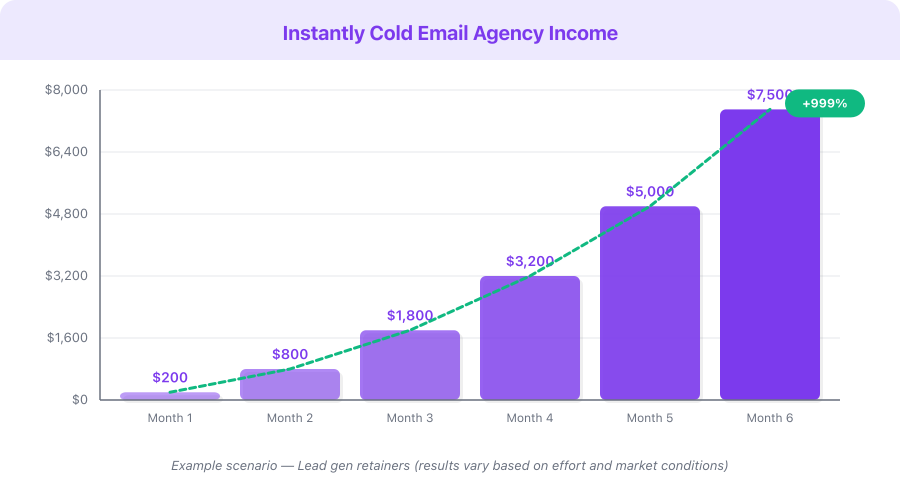
This is a hypothetical example based on publicly available data, not a guarantee of results. Individual results vary significantly.
| Month | Emails/Day | Sending Accounts | Positive Replies/Week | New Clients/Month | Monthly Revenue |
|---|---|---|---|---|---|
| 1 | 30-50 | 2 | 1-2 | 0-1 | $0-500 |
| 2 | 50-75 | 3 | 2-4 | 1-2 | $500-2,000 |
| 3 | 75-100 | 4 | 3-5 | 2-3 | $1,500-3,500 |
| 6 | 100-150 | 5 | 5-8 | 3-5 (+ retainers) | $4,000-10,000 |
| 12 | 150-250 | 5-8 | 8-15 | 5-8 (+ retainer base) | $8,000-25,000 |
Monetization Strategies: 5 Ways to Earn with Cold Email
1. Land Freelance Clients for Your Own Service ($500-5,000/Month)
Use Instantly to email potential clients who need your skill — writing, design, development, marketing, consulting. This is the most direct path to revenue. At 100 emails per day, expect 2-4 new clients per month.
2. Build a Lead Generation Agency ($3,000-20,000/Month)
Offer cold email outreach as a done-for-you service. Charge clients $1,500-5,000/month to fill their sales calendar with qualified meetings. Use Instantly to manage all campaigns from one dashboard. This is the most scalable model.
3. Sell Appointment Setting Services ($1,000-8,000/Month)
Similar to lead gen, but you manage the entire booking process. Charge per booked meeting ($50-200) or a monthly retainer ($1,000-3,000). Companies with sales teams but no outreach infrastructure are your ideal clients.
4. Cold Email Consulting and Setup ($500-3,000 Per Project)
Help businesses configure their own cold email systems — set up Instantly, write email sequences, build lead lists, configure DNS records, and train their team. Charge $500-3,000 for the initial setup plus $500-1,000/month for ongoing optimization and campaign management.
5. Affiliate Revenue from Instantly (20-40% Recurring)
Instantly offers a tiered affiliate program: 20% recurring commission at base, scaling up to 40% for top affiliates. With a 30-day cookie window and lifetime commissions on referred accounts, recommending Instantly to other freelancers and agencies creates a passive income stream. Ten referred users on the Growth plan generates $60-120/month in perpetual commissions.
Pricing Breakdown and ROI Analysis
Your Investment
| Tool | Monthly Cost | What You Get |
|---|---|---|
| Instantly Growth Plan | $30/month | 5,000 emails/month, unlimited accounts, warmup, basic CRM |
| Dedicated Domain | ~$1/month ($12/year) | Separate sending domain to protect your primary brand |
| Google Workspace (2 accounts) | $12-14/month | Professional email hosting with strong deliverability |
| Total (starter) | $43-45/month | Everything needed to land your first clients |
Upgrade Path
| Tool | Monthly Cost | When to Upgrade |
|---|---|---|
| Instantly Lead Database | $47/month | When you need leads faster than manual list building |
| Instantly Hypergrowth | $77.60/month | When running campaigns for multiple clients or niches |
| Additional sending domains | $1-2/month each | When scaling past 150 emails/day |
ROI by Service Type
Individual results vary based on service, niche, and execution quality.
| Your Service | Client Value | Clients from Outreach/Mo | Monthly Revenue | Instantly Cost | ROI |
|---|---|---|---|---|---|
| Freelance writing | $800/month retainer | 2 | $1,600 | $30 | 53x |
| Web design projects | $3,000/project | 1 | $3,000 | $30 | 100x |
| Lead gen agency | $2,500/month/client | 3 | $7,500 | $78 | 96x |
| Consulting | $5,000/project | 1 | $5,000 | $30 | 166x |
Affiliate Opportunity
Instantly offers a 20-40% tiered recurring affiliate commission with lifetime payouts and a 30-day cookie window. As you build expertise in cold email and create content about the platform, affiliate referrals add a passive revenue layer on top of your service income.
Common Mistakes to Avoid
1. Skipping email warmup. Sending cold emails from a brand-new email account is the fastest way to land in spam. Instantly's warmup system needs 14 days minimum to build your sender reputation. Do not skip this step — it is non-negotiable.
2. Sending too many emails too fast. Starting at 100+ emails per day triggers spam filters and burns your domain reputation. Begin at 30 per account per day. Increase by 10 per week only if your open rates stay above 50%. Patience here saves you from buying new domains later.
3. Writing long, salesy emails. Your cold email is not a sales page. It is a conversation starter. Keep every email under 100 words. No bullet-point feature lists, no "Dear Sir/Madam," no corporate jargon. Write like a human sending a message to another human.
4. Targeting the wrong people. Emailing info@ addresses, junior employees, or companies that cannot afford your service wastes your entire campaign. Spend more time on list quality and less time on email copy. A mediocre email to the right person outperforms a brilliant email to the wrong person.
5. Not following up. 80% of deals close after the second or third touch. Many freelancers send one email, get no response, and quit. Your 3-email sequence exists for a reason — most positive replies come from Email 2 or Email 3.
6. Using your primary domain for outreach. If your main business domain gets flagged as spam, your regular business emails (client communications, invoices, proposals) will also land in spam. Always use a separate, dedicated domain for cold outreach.
7. Giving up after one campaign. Your first campaign is a data collection exercise, not a revenue event. Use the metrics to improve. Test different subject lines, different opening lines, different CTAs, and different ICPs. Most successful cold emailers find their winning formula after 3-5 campaign iterations.
Quick-Start Checklist
- Sign up for Instantly.ai with the 14-day free trial
- Buy a dedicated sending domain ($10-15/year) separate from your main business domain
- Set up 2-3 email accounts on your sending domain via Google Workspace or Microsoft 365
- Connect your email accounts to Instantly and enable warmup immediately
- Define your Ideal Client Profile: industry, company size, decision-maker title, pain point
- Build your first lead list of 200-500 verified contacts using Instantly's database or manual research
- Write your 3-email drip sequence using the templates in this guide
- Configure your campaign: 30-50 emails/day, business hours sending, AI personalization enabled
- Wait 14 days for warmup to complete, then launch your first campaign
- Monitor open rates daily for the first week — if below 40%, check DNS records and email content
- Respond to positive replies within 1 hour and book discovery calls
- After 500 emails sent, analyze metrics, A/B test your weakest email, and iterate
Frequently Asked Questions
Is cold email legal?
Cold email is legal in most countries when done correctly. In the US, the CAN-SPAM Act requires you to include your physical address, provide a clear unsubscribe mechanism, and honor opt-out requests within 10 days. Instantly handles unsubscribe management automatically. In the EU, GDPR applies — you need a legitimate interest basis for B2B outreach. Always research the regulations in your target market.
How many emails should I send per day when starting?
Start with 30-50 emails per day spread across 2-3 sending accounts. This means 10-25 emails per account per day, which is well within safe sending limits for warmed-up accounts. After 2-3 weeks of consistent deliverability above 50% open rates, gradually increase by 10 emails per account per week up to a maximum of 50-75 per account.
What if I do not have case studies or social proof yet?
Start with a "relevance hook" instead of social proof. Reference something specific about the prospect's company — their recent blog post, a product launch, a job posting that signals they need help in your area. Specificity replaces credibility in early-stage outreach. After landing your first 2-3 clients, ask for testimonials and build case studies from real results.
How long before I see results from cold email?
Expect 14 days for warmup, then 1-2 weeks of active sending before meaningful data. Most freelancers see their first positive reply within the first 200-300 emails sent. First client typically comes within 30-45 days of starting. By month 3, you should have a repeatable system generating 2-4 new client conversations per week.
Can I use Instantly for outreach in any industry?
Instantly is designed for B2B outreach and works best when targeting businesses. It is not suitable for B2C cold email (emailing individual consumers). The platform works across any B2B industry — SaaS, professional services, agencies, real estate, healthcare, finance, and more. The lead database coverage is strongest in the US, UK, Canada, and Western Europe.
What is Next
You now have a complete system for landing clients through cold email — from technical setup to scaling an agency.
Recommended next steps on income.tools:
- Read our Instantly.ai review for a full feature breakdown and comparison with alternatives
- Check the Instantly pricing guide to choose the right plan for your budget
- Explore Writesonic if you need an AI writing tool to deliver content services to the clients you land through outreach
The gap between freelancers who struggle to find clients and those who have a waiting list almost always comes down to one thing: a proactive, systematic outreach process. Cold email is that process. Instantly.ai is the tool that makes it manageable.
Start your 14-day free trial today. Two weeks from now, your first outreach campaign will be live — and the clients you land will not have come from any job board. You created those opportunities yourself.