How to Create and Sell a Video Course with Synthesia
This guide contains affiliate links. If you sign up through our links, we may earn a commission at no extra cost to you. We only recommend tools we've thoroughly researched.

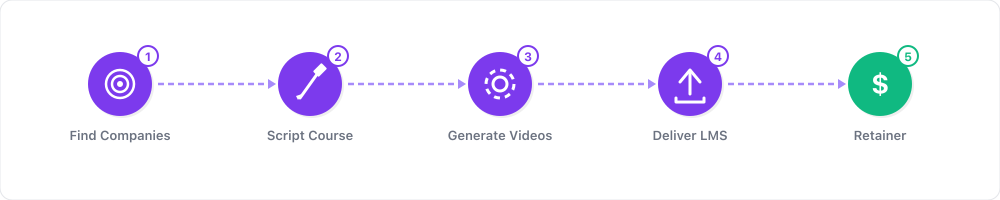
Why AI-Powered Video Courses Work in 2026
The global e-learning market is projected to exceed $400 billion in 2026, and it shows no signs of slowing. Professionals, career-changers, and hobbyists are paying for structured video courses on everything from AI prompting to supply chain management. The opportunity is massive — but most people never start because they picture themselves setting up a ring light, buying a microphone, and recording awkward takes in their spare bedroom.
Synthesia eliminates every one of those barriers. You write a script, choose an AI avatar, and get a polished, professional video with natural lip-sync, gestures, and speech in 230+ languages. No camera. No studio. No editing timeline. The result looks like you hired a professional presenter — because, in a sense, you did.
This is not a hypothetical workflow. Sky Italia used Synthesia to launch over 100 learning paths for internal training. Heineken trains 70,000 employees worldwide with Synthesia-generated videos. Zoom uses the platform to train more than 1,000 salespeople. The company has crossed $100M in annual recurring revenue and serves over 65,000 business customers. The technology is proven at enterprise scale — and it is equally powerful for individual course creators.
The economics are compelling. A single course video that would cost $500–2,000 to produce with a traditional videographer and presenter costs roughly $2–7 with Synthesia. A 20-lesson course that would take weeks of filming and editing can be produced in a few days of focused scripting and generation. And once the course is published, it sells indefinitely with zero ongoing production cost.
If you have expertise in any teachable subject — and you are willing to put in the work of structuring and scripting — Synthesia lets you build a video course business without ever appearing on camera.
What You Need to Get Started
Before you touch Synthesia, you need three things:
1. A teachable skill or knowledge area. You do not need to be a world-class expert. You need to know more than your target student and be able to explain it clearly. If you have ever trained a colleague, mentored someone, or explained a process — you can create a course.
2. The ability to write clearly. Synthesia is script-driven. The avatar reads what you write. This means your course quality depends entirely on your scripting. If you write well, your course will be excellent. If your writing is unfocused, the avatar will deliver unfocused content beautifully — which is worse than ugly content with a clear message.
3. A Synthesia account. The Starter plan ($22/month) gives you 10 minutes of video per month — enough to produce 2–3 lessons. The Creator plan ($67/month) gives you 30 minutes, which covers a full course module or an entire short course. You do not need the Enterprise plan to get started.
Optional but helpful:
- A course hosting platform (Teachable, Udemy, Skillshare, or Gumroad)
- A simple slide deck tool (Google Slides or Canva) for visual aids
- AI writing assistance (ChatGPT or Claude) for drafting and refining scripts
- Screen recording software if your course involves software demonstrations
Step 1: Choose and Validate a Profitable Course Topic

The most common mistake new course creators make is choosing a topic they are passionate about without checking whether anyone will pay to learn it. Passion matters — but demand matters more.
High-demand course categories in 2026:
| Category | Example Topics | Typical Price Range | Demand Level |
|---|---|---|---|
| AI & automation | AI prompting, workflow automation, AI for business | $49–199 | Very high |
| Business skills | Excel, data analysis, project management, sales | $29–99 | High |
| Technology | Python, no-code tools, cloud certifications | $49–199 | High |
| Professional development | Leadership, negotiation, communication | $29–99 | Medium-high |
| Creative skills | Graphic design, copywriting, video editing | $29–99 | Medium |
| Health & wellness | Nutrition, yoga instruction, mental health | $19–49 | Medium |
How to validate demand before you build anything:
- Search Udemy and Skillshare for your topic. If courses exist and have hundreds or thousands of reviews, there is proven demand. Do not avoid topics with competition — competition proves the market exists.
- Check Google Trends for your topic and related keywords. Is interest stable or growing? Avoid topics with declining interest.
- Browse Reddit, Quora, and Facebook groups in your niche. What questions do people ask repeatedly? Those questions become your lesson topics.
- Look at the price point. If similar courses sell for $49–199, the economics work. If the only courses are free, the audience may not be willing to pay.
- Ask yourself honestly: can you teach this topic in 20–30 lessons of 5–10 minutes each? If yes, you have enough material for a course.
Niche down for better results. "Python for Data Analysis" will outsell "Learn Python" because the buyer knows exactly what they are getting. "AI Prompting for Real Estate Agents" will outsell "AI Prompting" for the same reason. Specificity converts.
Step 2: Structure Your Course for Maximum Completion
A well-structured course keeps students engaged and earning you positive reviews. Positive reviews drive more sales. This is a virtuous cycle, and it starts with structure.
The ideal course architecture:
- 5–8 modules covering major topic areas, progressing from beginner to advanced
- 3–5 lessons per module, each 5–10 minutes long
- Total course length: 2–4 hours is the sweet spot. Longer courses have lower completion rates, which hurts reviews and rankings.
- Each lesson teaches exactly one concept. If you catch yourself saying "and also," you probably need two lessons.
Example structure — "AI Prompting for Small Business Owners" course:
| Module | Title | Lessons | Total Time |
|---|---|---|---|
| 1 | What AI Can (and Can't) Do for Your Business | 3 lessons | 20 min |
| 2 | Setting Up ChatGPT and Claude | 4 lessons | 30 min |
| 3 | Writing Prompts That Get Useful Results | 5 lessons | 40 min |
| 4 | AI for Marketing and Sales | 4 lessons | 30 min |
| 5 | AI for Operations and Customer Service | 3 lessons | 25 min |
| 6 | Building AI Workflows That Save Hours | 4 lessons | 35 min |
| Total | 23 lessons | ~3 hours |
Every lesson should follow this structure:
- Hook (15 seconds): Tell the student what they will learn and why it matters
- Core teaching (3–7 minutes): Deliver the main concept with examples
- Demonstration (1–3 minutes): Show it in action — screen recording, visual aid, or walkthrough
- Action item (30 seconds): Give the student something specific to do before the next lesson
Step 3: Write Scripts That Sound Natural on Camera
This is where most of your creative effort goes — and where the quality of your course is determined. Synthesia will deliver your script with perfect clarity and professionalism. Your job is to write scripts that sound like a knowledgeable human explaining something to a colleague, not like a textbook being read aloud.
Script writing guidelines:
- Write conversationally. Read every sentence out loud. If it sounds stiff, rewrite it. Replace "It is important to note that" with "Here is what matters."
- Use short sentences. Spoken language uses shorter sentences than written language. Break long sentences into two.
- Start each lesson with a hook. Not "In this lesson, we will cover..." but "By the end of this lesson, you will know exactly how to [specific skill]."
- Include concrete examples. Abstract concepts do not stick. Every principle needs a specific, relatable example.
- End with an action item. "Before you move to the next lesson, open ChatGPT and try this prompt: [specific prompt]."
- Aim for 800–1,200 words per lesson. This translates to 5–7 minutes of video, which is the ideal lesson length.
Use AI to accelerate script writing. Draft your outline and key points, then use ChatGPT or Claude to expand them into conversational scripts. Edit the output to add your personal examples and expertise. This cuts script writing time from hours to minutes per lesson.
Client Outreach Email Template
If you plan to sell course production as a service to businesses, use this template to reach out:
Subject: Quick question about [Company Name]'s training content
Hi [First Name],
I came across [Company Name]'s [specific page/resource you actually looked at] and noticed your training materials are primarily text-based documents and PDFs.
I help [industry] businesses create professional video training courses using AI — delivering broadcast-quality results in days instead of weeks, at a fraction of traditional video production costs.
Here is what a typical project looks like:
- 10-lesson onboarding course: $1,500–3,000
- 20-lesson skills training program: $3,000–6,000
- Multilingual version (per language): $500–1,000 additional
I would love to show you a 2-minute sample. Would a quick 10-minute call this week be worth it?
Best, [Your Name] [Portfolio Link]
P.S. I can create a free sample lesson using your actual content — no obligation. Just reply "sample" and I will send it over.
Step 4: Produce Your Videos in Synthesia
With your scripts written, production is the fastest part of the process. Here is the step-by-step workflow:
- Log in to Synthesia and create a new project
- Choose your avatar. Pick one avatar and use it for your entire course. Consistency builds familiarity and trust. Select someone whose appearance matches your course tone — professional and polished for business courses, approachable and casual for creative topics.
- Set up your template. Add your course logo, brand colors, and a consistent lower-third or title card. Synthesia's template system lets you save this so every lesson looks uniform.
- Paste your script into the text field. Synthesia will generate the avatar's speech from your text.
- Add visual elements. For each lesson, consider:
- Slides or images to illustrate key points
- Screen recordings for software demonstrations (use Synthesia's screen recording integration)
- Text overlays for key terms, statistics, or steps
- Break long lessons into scenes. A 7-minute lesson should have 4–6 scenes with different visual compositions. This prevents visual monotony.
- Generate and review. Synthesia renders a 5-minute video in about 10 minutes. Watch it through, check for pacing issues, and adjust the script if any section feels rushed or slow.
- Export in 1080p and download the final file.
Production tips from high-volume course creators:
- Batch your production. Script 5 lessons, then produce all 5 in one session. Context-switching between writing and production wastes time.
- If your course involves software tutorials, record your screen first, then write the avatar script to narrate it. This ensures the voiceover matches the on-screen action.
- Use Synthesia's multilingual capability strategically. Once your English course is complete, you can produce Spanish, Portuguese, German, and French versions by translating the scripts. Each additional language multiplies your addressable market with minimal extra work.
UGC Ad Brief Template
If you are marketing your course through video ads, use this brief to plan your ad creative:
Brand: [Your Course Name] Product: Online video course — [Topic] Ad Platform: YouTube / Instagram Reels / TikTok Target Audience: [Age range, profession, pain points]
Creative Direction: Ad Style: Talking head / Testimonial Tone: Authoritative but approachable Length: 30 sec / 60 sec
Hook (first 3 sec): "[Surprising result or bold claim about the course topic]" Example: "I went from zero AI knowledge to automating 10 hours of work per week."
Problem (3–10 sec): "[What frustration does the audience have?]" Example: "Most online courses are 40 hours of theory and zero practical application."
Solution (10–20 sec): "[How does this course fix it?]" Example: "This course is 3 hours of step-by-step walkthroughs you can follow along with."
CTA (last 5 sec): "Enroll now — link in bio."
Step 5: Choose Your Platform, Price Your Course, and Launch
Where you sell your course matters as much as what is in it. Each platform has different economics, audience reach, and control.
Platform comparison:
| Platform | Revenue Share | Best For | Control Level |
|---|---|---|---|
| Udemy | 37–97% (depends on traffic source) | Maximum exposure, price-sensitive buyers | Low — Udemy controls pricing and promotions |
| Teachable | 0–5% + monthly fee ($39–199/mo) | Your own audience, premium pricing | High — you set everything |
| Skillshare | ~$0.05–0.10 per minute watched | Passive income from short courses | Low — royalty-based |
| Gumroad | 10% | Simple setup, one-time purchases | Medium |
| Your own website | 0% (just payment processing) | Maximum margin, full brand control | Full |
Pricing strategy:
- On Udemy: Price at $19.99–49.99. Udemy frequently runs promotions that discount courses to $9.99–14.99. Your volume will be higher, but your per-sale revenue is lower.
- On Teachable or your own site: Price at $49–199 for a standard course, $199–499 for a comprehensive program with bonuses. You control the pricing and never get discounted without your consent.
- Dual-platform strategy (recommended): List on Udemy for discovery and organic sales. Simultaneously sell on Teachable or your own site at a premium price for buyers who find you through your own marketing. This gives you both reach and margin.
Launch checklist:
- Create a landing page or sales page for your course
- Build an email list of at least 50 interested people before launch (offer a free lesson or resource as a lead magnet)
- Record a 2-minute course preview video with Synthesia and upload it to YouTube
- Launch with a 48-hour early-bird discount (20–30% off) to generate initial sales and reviews
- Email your list on launch day with a direct link
- Post about the launch on LinkedIn, Twitter, and any relevant communities
- After launch week, shift to ongoing marketing (SEO blog posts, YouTube Shorts from course clips, answering questions on Reddit and Quora)
Step 6: Scale to Multiple Revenue Streams
A single course is a starting point. The real money comes from building a catalog and layering additional revenue on top.
Growth strategies:
- Build a course catalog. Your first course proves the model. Your second and third courses multiply your revenue with less effort because you already have an audience, a process, and reviews.
- Offer corporate licensing. Companies pay $5,000–50,000+ for training content. Approach businesses in your niche and offer to license your course or create custom versions for their teams. This is where Synthesia's enterprise customers like Heineken and Zoom operate — and where the highest revenue per deal lives.
- Create multilingual versions. Synthesia supports 230+ languages. Translating your course into Spanish, Portuguese, German, or Hindi opens entirely new markets. Each translated version costs only the time to translate scripts (which AI can help with).
- Add coaching or community. Bundle your course with group coaching calls ($199–499/month) or a private community. This transforms a one-time purchase into recurring revenue.
- Build an affiliate army. Promote your course through affiliates who earn a commission on each sale. This scales your marketing without scaling your ad spend.
Real-World Examples & Case Studies
These examples illustrate what is possible with AI-generated video training content:
Sky Italia — 100+ Learning Paths: Sky Italia, the Italian branch of the media company, used Synthesia to create over 100 internal learning paths. Instead of flying trainers across Italy and booking production studios, they generated video lessons from scripts and deployed them company-wide. The result: faster training rollout, consistent quality, and dramatically lower production costs.
Heineken — 70,000 Employees Worldwide: Heineken uses Synthesia to train 70,000 employees across dozens of countries and languages. The multilingual capability is critical here — a single training module created in English can be produced in 20+ languages with accurate lip-sync, eliminating the need for separate filming sessions in each region.
Zoom — 1,000+ Salespeople Trained: Zoom uses Synthesia to create sales training content for their growing team. Instead of scheduling live training sessions across time zones, they produce on-demand video modules that salespeople can watch at their own pace.
These are enterprise examples, but the same technology is available to individual creators on the $22/month Starter plan. The difference is scale, not capability.
Example Scenario — Individual Course Creator:
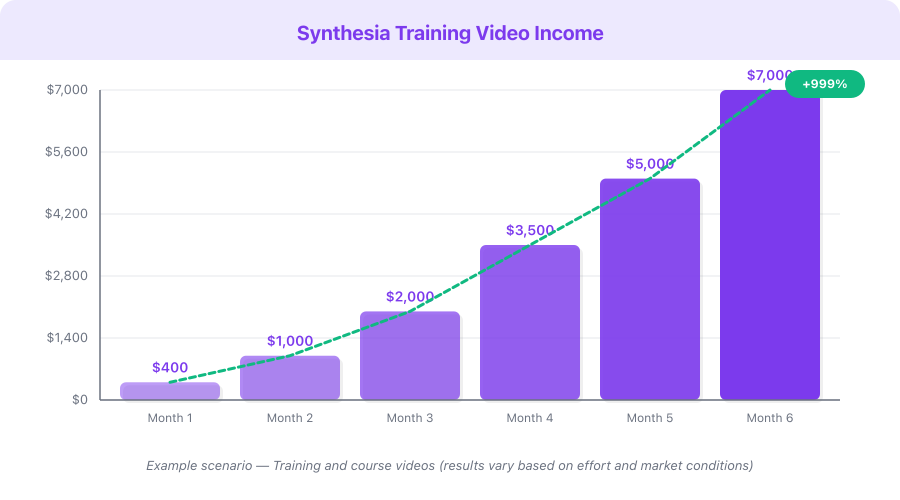
This is a hypothetical example based on publicly available data, not a guarantee of results. Individual results vary significantly.
| Scenario | Courses | Monthly Sales | Avg Price | Monthly Revenue | Synthesia Cost | Net Revenue |
|---|---|---|---|---|---|---|
| Just starting (Month 1–3) | 1 course | 10–20 | $49 | $490–980 | $22–67 | $423–913 |
| Growing (Month 4–8) | 2 courses | 40–80 | $49 | $1,960–3,920 | $67 | $1,893–3,853 |
| Established (Month 9–18) | 3–4 courses | 100–200 | $59 | $5,900–11,800 | $67 | $5,833–11,733 |
| Scaling (Month 18+) | 5+ courses + corporate | 200+ sales + licensing | $59–99 | $15,000–30,000+ | $67–custom | $14,000+ |
Monetization Strategies
Beyond direct course sales, Synthesia-powered video content opens multiple revenue streams:
1. Direct Course Sales — $500–10,000+/month The primary model. Create courses, list them on marketplaces and your own site, and earn from every sale. Margins are 85–95% after platform fees and Synthesia costs.
2. Corporate Training Services — $2,000–15,000 per project Businesses spend $1,000–10,000+ per training video when hiring traditional production companies. You can deliver the same quality with Synthesia at a fraction of the cost and pocket the difference. Offer packages: 10-lesson onboarding course for $3,000, 20-lesson skills program for $6,000.
3. Multilingual Course Licensing — $1,000–5,000 per language Translate your existing course into additional languages and sell regional licenses. Or offer translation as a service to other course creators. With Synthesia, adding a language costs only the time to translate scripts.
4. Course Platform Affiliate Revenue — $200–2,000/month As a course creator, you naturally recommend tools. Affiliate commissions from Synthesia (25% for 12 months), course platforms, and related tools add a passive income layer. A course about "How to Create Video Courses" is particularly lucrative because every student becomes a potential Synthesia customer.
5. Coaching and Community Upsells — $199–999/month per member Your course establishes expertise. Upsell graduates into a group coaching program or premium community. This recurring revenue compounds over time and does not require additional video production.
Pricing Breakdown with ROI Calculation
| Plan | Monthly Cost | Annual Cost | Video Minutes | Cost Per Minute |
|---|---|---|---|---|
| Starter | $22/mo | $264/yr (~$18/mo annual) | 10 min/month | $2.20 |
| Creator | $67/mo | $804/yr (~$54/mo annual) | 30 min/month | $2.23 |
| Enterprise | Custom | Custom | Unlimited | Negotiable |
ROI calculation — Creator plan ($67/month):
- Monthly Synthesia cost: $67
- 30 minutes of video = approximately 6 course lessons (5 min each)
- In 4 months: a complete 24-lesson course produced for $268 total
- If you sell that course at $49 on Udemy and make 10 sales/month: $490/month
- Payback period: less than 1 month of sales
- If you sell at $99 on Teachable and make 10 sales/month: $990/month
- Annual ROI: 1,380% on Creator plan
Compare to traditional production:
- Hiring a presenter + videographer for 24 lessons: $12,000–48,000
- Synthesia Creator plan for 4 months: $268
- Cost savings: 97–99%
Common Mistakes
-
Choosing a topic nobody will pay for. Passion projects are wonderful, but validate demand before you invest 40+ hours of scripting. Search Udemy, check Google Trends, and confirm people are actively buying courses on your topic.
-
Making the course too long. A 15-hour course feels comprehensive to you but overwhelming to buyers. Students want results, not exhaustive coverage. Aim for 2–4 hours total. You can always create an advanced follow-up course.
-
Writing scripts like blog posts. Written language and spoken language are different. Read every script out loud. If you would not say it that way in conversation, rewrite it. Synthesia's avatar will deliver exactly what you write — stiff writing produces stiff video.
-
Using a different avatar for every lesson. Consistency builds trust and familiarity. Choose one avatar and use it throughout your entire course. Students should feel like they have a consistent instructor.
-
Skipping the screen recording integration. If your course involves any software, tool, or process that happens on a screen — use Synthesia's screen recording feature. An avatar talking about clicking buttons without showing the screen is frustrating for students.
-
Not marketing before launch. The biggest mistake is finishing a course and then wondering how to sell it. Start building an email list and social presence while you are still creating the course. Launch to an audience, not into a void.
-
Pricing too low on your own platform. On Udemy, competitive pricing is necessary because the platform controls discounts. On Teachable or your own site, do not price a comprehensive course at $19. Price at $49–199 and let the quality speak for itself. You can always offer limited-time discounts.
Quick Start Checklist
- Identify 3 potential course topics and validate demand for each on Udemy and Google Trends
- Select the topic with the strongest combination of demand and your expertise
- Write a course outline with 5–8 modules and 3–5 lessons per module
- Script your first 3 lessons (800–1,200 words each)
- Sign up for Synthesia and produce those 3 lessons
- Watch the output and refine your scripting approach based on what sounds natural
- Script and produce the remaining lessons in batches of 3–5
- Set up accounts on Udemy and Teachable (or your chosen platforms)
- Create a course landing page with a preview video
- Build an email list of at least 50 potential students
- Launch with an early-bird discount and email your list
- After 10+ reviews, raise your price and shift to ongoing marketing
FAQ
How long does it take to create a full course with Synthesia?
Most creators complete a 20-lesson course in 2–4 weeks of part-time work. The breakdown: 1 week for outlining and research, 1–2 weeks for scripting (the most time-intensive part), and 2–3 days for video production in Synthesia. The actual video generation is fast — about 10 minutes per 5-minute lesson. The bottleneck is always the scripting.
Do I need the Creator plan, or is Starter enough?
The Starter plan ($22/month) gives you 10 minutes of video per month. If your lessons average 5 minutes, that is 2 lessons per month — meaning a 20-lesson course would take 10 months to produce. The Creator plan ($67/month) gives you 30 minutes, which is 6 lessons per month and a complete course in about 4 months. For serious course creators, the Creator plan is worth the investment. Start with Starter to test the platform, then upgrade when you commit to building the full course.
Will students know the presenter is AI?
Synthesia's avatar quality is among the best in the industry — good enough for Fortune 500 companies like Zoom and Heineken. Most students will not notice or care, especially in educational content where the focus is on the information, not the presenter. Be transparent in your course description if you choose to, but the quality speaks for itself.
Can I create my course in multiple languages?
Yes, and this is one of Synthesia's strongest advantages. The platform supports 230+ languages with accurate lip-sync. Once your English scripts are complete, translate them (using AI translation tools and a native speaker for review) and generate the same course in Spanish, Portuguese, German, French, Hindi, or virtually any other language. Each additional language version multiplies your addressable market.
What if I want to use my own face instead of a stock avatar?
Synthesia offers custom avatar creation on the Enterprise plan. You record a short video of yourself, and Synthesia creates a permanent AI avatar that looks and sounds like you. This gives you the personal branding of being on camera without ever recording again after the initial setup. For most creators starting out, the stock avatars work perfectly well.
What's Next
You have the roadmap. The question is whether you will execute on it.
Start with the smallest possible step: pick a topic, write one lesson script, and produce it with Synthesia. If you like the result — and you almost certainly will once you see a professional AI avatar delivering your expertise — script the rest and build your course.
The e-learning market is not slowing down. AI video tools like Synthesia are not going away — they are getting better. The creators who move now build their course catalog, their reviews, and their reputation before the market gets more competitive. A course published today earns revenue for years.
Your expertise has value. Synthesia gives it a voice. The rest is up to you.