How to Turn Blog Posts into YouTube Videos with Pictory
This guide contains affiliate links. If you sign up through our links, we may earn a commission at no extra cost to you. We only recommend tools we've thoroughly researched.


Why Blog-to-Video Repurposing Works in 2026
The video content market is projected to exceed $300 billion by 2027, and short-form video consumption continues to accelerate across every platform. YouTube has over 2.5 billion monthly active users. TikTok surpassed 1.5 billion. Instagram Reels and LinkedIn video are growing double-digits year over year. The audience is there — and they overwhelmingly prefer watching over reading.
Here is the problem for most businesses and content creators: they already have hundreds of blog posts, articles, whitepapers, and written guides sitting on their websites. That written content represents months or years of effort, but it only reaches people who search Google and prefer reading. The same content, converted into video, reaches an entirely different audience — one that is often larger, more engaged, and more likely to share.
This is where Pictory creates a genuine business opportunity. Pictory is the only AI video tool built specifically for converting written content into polished video. You paste a blog post URL or article text, and Pictory automatically selects relevant stock footage, generates AI voiceover, adds animated captions, and produces a finished video in under 10 minutes. No video editing skills. No stock footage hunting. No voiceover recording.
The economics are compelling. A single blog-to-video conversion that you could charge a client $100-200 for costs you under $1 in Pictory platform fees. Mark, an agency owner featured in Pictory's case studies, achieved near 100% profit margins on his video services. Dori O'Neill created over 200 videos using Pictory for content repurposing. These are real results from real users — not theoretical projections.
The market is also underserved. Most businesses know they should be creating video content, but they lack the skills, equipment, or budget to do it. A freelancer or agency offering blog-to-video conversion services fills a gap that millions of businesses have — and Pictory makes the delivery almost effortless.
What You Need to Get Started
Before you open Pictory, make sure you have these fundamentals in place:
1. Written content to convert. You need either your own blog posts or client content. If you are starting a service business, you will be converting other people's content. If you are building your own YouTube channel, you need your own articles or scripts. Either way, you need written source material.
2. Basic understanding of what makes good video. You do not need video editing skills — Pictory handles that. But you need to understand pacing, hooks, and visual storytelling at a basic level. Watch 20-30 successful YouTube videos in your target niche and pay attention to how they open, transition, and close.
3. A Pictory account. The free trial gives you 3 video projects to test the platform. The Starter plan ($19/month) provides 30 videos per month — more than enough for most individual creators. The Professional plan ($39/month) adds premium stock footage, brand kits, and 60 videos per month for client work.
4. A YouTube channel or client delivery system. If you are building your own channel, set up a YouTube account with proper branding. If you are offering services, you need a simple way to deliver finished videos — Google Drive, Dropbox, or a project management tool.
Optional but helpful:
- Canva (free) for creating video thumbnails
- A script editing workflow (Google Docs works fine)
- Basic SEO knowledge for optimizing YouTube titles and descriptions
- An email outreach tool if you plan to acquire clients through cold outreach
Step 1: Select and Prepare Your Source Content

Not every blog post makes a good video. The difference between a mediocre AI-generated video and one that actually gets views comes down to content selection and preparation.
Blog posts that convert well to video:
| Content Type | Why It Works | Example |
|---|---|---|
| How-to guides | Step-by-step structure maps naturally to video scenes | "How to Set Up Google Analytics in 2026" |
| Listicles | Each item becomes a visual scene with clear transitions | "7 Email Marketing Mistakes That Kill Your Open Rate" |
| Product reviews | Visual format adds credibility and engagement | "Best Project Management Tools Compared" |
| Explainer articles | Complex topics benefit from visual illustration | "How SEO Actually Works — Plain English Guide" |
| Case studies | Results and data translate well to visual storytelling | "How We Grew from 0 to 10K Email Subscribers" |
Content to avoid converting:
- Data-heavy posts with complex charts (the stock footage will not match)
- Very short posts under 500 words (not enough for a meaningful video)
- Posts that rely heavily on interactive elements like calculators or quizzes
- Highly technical documentation (better suited for screen recordings)
Preparing your text for video:
Blog posts are written for readers. Video scripts are written for listeners. Before you paste content into Pictory, spend 10-15 minutes editing:
- Cut the filler. Remove phrases like "In this article, we will explore..." and "It is important to note that..." Video moves faster than text.
- Shorten paragraphs. Each scene in Pictory corresponds to a paragraph or section. Keep paragraphs to 2-3 sentences so scenes change frequently and maintain visual interest.
- Add spoken transitions. Written content uses headers. Video needs verbal transitions: "Now let's look at..." or "Here is where it gets interesting..."
- Front-load the hook. The first 10 seconds determine whether viewers keep watching. Move your most compelling point or result to the very beginning — do not save the best for last.
- Simplify vocabulary. Spoken language is simpler than written. Replace "utilize" with "use," "facilitate" with "help," and "implement" with "set up."
Video Ad Script Template (E-Commerce)
Use this template when creating product-focused video ads for e-commerce clients:
HOOK (0-3 sec): "[Surprising statistic or bold claim about the product category]" Example: "I tested 12 standing desks — only one was worth buying."
PROBLEM (3-10 sec): "[Pain point the target customer faces daily]" Example: "Most standing desks wobble, look cheap, and break within a year."
SOLUTION (10-25 sec): "[Introduce the product naturally — like a friend recommending it]" Example: "The [Product Name] is the first one I have actually kept using. Here is why..."
FEATURES (25-45 sec): "[3 specific benefits with concrete details]" Example: "First, the motor is whisper quiet — I have used it on Zoom calls with no issues. Second, the memory presets mean I switch between sitting and standing with one button. Third, the cable management tray keeps everything clean."
SOCIAL PROOF (45-55 sec): "[A result, review, or credibility signal]" Example: "Over 15,000 five-star reviews, and it is the top-rated desk on Wirecutter."
CTA (55-60 sec): "[Clear next step]" Example: "Link in the description — they are running 20% off this week."
Step 2: Create Your Video in Pictory
With your prepared text ready, the actual video creation process takes 5-10 minutes.
-
Log in to Pictory and choose your creation method:
- Script to Video: Paste your edited text directly. Best for prepared scripts.
- Article to Video: Paste a blog post URL. Pictory scrapes the content and identifies key points. Best for quick repurposing without manual editing.
- Long Video to Shorts: Upload an existing long video and Pictory extracts highlight clips. Best for repurposing webinars, podcasts, or existing YouTube videos.
-
Select your visual style and aspect ratio:
- 16:9 for YouTube and website embeds
- 9:16 for TikTok, Instagram Reels, and YouTube Shorts
- 1:1 for LinkedIn and Facebook feed posts
-
Choose your AI voice. Pictory offers 20+ voices on the Starter plan and 40+ on Professional. Match the voice to your content tone — authoritative for business content, friendly for lifestyle, calm for educational. For premium voice quality, Pictory integrates with ElevenLabs.
-
Generate the video. Pictory breaks your text into scenes, matches each scene with stock footage from its library, layers in the voiceover, and adds animated captions. The initial generation takes 2-5 minutes.
-
Review and customize (5-10 minutes):
- Swap stock footage that does not match the topic. This is the single most impactful edit you can make. Replace generic clips with footage that directly illustrates your point.
- Adjust scene timing so voiceover and visuals stay synchronized.
- Style your captions — choose fonts, colors, and animation that match your brand or client brand.
- Add a branded intro and outro — even a 3-second logo animation makes the channel look professional.
- Select background music from Pictory's library. Keep it subtle — music should support the voiceover, not compete with it.
-
Export in your target resolution (1080p for YouTube, optimized for social platforms).
Production tip: Batch your video creation. Convert 4-8 blog posts in a single session. This takes 2-3 hours and produces weeks of content. Context-switching between writing, editing, and producing is the biggest time killer — batching eliminates it.
Step 3: Optimize and Publish for Maximum Reach
Creating the video is half the battle. How you publish and optimize it determines whether anyone actually watches.
YouTube optimization checklist:
- Title: Use the exact keyword phrase people search for. "How to Start a Blog in 2026 — Step by Step" outperforms "Blogging Tips and Advice" because it matches search intent. Use tools like TubeBuddy or VidIQ to research keyword volume.
- Description: Write 200+ words. Include your target keyword in the first 2 sentences. Add timestamps for each major section. Link to the original blog post. Include relevant affiliate links and a subscribe CTA.
- Tags: Add 10-15 relevant keyword variations. Include your channel name, the broad topic, and specific subtopics.
- Thumbnail: This matters more than the video itself for click-through rate. Use Canva to create a thumbnail with large text (4-6 words maximum), a contrasting color scheme, and a visual element that communicates the topic. Test different thumbnail styles and track which get higher CTR.
- End screen and cards: Link to your most relevant other video and your subscribe button. These drive channel growth.
Multi-platform distribution:
Every video you create for YouTube should be repurposed for other platforms:
| Platform | Format | Action |
|---|---|---|
| YouTube | Full video (16:9) | Primary publish |
| YouTube Shorts | 60-sec highlight (9:16) | Use Pictory's clip feature to extract the best 60 seconds |
| TikTok | 60-sec clip (9:16) | Same clip, uploaded natively |
| Instagram Reels | 60-90 sec (9:16) | Same clip with Instagram-specific captions |
| 1-2 min clip (1:1 or 16:9) | Shortened version with professional framing | |
| Blog embed | Full video (16:9) | Embed the YouTube video in the original blog post for SEO |
One blog post becomes one YouTube video, which becomes 3-5 short clips across platforms. This is the content multiplication flywheel that makes video repurposing so powerful.
Step 4: Build a Blog-to-Video Service Business
If you want to turn Pictory into a revenue source beyond your own content, offering blog-to-video conversion as a service is the highest-margin business model available.
Why businesses will pay you for this:
Every company with a blog (essentially all of them) has written content that could be video. Most never convert it because they lack the skills, the time, or the budget for traditional video production. You are solving a real, painful problem — and your delivery cost is under $1 per video.
Service packages that sell:
| Package | Deliverables | Price Range | Your Cost | Margin |
|---|---|---|---|---|
| Single Video | 1 blog-to-video conversion, 1 revision | $100-200 | ~$1 | 99%+ |
| Starter Pack | 5 videos/month, basic optimization | $400-750/mo | ~$5 | 99%+ |
| Growth Pack | 10 videos/month + YouTube Shorts | $750-1,500/mo | ~$10 | 99%+ |
| Agency Retainer | 20+ videos/month + strategy + multi-platform | $1,500-3,000/mo | ~$20 | 99%+ |
These margins are not a typo. Pictory's per-video cost is so low that your pricing is based entirely on the value to the client, not your production cost. Mark's agency, featured in Pictory's case studies, achieved near 100% profit margins precisely because of this cost structure.
Client Outreach Email Template
Subject: Quick idea for your blog content, [First Name]
Hi [First Name],
I came across [Company Name]'s blog — specifically your post on [specific post title you actually read]. Great content.
Here is the thing: that post is only reaching people who search Google and prefer reading. The same content, converted into a YouTube video with professional voiceover and captions, reaches an entirely different audience — one that is often larger and more engaged.
I specialize in converting blog posts into polished video content using AI video tools. The result looks and sounds professional, includes animated captions (critical since 85% of social video is watched without sound), and is optimized for YouTube, LinkedIn, and social media.
Here is what a typical engagement looks like:
- 5 blog-to-video conversions per month: $500-750
- Each video optimized for YouTube with titles, descriptions, and tags
- Bonus: 2-3 short clips per video for social media (TikTok, Reels, LinkedIn)
I would love to convert one of your existing posts for free — no obligation. You can see the quality before committing to anything.
Would a free sample video be worth 2 minutes of your time to review?
Best, [Your Name] [Portfolio Link]
Where to find clients:
- LinkedIn outreach: Search for "content marketing manager" or "head of content" at companies with active blogs but no YouTube channel. This is your ideal client.
- Upwork and Fiverr: List "blog to video conversion" services. Price competitively at first to build reviews.
- Agency partnerships: Approach marketing agencies and offer white-label video production. They sell to their clients, you produce the videos.
- Cold email to bloggers: Find successful bloggers with traffic but no video presence. Offer to convert their top 5 posts for free as a portfolio-building exercise.
Step 5: Scale with Systems and Automation
Once you have consistent clients or a growing YouTube channel, the next step is systematizing your workflow so you can increase output without proportionally increasing your time.
The batch production system:
- Monday: Collect all client briefs or select your own blog posts for the week. Aim for 8-12 videos per batch.
- Tuesday: Edit and prepare all source text for video conversion. Apply the script optimization techniques from Step 1.
- Wednesday: Run all videos through Pictory in a single session. Generate, customize stock footage, style captions, and export. A batch of 10 videos takes 3-4 hours.
- Thursday: Create thumbnails for all videos in Canva. Write YouTube titles, descriptions, and tags.
- Friday: Schedule all uploads and deliver client videos.
This system produces 8-12 videos per week in roughly 10-12 hours of work. At $100-200 per video for client work, that is $800-2,400 per week from a part-time schedule.
Hiring and delegation:
As you scale beyond 15-20 videos per week, delegate the lowest-skill tasks first:
- Thumbnail creation: Hire on Fiverr for $5-10 per thumbnail
- YouTube optimization: Train a VA to write descriptions and tags using a template you create
- Stock footage swapping: The most time-consuming part of Pictory production — train an editor to handle this
Keep the client communication, content selection, and quality review in-house. These are the high-value tasks that determine whether clients stay.
Real-World Examples & Case Studies
These are documented results from real Pictory users, sourced from pictory.ai/pictory-case-studies:
Mark's Agency — Near 100% Profit Margins: Mark built a video content agency using Pictory as his primary production tool. Because Pictory's per-video cost is under $1 and he charges clients $100-200+ per video, his profit margins approach 100%. He scaled from a solo freelancer to running a full agency by systematizing the blog-to-video workflow and hiring assistants for low-skill tasks.
Dori O'Neill — 200+ Videos Created: Dori used Pictory to create over 200 videos for content repurposing and social media distribution. The key insight from Dori's experience is volume — the more content you produce and distribute, the more compounding returns you see from search traffic, social sharing, and audience growth. Pictory's speed makes high-volume production feasible for a single person.
The Broader Market Validation: Pictory serves thousands of users across marketing agencies, SaaS companies, coaches, consultants, and content creators. The blog-to-video use case is the platform's core strength and the one with the most documented success stories. The pattern is consistent: users who commit to regular video production see meaningful growth in reach, engagement, and revenue within 3-6 months.
This is a hypothetical example based on publicly available data, not a guarantee of results. Individual results vary significantly.
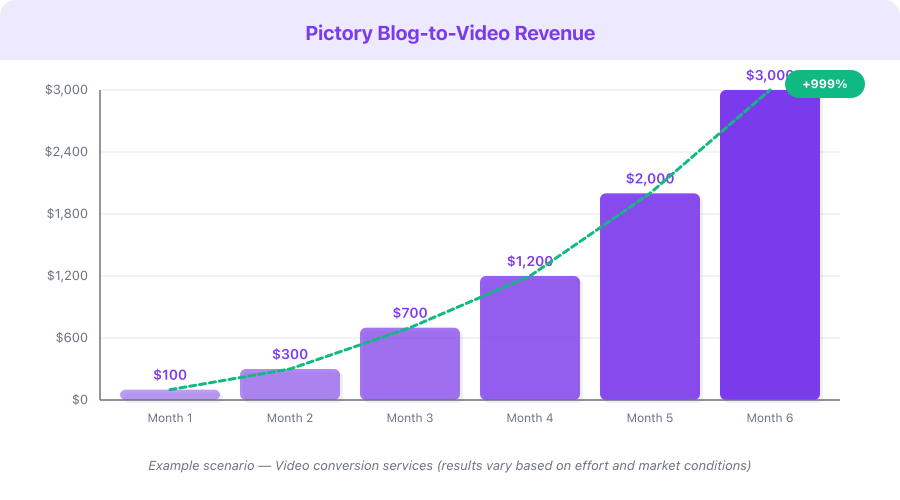
| Scenario | Videos/Month | Revenue Source | Monthly Revenue | Pictory Cost | Net Revenue |
|---|---|---|---|---|---|
| Conservative (own channel) | 8 | YouTube ads + affiliates | $200-500 | $19 | $181-481 |
| Moderate (freelance service) | 20 | Client payments | $2,000-4,000 | $39 | $1,961-3,961 |
| Aggressive (agency model) | 50+ | Client retainers | $5,000-12,000 | $99 | $4,901-11,901 |
Monetization Strategies
Blog-to-video repurposing opens multiple revenue streams beyond direct client work:
1. Freelance Video Conversion Services — $1,000-5,000/month The most straightforward model. Convert clients' blog posts into videos and charge per video or on retainer. Margins exceed 99% because Pictory's cost per video is under $1 while you charge $100-200+.
2. YouTube Ad Revenue — $200-2,000/month Build your own YouTube channel by converting your blog posts into videos. Once monetized (1,000 subscribers + 4,000 watch hours), YouTube ad revenue creates passive income from content you have already written. Evergreen educational content earns for years.
3. Affiliate Marketing Through Video — $500-3,000/month Embed affiliate links in your video descriptions. Product reviews, tool comparisons, and "best of" lists perform especially well. A single well-ranking video review can generate $100-500/month in affiliate commissions indefinitely.
4. Content Agency with Video Upsells — $3,000-10,000/month If you already offer content marketing services (blog writing, SEO), add video as an upsell. Clients who pay $1,000/month for blog content will often pay an additional $500-1,000/month for video versions of the same content. Your marginal production cost is nearly zero.
5. Course and Training Video Production — $500-5,000 per project Use Pictory to produce training videos, course content, and educational materials for businesses. The script-to-video workflow is perfect for structured educational content where a professional voiceover with supporting visuals is more effective than a talking head.
Pricing Breakdown
Pictory plans and what you need:
| Plan | Monthly Cost | Videos/Month | Best For | Key Feature |
|---|---|---|---|---|
| Free Trial | $0 | 3 projects | Testing the platform | Watermarked output |
| Starter | $19/mo | 30 videos | Individual creators, own YouTube channel | No watermark, 20+ voices |
| Professional | $39/mo | 60 videos | Freelancers serving clients | Brand kits, premium stock, 40+ voices |
| Teams | $99/mo | Unlimited | Agencies, high-volume production | Team access, API, priority |
Annual billing saves ~20%: Starter drops to ~$15/mo, Professional to ~$31/mo, Teams to ~$79/mo.
ROI calculation — Professional plan ($39/month):
- Monthly Pictory cost: $39
- 60 videos available per month
- Cost per video: $0.65
- If you convert 10 client blog posts at $150 each: $1,500 revenue
- Monthly profit: $1,461
- Annual ROI: 4,392% on Professional plan
Compare to traditional video production:
- Hiring a videographer + editor for 10 videos: $3,000-10,000
- Pictory Professional for the same 10 videos: $39
- Cost savings: 98-99%
Pictory affiliate program: 20-50% tiered recurring commission. As you refer more users, your commission rate increases. With 30 referrals on the Starter plan at the 50% tier, that is $285/month in recurring passive income — from a single recommendation in your video descriptions.
Common Mistakes
-
Using raw blog post text without editing for video. Written content and spoken content are fundamentally different. If you paste a blog post directly into Pictory without editing for conversational tone, pacing, and transitions, the video will feel like someone reading an article aloud — because that is exactly what it is. Spend 10-15 minutes editing before you generate.
-
Accepting the default stock footage without customizing. Pictory's AI selects relevant footage, but "relevant" is not the same as "perfect." The videos that perform best on YouTube have footage that directly illustrates the point being made. Swap 3-5 clips per video and the quality improves dramatically.
-
Skipping the thumbnail. YouTube data consistently shows that thumbnails are the single biggest factor in click-through rate. A video with great content and a bad thumbnail will get fewer views than a mediocre video with a compelling thumbnail. Spend 5 minutes in Canva creating a custom thumbnail with large text, contrasting colors, and a clear visual hook.
-
Publishing only on YouTube and ignoring other platforms. Every long-form video contains 2-3 short clips that work as YouTube Shorts, TikTok videos, Instagram Reels, and LinkedIn posts. Use Pictory's clip feature to extract these. One video becomes 4-5 pieces of content across platforms — with zero additional production.
-
Giving up before reaching 30-50 videos. YouTube's algorithm needs data to understand your channel and recommend your content. Most channels see meaningful traction after 30-50 published videos with consistent quality. The first 20 videos are an investment in the algorithm learning your channel — not a test of whether video works for your niche.
-
Not tracking which content types perform. After 10-15 videos, you will have data on what your audience watches. Some topics will get 5x more views than others. Double down on what works. Create more videos on high-performing topics and stop producing content on topics that consistently underperform.
-
Overcomplicating the production process. Pictory's strength is speed. If you spend 2 hours perfecting every video, you lose the efficiency advantage. Aim for "professional and good" not "cinematic masterpiece." Publish consistently, learn from analytics, and improve iteratively.
Quick Start Checklist
- Sign up for Pictory's free trial and convert your first blog post into a video to see the output quality
- Identify your path — building your own YouTube channel or offering video services to clients (or both)
- Select your 5 best-performing blog posts (highest traffic, most engagement) as your first batch
- Edit each post for video: shorten paragraphs, add spoken transitions, front-load the hook
- Generate all 5 videos in a single Pictory session (batch production)
- Customize stock footage — swap at least 3-5 clips per video for more relevant visuals
- Create custom thumbnails in Canva for each video (large text, contrasting colors)
- Set up your YouTube channel with proper branding, description, and channel art
- Publish your first 5 videos over 5 days with optimized titles, descriptions, and tags
- Extract 2-3 short clips from each video and publish on TikTok, Reels, and LinkedIn
- If offering services, create 3 sample videos and send cold outreach to 10 potential clients
- Commit to publishing at least 2 videos per week for 90 days before evaluating results
FAQ
How long does it take to convert a blog post into a video?
The actual Pictory generation takes 2-5 minutes. However, you should budget 10-15 minutes for text preparation before generation and 5-10 minutes for customization after. Total time per video is 20-30 minutes from start to exported file. In a batch session, you can produce 8-12 videos in 3-4 hours because setup and context-switching overhead is eliminated.
Do I need the Professional plan, or is Starter enough?
The Starter plan ($19/month, 30 videos) is sufficient for individual creators building their own YouTube channel. If you are offering video services to clients, upgrade to Professional ($39/month, 60 videos) for the brand kit feature — it lets you save client branding presets so every video is consistent. The premium stock footage library on Professional also produces noticeably better output.
Will YouTube rank AI-generated videos?
YouTube ranks videos based on watch time, click-through rate, and engagement — not production method. If your AI-generated video has a compelling title, a strong thumbnail, and content that keeps viewers watching, it will rank just as well as a traditionally produced video. Many of the top-performing faceless YouTube channels use AI video tools and generate millions of views monthly.
Can I use Pictory for client work commercially?
Yes. All Pictory paid plans include commercial usage rights. You can create videos for clients, publish them on their channels, and charge for the service. The stock footage included in Pictory's library is licensed for commercial use. Check the terms of service for any restrictions on specific use cases, but standard client video production is fully permitted.
What niches work best for blog-to-video conversion services?
The highest-value niches are B2B SaaS (companies with technical blogs), real estate (property and market update videos), health and wellness (educational content), finance and investing (explainer videos), and e-commerce (product guides and comparisons). These niches have high content volume, strong willingness to pay for video, and content that translates naturally to the video format.
What's Next
You have the complete playbook for turning written content into a video business with Pictory. The question is whether you will execute on it.
Start with the smallest possible action: sign up for Pictory's free trial, paste your best blog post URL, and generate a video. The entire process takes under 10 minutes. If the output quality surprises you — and it almost certainly will — you have the foundation for a content strategy or service business that scales.
For a detailed look at Pictory's features and limitations, read our Pictory review. To compare plans and find the best value for your situation, check our Pictory pricing breakdown. And if you are looking for complementary tools, explore Opus Clip for long-video-to-shorts conversion and Canva for thumbnail creation.
The content you have already written is sitting idle. Pictory gives it a second life — in a format that reaches more people, drives more engagement, and generates more revenue. Every day you wait is a day your best content is only reaching readers, when it could be reaching viewers too.