How to Create and Sell Digital Products with Leonardo AI
This guide contains affiliate links. If you sign up through our links, we may earn a commission at no extra cost to you. We only recommend tools we've thoroughly researched.
Why Selling AI-Generated Digital Products Works in 2026
The AI image generation market has matured from a novelty into a legitimate creator economy engine, and the numbers back it up. Leonardo AI has surpassed 19 million registered users and generated over $50 million in revenue. Its built-in marketplace alone processes more than $18 million in annual transaction volume. These are not projections or hopes — they are verified figures from an ecosystem where real creators are earning real money.
The economics of AI-generated digital products are unlike almost any other business model. Traditional graphic design requires expensive software subscriptions ($55/month for Adobe Creative Cloud), years of skill development, or hiring designers at $50–150 per hour. Leonardo AI collapses that entire cost structure into a text prompt and a few seconds of processing time. The free tier gives you 150 tokens per day, enough to generate 30–50 commercial-quality images without paying a cent.
Digital products carry zero marginal cost after creation. You design an ebook cover, a wall art print, or a clipart pack once, and it sells indefinitely. No inventory. No shipping. No manufacturing. No customer service beyond the occasional download question. When you combine this zero-marginal-cost model with AI-generated visuals, your time-to-market drops from days to minutes, and your profit margins approach 95%.
The demand side is growing faster than supply. Etsy reported that digital downloads are among their fastest-growing product categories in 2025, with buyers actively searching for printable art, social media templates, and design assets every single day. Small businesses, content creators, and individuals want professional visuals but do not want to learn Photoshop or pay designer rates. They are the ideal buyers for your AI-generated products.
The competitive landscape is still favorable. While AI tools are mature enough to produce commercial-quality output, most potential sellers have not yet built their catalogs or figured out the workflow. Creators who establish their shops, build reviews, and develop their prompt engineering skills now will have compounding advantages — more listings, more social proof, more search authority — that later entrants will struggle to match.
The global print-on-demand market is projected to reach $45.6 billion by 2031. The digital assets market on platforms like Etsy, Gumroad, and Creative Market continues to expand as more people start online businesses, create content, and need visual assets. Every one of those buyers is a potential customer for products you can create in minutes with Leonardo AI.
What You Need to Get Started
Before generating your first product, set up your workspace properly. Skipping this step leads to disorganized files, inconsistent quality, and wasted time down the road.
Accounts you need (all free to start):
- Leonardo AI account — sign up here for 150 free tokens per day
- Etsy seller account — $0.20 per listing fee, no monthly subscription required
- Gumroad account — free to create, they take a percentage per sale
- Canva free account — for final mockup creation, file packaging, and adding text overlays
- Pinterest business account — for driving free traffic to your listings
Hardware requirements:
- Any computer with a modern web browser — Leonardo AI runs entirely in the cloud
- Reliable internet connection (minimum 10 Mbps for comfortable image generation)
- At least 20 GB of free storage for your product files, mockups, and organized catalog
- A second monitor is helpful but not required — speeds up the workflow considerably
Skills you need:
- Basic typing and web browsing (the core interaction with Leonardo AI is typing prompts)
- Willingness to learn prompt engineering through experimentation
- Basic understanding of your target market — who buys what, where they shop, and what they search for
- File organization discipline — naming conventions and folder structures matter at scale
Optional but helpful:
- Familiarity with Etsy SEO basics (keyword research, tag optimization)
- A Smartmockups or Placeit account for professional product mockups
- Basic Canva skills for assembling multi-file download packages
- An email marketing tool like Mailchimp or ConvertKit for building a subscriber list
Step 1: Choose Your Product Type and Niche

The most important decision you make is not which AI model to use — it is what to sell and to whom. A focused shop with a clear niche outperforms a scattered shop every time. The Etsy algorithm rewards sellers who demonstrate expertise in a specific category through consistent listings, relevant tags, and strong conversion rates.
Best digital products to create with Leonardo AI:
| Product Type | Price Range | Best Platform | Effort per Product | Monthly Demand |
|---|---|---|---|---|
| Digital wall art | $3–15 | Etsy, Gumroad | 15–30 min | Very high |
| Ebook covers | $5–25 | Etsy, Fiverr | 20–45 min | High |
| Social media template packs | $5–15/pack | Etsy, Gumroad | 45–90 min | Very high |
| Coloring pages | $3–8/pack | Etsy, Amazon KDP | 30–60 min | High |
| Print-on-demand designs | $3–15 royalty | Redbubble, Printful | 10–20 min | High |
| Clipart and illustration packs | $5–20 | Etsy, Creative Market | 60–120 min | Medium |
| Pattern and texture packs | $5–15 | Creative Market | 45–90 min | Medium |
| Logo concepts and brand assets | $25–100 | Fiverr, direct clients | 30–60 min | Medium |
| Digital planner stickers | $3–10/pack | Etsy | 60–90 min | High |
| Stock photography packs | $10–30 | Gumroad, own site | 30–60 min | Medium |
Pick one product type and one niche audience to start. For example:
- Product type: Digital wall art
- Niche: Minimalist botanical prints for modern apartments
Now every image you generate has a clear purpose and a clear buyer. This focus makes your Etsy listings more discoverable, your brand more cohesive, and your prompt engineering more efficient because you are iterating within a single style.
High-demand niches for AI-generated digital art in 2026:
- Minimalist nature and landscape prints for home offices
- Nursery and children's room art (animals, alphabet, space themes, woodland creatures)
- Abstract and geometric patterns for modern interiors
- Botanical and scientific illustrations (pressed flowers, herb gardens, succulents)
- Vintage and retro aesthetics (mid-century modern, art deco, 1970s color palettes)
- Pet portraits and breed-specific art (golden retrievers, French bulldogs, cats)
- Motivational and inspirational quote art for gyms and offices
- Boho and earthy interior design prints (macrame-style, desert landscapes, natural textures)
- Seasonal and holiday decorations (Christmas, Halloween, Valentine's Day, Easter)
- Astrology and zodiac-themed art (each sign is its own micro-niche)
Niche validation before you commit: Search your product idea on Etsy. If you find sellers with hundreds or thousands of sales in that niche, demand exists. If the top sellers have fewer than 50 reviews, competition is low. The sweet spot is high demand with moderate competition — enough sales activity to prove the market, but not so many established sellers that you cannot break through.
Step 2: Master Prompt Engineering for Commercial Output
The difference between amateur AI art and products that sell for $10–25 is prompt quality. Leonardo AI responds to specific, structured prompts far better than vague descriptions. Investing time in prompt engineering is the single highest-leverage skill for this business.
The commercial prompt formula:
[Style] [subject] in [specific color palette], [composition details], [mood/atmosphere], [technical specs], [format]
Examples that produce sellable output:
For wall art:
- "Minimalist watercolor mountain landscape in soft sage green and dusty rose, clean lines, centered composition, negative space around edges, white background, wall art print, high resolution, 4K, printable quality"
- "Vintage botanical illustration of eucalyptus branches, detailed scientific drawing style with subtle watercolor washes, cream parchment background, no text, printable quality, 300 DPI"
- "Mid-century modern abstract shapes in mustard yellow, burnt orange, and teal on cream background, balanced geometric composition, retro poster style, wall art, high resolution"
For ebook covers:
- "Professional book cover design, dark moody atmosphere, single spotlight on a chess piece, thriller genre feel, cinematic lighting, vertical 6x9 format, high resolution, no text"
- "Warm watercolor illustration of a cozy cottage garden with wildflowers, children's book cover style, soft pastel colors, whimsical feel, vertical format, high resolution"
For print-on-demand:
- "Bold graphic illustration of a golden retriever wearing sunglasses, pop art style, bright primary colors on transparent background, t-shirt design, clean edges, vector look"
- "Vintage distressed typography layout reading ADVENTURE AWAITS, outdoor wilderness theme, earth tones, retro national park poster style, t-shirt graphic"
Advanced prompt engineering techniques:
-
Negative prompts — Tell the AI what to exclude: "no text, no watermark, no borders, no frame, no signature, no artifacts, no blurry elements." This dramatically improves output quality and saves editing time.
-
Style anchoring — Reference specific art movements or techniques: "in the style of Japanese woodblock prints," "reminiscent of Bauhaus graphic design," or "inspired by William Morris botanical patterns." These references give the AI a much stronger stylistic direction than generic terms.
-
Color precision — Use specific color names rather than generic terms. "Terracotta and sage green" produces far better results than "warm and cool colors." Reference Pantone-style descriptions when possible: "dusty mauve," "burnt sienna," "ocean teal."
-
Composition control — Specify exactly where elements should appear: "centered subject with ample negative space," "rule of thirds placement," "symmetrical arrangement," or "full bleed edge-to-edge design."
-
Batch consistency — When creating a product bundle, use the same style descriptors across all prompts. Change only the subject while keeping the style, color palette, and format identical. This creates cohesive product sets that command higher bundle prices.
Model selection guide:
- PhotoReal — best for realistic product shots, lifestyle photography, stock images, and food photography
- DreamShaper — ideal for artistic illustrations, fantasy designs, and creative work with painterly qualities
- SDXL models — highest quality for general-purpose generation, sharp details, and professional output
- Anime/Manga models — specific styles for character art, fan merch, and Japanese-influenced designs
- 3D Render models — ideal for icon sets, app graphics, and isometric illustrations
Keep a prompt journal — a simple spreadsheet where you record each prompt, the model used, and whether the output was sellable. After 100 prompts, you will have a library of proven formulas for your niche.
Step 3: Prepare Your Products for Sale
Raw AI output is not a finished product. The preparation and packaging step is what separates sellers earning $50 per month from those earning $2,000+ per month. Buyers are paying for convenience, quality, and a professional experience — not just an image file.
For Digital Downloads (Etsy, Gumroad):
-
Upscale to print resolution. Use Leonardo AI's built-in upscaler to reach at least 3000x3000 pixels, ideally 4000x4000 or higher. Print buyers expect 300 DPI at their target print size. An 8x10 print at 300 DPI requires 2400x3000 pixels minimum.
-
Save in multiple standard sizes. Every wall art product should include: 2:3 ratio (8x12, 16x24), 4:5 ratio (8x10, 16x20), 3:4 ratio (9x12, 18x24), ISO sizes (A4, A3, A2), and a square option (10x10, 12x12). This takes 20 minutes per design but dramatically increases your listing's appeal.
-
Create professional mockups. Show the art framed and hanging in a styled room, displayed on a desk, in a nursery, or as part of a gallery wall. Free mockup generators like Smartmockups work well, but investing in a Placeit subscription ($14.95/month) gives you access to thousands of realistic room scenes that make your listings look professional.
-
Bundle strategically. Individual prints at $3–5 are fine, but bundles of 3–6 matching pieces at $12–25 generate significantly higher revenue per transaction. A "Gallery Wall Set of 6 Botanical Prints" has higher perceived value and higher conversion rates than six individual listings.
-
Package everything properly. Create a ZIP file containing: all size variants in high-resolution PNG and JPG formats, a PDF printing guide with paper weight recommendations and frame size suggestions, and a thank-you note with links to your shop for future purchases.
For Print-on-Demand:
-
Export at the exact resolution required by your platform. Redbubble needs 4500x5400 pixels for t-shirts. Printful requires specific dimensions per product type. Check each platform's guidelines.
-
Ensure transparent backgrounds for designs that need to sit cleanly on colored products. Use Leonardo AI's background removal or Canva's background remover.
-
Test your design on both light and dark product colors. A design that looks stunning on a white t-shirt may be invisible on a black one. Create separate versions if needed.
-
Enable your design on every applicable product type — a single design can work on t-shirts, mugs, posters, phone cases, tote bags, stickers, and notebooks. Each additional product type is a free additional listing.
Step 4: List and Optimize for Search Discovery
Your listing quality determines whether anyone finds your products. Etsy and Gumroad are search engines — your products are invisible without proper optimization. This step deserves as much attention as the design process itself.
Etsy title optimization: Pack your title with relevant keywords, front-loading the most important terms. Etsy gives you 140 characters — use all of them.
Example: "Minimalist Botanical Wall Art Print Set of 4, Eucalyptus Sage Green Watercolor, Digital Download, Printable Art, Modern Nursery Decor, Gallery Wall"
Tag strategy (use all 13 tags): Research what buyers actually search for using Etsy's search bar autocomplete. Type the beginning of a search term and note the suggestions — these are real buyer searches.
Example tags for botanical wall art: botanical print, eucalyptus art, sage green decor, printable wall art, digital download art, nursery wall decor, minimalist plant art, watercolor botanical, gallery wall set, modern wall art, nature art print, instant download, green wall art
Description structure (200+ words): Open with the buyer's problem and your solution. Include: what is in the download, all available sizes, printing instructions, who the product is perfect for, and care/display recommendations. End with a link to related products in your shop.
Listing images (minimum 5, ideally 8–10):
- Hero image — the art beautifully framed in a styled room setting
- Full bundle overview — all pieces in the set displayed together
- Close-up detail shot — showcase the quality and texture
- Size comparison — show the art at different print sizes with measurements
- Lifestyle context — the art in a real living space (bedroom, office, nursery)
- Color palette swatch — show the exact colors for buyers matching their decor
- What's included — visual showing all file formats and sizes in the download
- Printing guide preview — show buyers they get instructions, not just files
Etsy/Gumroad Product Listing Template:
TITLE (max 140 chars, keyword-rich): [Number] [Product Type] Set | [Style] [Subject] | [Color Palette] | Digital Download | Printable | [Room/Use] Decor | Instant Download
DESCRIPTION: Transform your [room/space] with this stunning set of [number] [product type]. Each piece features [style description] in [color palette] — designed to complement modern [room type] decor without hiring a designer or spending hundreds on original art.
What you get (instant download):
- [Number] high-resolution digital files (PNG + JPG)
- 6 print sizes per design: 8x10, 11x14, 16x20, 18x24, A4, A3
- Step-by-step printing guide with paper and frame recommendations
- Color-matched set — all pieces work together as a gallery wall
Perfect for:
- [Room type] gallery walls and accent pieces
- Gifts for [audience] who love [style/subject]
- [Seasonal/occasion] home refresh on a budget
- Rental-friendly decor — print, frame, and take with you when you move
How it works:
- Purchase and instantly download the ZIP file
- Pick your favorite size and print at home or upload to a local print shop (we recommend Staples, FedEx, or Shutterfly for best results)
- Frame in a standard-size frame (no custom framing needed) and display
Printing tips:
- Use matte or luster photo paper (at least 200gsm) for best results
- Standard frames at Target, IKEA, or Amazon fit all included sizes
- For the richest colors, choose a professional print service over a home printer
TAGS: [product type], [style], [subject], [color], [room type] decor, digital download, printable art, wall art set, gallery wall, instant download, [seasonal], [audience] gift, modern home art
Step 5: Scale with Systems and Seasonal Strategy
Once you have 15–25 listings generating initial sales and favorites, shift from individual product creation to systematic scaling. The goal is to build a catalog that compounds — more listings create more search visibility, which generates more sales, which builds more reviews, which improves search ranking further.
Daily production system: Block 60–90 minutes each day for product creation. In that time, you should be able to generate 8–12 images, select the best 3–5, upscale them, create mockups, and list 1–2 new products. Consistency beats intensity — 2 listings per day, 5 days per week, gives you 40+ new products per month.
Analytics-driven iteration: After your first 30 listings, your Etsy analytics become your most valuable tool. Check weekly: which listings get the most views (your SEO is working), which get the most favorites (your design resonates), and which convert to sales (your listing quality is effective). Double down on the styles, subjects, and niches that show traction. Abandon categories that generate views but no sales.
Seasonal calendar strategy: Design seasonal products 6–8 weeks before the holiday or event. Etsy search traffic for seasonal terms starts rising well before the actual date.
- January: Valentine's Day prints, New Year goal-setting art
- March: Easter and spring decor, Mother's Day gifts
- June: Father's Day, summer themes, back-to-school prep
- September: Halloween, fall foliage, Thanksgiving
- October: Christmas and holiday art (the biggest sales window of the year)
Bundle strategy for higher AOV: Combine individual pieces into themed collections. "Gallery Wall Set of 6 Minimalist Botanicals" at $18 outsells six individual $5 listings by revenue, conversion rate, and profit margin. Create bundles by theme (Ocean Collection, Forest Set), by room (Nursery Bundle, Office Pack), and by color palette (Earth Tones Set, Sage and Blush Collection).
Cross-platform expansion: Once you have 50+ products on Etsy, expand to Gumroad (for direct sales with higher margins), Creative Market (for design-savvy buyers), and your own Shopify or Squarespace store (for full brand control and zero marketplace fees).
Pinterest as your free traffic engine: Create a Pinterest business account and pin every product mockup with a direct link to your Etsy listing. Pinterest users are actively looking for home decor inspiration, printable art, and design ideas — they are your exact target buyer. Pin 5–10 images per day using a scheduler like Tailwind. Consistent pinning for 3–6 months can drive 30–50% of your Etsy traffic from Pinterest alone.
Step 6: Offer Design Services for Higher-Ticket Revenue
Once you have a portfolio of AI-generated work and a track record of sales, you can offer design services that command dramatically higher prices than individual product sales. Your Etsy shop and product catalog serve as your portfolio — proof that you produce professional-quality work.
Service positioning: You are not selling "AI-generated art." You are selling professional design services delivered with exceptional speed and competitive pricing. Clients care about the result, not the process.
Design Service Pricing Sheet:
Service Deliverables Price Turnaround Custom digital art (single piece) High-res file in 5 size variants, 2 revision rounds $50–100 24–48 hours Product mockup set (5 images) 5 styled lifestyle mockups for your products $75–150 2–3 days Social media template pack (10 posts) 10 on-brand templates, editable in Canva, your brand colors and fonts $150–300 3–5 days Ebook cover design Front cover + spine + back cover, 3 concepts, 2 revision rounds $100–200 2–3 days Full brand visual kit Logo concepts, color palette, social templates, digital assets, brand guidelines $400–800 5–7 days Monthly content retainer 20 social posts + 10 stories + 5 product images + 2 blog headers $500–800/month Ongoing Custom illustration pack (20 pieces) 20 cohesive clipart/illustration elements, transparent backgrounds, commercial use $200–400 5–7 days All packages include:
- Full commercial usage rights transferred to client
- 2 revision rounds included (additional revisions $25/round)
- High-resolution files in PNG, JPG, and PDF formats
- Rush delivery available: +50% for 24-hour turnaround
- Source files and size variants for all deliverables
List these services on Fiverr (start at competitive rates to build reviews, then raise prices), Upwork (target small business clients), and LinkedIn (position yourself as a design service provider). Once you have 5–10 completed projects with positive reviews, your service business can generate $1,000–5,000/month alongside your passive product income.
Real-World Examples and Case Studies
The AI-generated content economy is not theoretical. Here are documented examples with verified sources.
Virtual Influencers and AI-Generated Characters: AI-generated virtual influencers — characters created entirely with tools like Leonardo AI — are earning $110,000 or more per month through brand partnerships, sponsored content, and merchandise sales. According to analysis by Miracuves, these creators use AI image generation to produce consistent character imagery across hundreds of posts, building audiences that rival human influencers. The key insight is that brands pay for audience attention and engagement metrics, and they do not differentiate between human and AI-generated influencers as long as the audience engagement is genuine.
Leonardo AI Platform Growth: Leonardo AI has crossed 19 million registered users with over $50 million in platform revenue. The built-in marketplace processes over $18 million in annual transaction volume, where creators sell custom AI models, prompt packs, and generated asset collections directly to other users. Top marketplace sellers earn thousands per month from models they trained once and listed — a form of passive income built entirely on prompt engineering expertise.
Etsy Digital Product Sellers: Digital art and printable sellers on Etsy consistently report earnings of $1,000–5,000 per month from shops with 100–200 active listings. The top performers share a common pattern: they focus on a single niche, produce high-quality lifestyle mockups, optimize aggressively for Etsy search, and list new products on a consistent daily or weekly schedule. AI image generation has cut their production time by 80–90%, allowing them to scale their catalogs faster than traditional designers ever could.
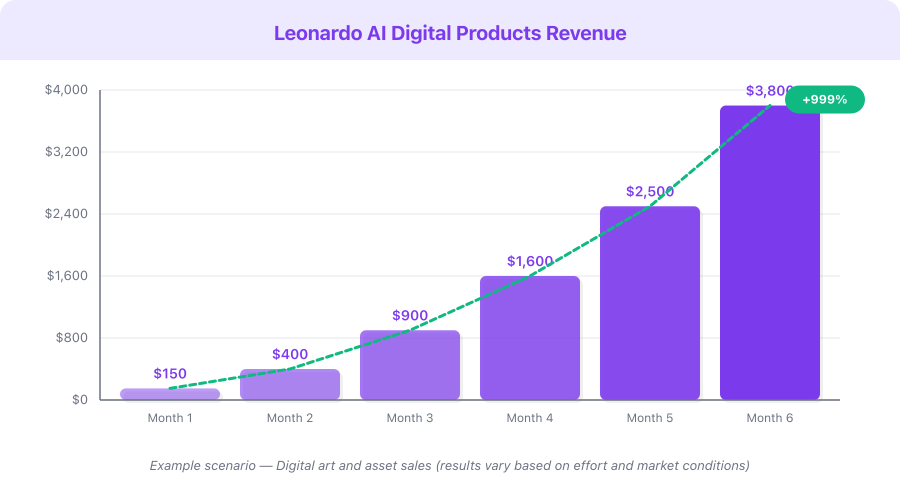
Revenue Projection — Building a Digital Art Shop:
| Month | Active Listings | Monthly Sales | Avg Price | Monthly Revenue | Monthly Costs |
|---|---|---|---|---|---|
| 1 | 15–25 | 5–15 | $6 | $30–90 | $0 (free tier) |
| 2–3 | 40–75 | 20–60 | $7 | $140–420 | $0–12/month |
| 4–6 | 80–150 | 60–200 | $8 | $480–1,600 | $12/month |
| 7–12 | 150–250 | 200–600 | $9 | $1,800–5,400 | $12/month |
| Year 2 | 250–500 | 600–2,000 | $10 | $6,000–20,000 | $12–30/month |
This is a hypothetical example based on publicly available data, not a guarantee of results. Individual results vary significantly.
Monetization Strategies
1. Digital Product Sales — $500–5,000/month
Sell AI-generated wall art, templates, ebook covers, clipart packs, and design assets on Etsy, Gumroad, and Creative Market. This is the most passive approach — create once, sell forever. Revenue scales linearly with catalog size and compounds with reviews and search authority. Aim for 100+ listings within your first six months.
Dollar range: $3–25 per product. Bundles at $15–25 outsell individual items at $3–5 by 2–3x in revenue per transaction. Target $500–5,000/month with 100–300 optimized listings.
2. Print-on-Demand — $300–3,000/month
Upload designs to Redbubble, Printful, Printify, or Merch by Amazon. Zero inventory, zero shipping, zero customer service. You earn royalties on every sale. A single strong design can sell on dozens of product types — t-shirts, mugs, posters, phone cases, stickers, notebooks.
Dollar range: $3–15 profit per sale depending on product type and platform. Scale to $300–3,000/month with 200+ designs across multiple platforms.
3. Freelance Design Services — $1,000–5,000/month
Offer AI-powered design services on Fiverr, Upwork, or directly to businesses. Custom logos, social media graphics, marketing materials, ebook covers, and brand asset packages. AI speed lets you deliver in hours what traditional designers take days to produce, giving you a massive throughput advantage.
Dollar range: $25–200 per project. Serve 10–30 clients per month for $1,000–5,000. Monthly retainer clients at $500–800/month provide predictable recurring revenue.
4. Stock Image and Asset Creation — $200–1,500/month
Generate high-quality stock photos, illustrations, and design elements. Upload to Adobe Stock, Shutterstock, Freepik, or sell directly through Gumroad. Earn royalties on every download. This is a long game — the more assets you upload, the more passive income you generate over time.
Dollar range: $0.25–5 per download. At scale with 500+ images across multiple platforms, this generates $200–1,500/month in truly passive income.
5. AI Model and Prompt Pack Sales — $100–2,000/month
Train custom AI models on Leonardo AI and sell them on the platform's marketplace. Sell prompt packs, workflow guides, and niche-specific prompt libraries on Gumroad. Creators who build specialized models for specific art styles, consistent characters, or niche aesthetics earn recurring revenue from other users who want the same quality without the prompt engineering work.
Dollar range: $5–50 per model or prompt pack. Leonardo AI's marketplace processes $18M+ annually, proving the demand. Top sellers build libraries of 20–50 models and earn passively from the entire collection.
Pricing Breakdown and ROI
| Plan | Monthly Cost | Tokens/Month | Approx Images | Break-Even Sales |
|---|---|---|---|---|
| Free | $0 | 150/day (~4,500/mo) | 900–2,250 | Already free |
| Apprentice | $12/mo | 8,500 | ~1,700 | 1–2 Etsy sales |
| Artisan | $30/mo | 25,000 | ~5,000 | 3–5 Etsy sales |
| Maestro | $60/mo | 60,000 | ~12,000 | 6–10 Etsy sales |
Annual plans save 20%: Apprentice drops to ~$10/month, Artisan to ~$24/month, Maestro to ~$48/month.
ROI calculation for a typical creator on the Apprentice plan ($12/month):
- Products created per month: 20–40 (easily achievable with 8,500 tokens)
- Average product price: $8
- Sales needed to break even: 1.5 (less than two sales)
- Realistic monthly sales after 6 months with 100+ listings: 50–200
- Monthly revenue: $400–1,600
- Monthly profit after Etsy fees (~15%) and Leonardo cost: $328–1,348
- ROI: 2,633–11,133%
Affiliate program: Leonardo AI offers 60% commission on the first month's subscription for every referral. If you create tutorials, write blog posts, or recommend the tool on social media, each Apprentice referral earns you approximately $7.20, and each Maestro referral earns approximately $36. Creators who build YouTube channels or blogs around AI art tools report affiliate earnings of $200–2,000/month from Leonardo AI referrals alone.
Common Mistakes
-
Not using mockups for every listing. A flat image file uploaded as a product photo does not sell. Buyers need to visualize the art framed on their wall, displayed in their nursery, or printed on their coffee mug. Free mockup tools exist (Smartmockups, Canva mockup templates), and paid tools like Placeit cost less than $15/month. Every listing should have at least 5 mockup images showing the product in realistic contexts.
-
Pricing too high before building social proof. Start at $3–5 for individual pieces and $8–12 for bundles. Your first priority is accumulating reviews, not maximizing per-unit revenue. After 20–30 five-star reviews, gradually raise prices by $1–2. Shops with 100+ positive reviews can charge premium prices because buyers trust them.
-
Ignoring Etsy SEO completely. Etsy is a search engine first and a marketplace second. If your titles and tags do not match what buyers type into the search bar, your products are invisible regardless of quality. Spend 15–20 minutes researching keywords using Etsy's autocomplete and tools like eRank before writing each listing.
-
Creating random one-off designs with no thematic connection. A cohesive shop with a clear niche (minimalist botanicals, vintage travel posters, nursery animal art) converts dramatically better than a random collection of unrelated designs. When a buyer likes one of your products, they should see 20–50 more they want to buy.
-
Listing too few products and expecting meaningful income. Digital products are a volume and compounding game. 10 listings will not generate significant revenue. 50 listings start to show consistent daily sales. 100+ listings create compounding effects as your shop authority grows, your search rankings improve, and your review count builds buyer confidence.
-
Using vague prompts without iterating. Your first prompt rarely produces the best possible result. The difference between a $3 product and a $15 product is often 5–10 rounds of prompt refinement. Adjust style descriptors, color specifications, composition details, and negative prompts. Keep a prompt journal of what works and what does not for your specific niche.
-
Skipping the bundling strategy entirely. Individual $5 products generate thin margins after Etsy fees. Bundles at $12–25 significantly increase your average order value, improve your profit margin per transaction, and offer better perceived value to the buyer. A "Gallery Wall Set of 6 Matching Botanical Prints" at $18 outsells and outearns six individual $5 listings every time.
Quick Start Checklist
- Create a free Leonardo AI account at leonardo.ai and familiarize yourself with the interface
- Choose one product type from the table above (wall art is the easiest starting point)
- Choose one specific niche audience (e.g., minimalist botanical prints for modern apartments)
- Validate your niche on Etsy — search for similar products and confirm demand exists
- Generate 30–40 images using the prompt formula and model recommendations — keep the best 10–15
- Upscale your top images to print resolution (3000x3000 pixels minimum)
- Create professional mockup images for each product using Smartmockups or Placeit
- Prepare multi-size download packages (8x10, 11x14, 16x20, A4, A3) with printing guides
- Set up an Etsy seller account and create your first 5 listings with keyword-optimized titles and all 13 tags
- Set up a Gumroad account and cross-list your best products for direct sales
- Create a Pinterest business account and pin every mockup image with a direct link to your listing
- Set a daily production goal: 2–3 new listings per day, 5 days per week, for the first 90 days
FAQ
How many images can I generate for free with Leonardo AI?
Leonardo AI gives you 150 free tokens per day, which translates to roughly 30–50 images depending on the model and resolution settings you choose. That is enough to create 2–4 finished, multi-size products daily without spending anything. Most successful sellers start entirely on the free tier and only upgrade to the Apprentice plan ($12/month) when their sales volume justifies the additional tokens. The free tier is not a crippled trial — it is a genuinely usable production tool.
Do I need design skills to sell AI-generated digital products?
No traditional design skills are required. The core skill is prompt engineering — learning to describe what you want in specific, detailed language that the AI can interpret effectively. You will also need basic skills in file organization, mockup creation (using tools like Smartmockups), and Etsy listing optimization. All of these are learnable within a few hours of focused practice. The AI handles the actual design work; your job is direction, curation, and marketing.
Can I legally sell images generated by Leonardo AI?
Yes. Leonardo AI's paid plans include full commercial rights to the images you generate. You can sell them as digital products, use them in client work, upload them to print-on-demand platforms, or incorporate them into any commercial project. The free tier has some restrictions on commercial use, so review the current terms of service before selling free-tier outputs. Once you are on any paid plan, you have clear commercial rights to your generated images.
How long does it take to start making sales on Etsy?
Most sellers see their first sale within 1–4 weeks of listing products, assuming they have at least 10–15 listings with proper keyword optimization. Consistent revenue of $100+ per month typically takes 2–3 months of regular listing activity. The compound effect is real — more listings mean more search visibility, which generates more sales, which builds more reviews, which further improves your search ranking. Patience and consistency matter more than perfection.
What is the best niche for AI-generated digital products in 2026?
The highest-performing categories based on Etsy search volume and seller data are minimalist wall art, nursery and children's decor, botanical illustrations, motivational quote prints, and social media template packs. However, the best niche for you specifically combines three factors: a buyer audience you understand, a style you can produce distinctively well, and manageable competition. Validate any niche by searching Etsy before committing — look for niches where top sellers have strong sales but the market is not oversaturated with thousands of nearly identical products.
What's Next
You now have a complete system for creating and selling digital products with Leonardo AI. Here are your next steps:
- Read our Leonardo AI Review for a detailed look at every feature, model comparison, and honest pros and cons
- Check our Leonardo AI Pricing breakdown to understand the token system and choose the right plan as you scale
- Explore Canva for creating mockups, assembling multi-file packages, and adding text overlays to your AI-generated designs
- Consider Kittl if you want to focus specifically on print-on-demand typography and merchandise design
Start with the free tier today. Generate your first batch of images this afternoon. List your first five products this week. The creators who succeed with this model are not the most talented designers — they are the most consistent producers who show up every day, generate new designs, optimize based on data, and let the compound effects of a growing catalog work in their favor.
Start free with Leonardo AI — your first sellable product is 15 minutes away.