How to Start a Podcast with Descript — Complete Beginner Guide
This guide contains affiliate links. If you sign up through our links, we may earn a commission at no extra cost to you. We only recommend tools we've thoroughly researched.
Why Podcasting Works in 2026
Podcasting is one of the few content channels where demand continues to outpace supply. There are over 500 million podcast listeners globally, and the medium keeps growing as smart speakers, connected cars, and AirPods make audio consumption effortless. Unlike social media posts that vanish from feeds within hours, a single podcast episode can generate listens for months or years — compounding your audience with every new release.
The income opportunity is tangible and well-documented. Podcasters with just 1,000 downloads per episode can earn $500-2,000/month through sponsorships, affiliate marketing, and selling their own products or services. Shows with 5,000+ downloads per episode regularly command $2,000-10,000/month. And unlike YouTube, where the algorithm determines your fate, podcast audiences are loyal subscribers who actively choose to listen.
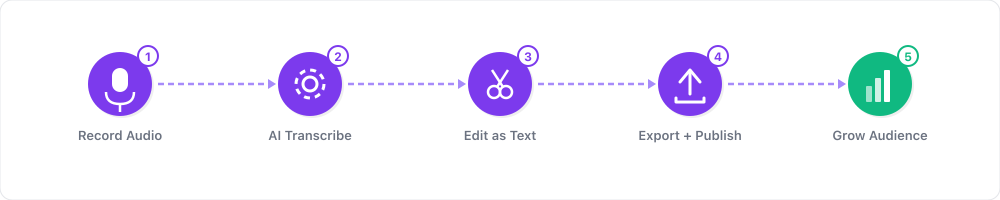
The barrier to entry has never been lower. In 2024, producing a professional-sounding podcast required expensive microphones, acoustic treatment, and hours of learning audio editing software like Audacity or Adobe Audition. In 2026, Descript has collapsed that entire production pipeline into a single tool where you edit audio by editing text. Delete a word from the transcript, and it disappears from the recording. Click one button to remove every "um" and "uh." Apply AI-powered Studio Sound to make any microphone sound like it was recorded in a professional studio.
The proof is in the adoption. Descript has grown to over 1.5 million active users, and one content marketing case study documented 103% organic traffic growth by repurposing podcast content into written articles using Descript's transcription capabilities. The platform is not just an editing tool — it is a complete podcast production system that makes professional audio accessible to anyone who can type.
If you have knowledge worth sharing and 2-3 hours per week to invest, you can build a podcast that generates real income. This guide walks you through every step — from recording your first episode to scaling a monetized show — using Descript as your production engine.
What You Need to Get Started
Essential Equipment and Tools
- A USB microphone ($30-60) — The Audio-Technica ATR2100x or Samson Q2U are the best budget options. Your phone technically works, but a dedicated mic makes a meaningful quality difference. Descript's Studio Sound can enhance poor audio, but better input means better output.
- A quiet recording space — Any room with soft surfaces (carpet, curtains, a closet full of clothes). You do not need acoustic panels. Close the window, shut the door, and record when the house is quiet.
- Descript — Your recording, editing, transcription, and export tool. The free tier gives you 1 hour of transcription per month — enough to produce and publish your first episode before spending a dollar. The Hobbyist plan ($8/month) gives you 10 hours, covering 2-3 weekly episodes.
- A podcast hosting platform — Spotify for Podcasters (free) or Buzzsprout ($12/month) distributes your show to Apple Podcasts, Spotify, Google Podcasts, Amazon Music, and every other major platform automatically.
- Headphones — Any headphones work. Over-ear models help you catch audio issues during editing.
Upgrade When You Are Earning
- Descript Pro Plan ($24/month) — 30 hours of transcription, AI voice cloning (Overdub), advanced Studio Sound, and 4K video export. This is the plan for creators producing weekly content or offering editing services.
- A better microphone ($100-200) — The Shure MV7 or Rode PodMic are professional-grade podcast microphones that last for years.
- Buzzsprout Professional ($24/month) — Advanced analytics, dynamic content insertion, and magic mastering for automatic audio leveling.
Total Startup Cost
$0-72 to launch. The free tier of Descript plus Spotify for Podcasters costs nothing. Add a $30-60 USB microphone and you have a complete setup that sounds professional. Compare this to 2020, when a comparable setup required $500+ in equipment and software subscriptions.
Step 1: Choose Your Podcast Niche and Format

The two most important decisions you will make are what your podcast is about and how you deliver it. Get these right and everything else — audience growth, monetization, guest booking — becomes dramatically easier.
Profitable Podcast Niches in 2026
| Niche | Audience Size | Primary Monetization | Sponsorship CPM | Why It Works |
|---|---|---|---|---|
| Business and entrepreneurship | Very large | Courses, coaching, sponsorships | $25-50 | High-intent audience willing to spend money on growth |
| Personal finance and investing | Large | Affiliate marketing, sponsorships | $30-60 | Audience actively looking for product recommendations |
| Technology and AI | Growing fast | Sponsorships, consulting, SaaS affiliates | $20-40 | Companies pay premium to reach tech decision-makers |
| Health and wellness | Large | Product sales, affiliate marketing | $20-35 | Evergreen topics with massive search volume |
| Career development | Medium | Courses, coaching, sponsorships | $15-30 | Working professionals with disposable income |
| True crime and storytelling | Very large | Ads, Patreon, live shows | $20-35 | Extremely loyal, binge-listening audience |
Beginner recommendation: Choose a niche where you have genuine knowledge or experience AND the audience has money to spend. A podcast about budget travel tips will grow an audience but struggle to monetize. A podcast about SaaS marketing strategies will grow slower but monetize much faster.
Format Options
| Format | Difficulty | Episode Length | Best For |
|---|---|---|---|
| Solo commentary | Easy | 15-30 min | Subject-matter experts, educators, thought leaders |
| Interview | Medium | 30-60 min | Networking, diverse perspectives, borrowed audience |
| Co-hosted conversation | Medium | 30-45 min | Chemistry-driven shows, entertainment, debate |
| Narrative/storytelling | Hard | 20-45 min | True crime, history, documentary, journalism |
| Hybrid (solo + interviews) | Medium | 20-45 min | Flexibility, mix of content types |
Start with solo or interviews. Solo episodes are the simplest to produce — no scheduling, no guest management, no multi-track editing. Interview episodes give you built-in promotion partners (guests share episodes with their audiences). Many successful podcasters alternate between both.
Step 2: Plan and Record Your First Episode
Do not overthink your first episode. It will not be your best episode, and that is fine. The goal is to complete the production process end-to-end so you understand the workflow before committing to a weekly schedule.
Episode Planning
Create a simple outline — not a full script. Scripted podcasts sound robotic. Outline-based episodes sound natural and conversational.
Episode structure for a 25-minute solo episode:
- Hook (30-60 seconds) — Start with a compelling question, a surprising statistic, or a bold statement. "Today I am going to show you why 90% of small business websites are losing customers because of one fixable mistake."
- Introduction (1-2 minutes) — Briefly introduce yourself, the topic, and what the listener will learn.
- Main content (18-22 minutes) — Deliver 3-5 key points with examples, stories, and actionable advice. Use specific numbers, names, and scenarios — specificity is what separates good podcasts from generic ones.
- Call to action (1-2 minutes) — Ask listeners to subscribe, leave a review, visit your website, or check out a resource you mentioned.
Recording in Descript
- Open Descript and create a new project
- Click "Record" and select your microphone
- Place your outline on a second screen or printed beside you
- Hit record and talk through your outline naturally
- If you stumble, pause for 2 seconds and repeat the sentence — you will cut the mistake in editing
Recording tips that improve audio quality:
- Position your microphone 4-6 inches from your mouth, slightly off to the side (not directly in front) to reduce plosive sounds
- Speak at a consistent volume — do not trail off at the end of sentences
- Record a 10-second silent room tone at the beginning. This helps Descript's noise removal identify and eliminate background noise patterns.
- If recording an interview, use Descript's multi-track recording or have your guest record locally using a separate tool and send you the file
Step 3: Edit Your Episode with Descript
This is where Descript transforms the podcasting experience. Traditional editing in Audacity or GarageBand requires you to visually identify audio waveforms, make precise cuts at the right millisecond, and manually process each section. Descript turns all of this into text editing.
The Descript Editing Workflow
-
Review the transcript. Descript transcribes your recording automatically. Read through the transcript like you would read a document. Any sections that feel weak, redundant, or off-topic will be obvious in text form.
-
Remove filler words. Click the "Remove Filler Words" button. Descript identifies and removes every "um," "uh," "like," "you know," "sort of," and other verbal tics. This single feature saves 30-60 minutes of manual editing per episode.
-
Cut mistakes and dead air. Misspoke? Select the words in the transcript and press delete. The audio follows automatically. Paused too long between thoughts? Select the gap in the transcript timeline and remove it. No waveform hunting required.
-
Rearrange sections. Realized your third point should have come first? Select the paragraph in the transcript, cut it, and paste it where it belongs. The audio rearranges to match.
-
Apply Studio Sound. Click the Studio Sound toggle to apply AI audio enhancement. This removes background noise, reduces echo, normalizes volume levels, and adds subtle processing that makes your recording sound professional. The difference is dramatic — especially if you are recording in a non-ideal space.
-
Add intro and outro music. Drag a royalty-free music file into the timeline and adjust the volume. Descript supports multi-track editing, so your music plays underneath your voice at a lower volume. Free music sources: YouTube Audio Library, Pixabay Music, or Uppbeat.
-
Export. Export as MP3 for audio-only podcasts or MP4 for video podcasts. Descript handles encoding, bitrate optimization, and file compression automatically.
Time Comparison
| Task | Audacity/GarageBand | Descript |
|---|---|---|
| Filler word removal | 45-90 minutes (manual) | 10 seconds (one click) |
| Cutting mistakes | 20-40 minutes | 5-10 minutes |
| Audio enhancement | 15-30 minutes (plugins) | 10 seconds (Studio Sound) |
| Total edit time per episode | 1.5-3 hours | 15-30 minutes |
The time savings alone justify Descript's subscription. At even a modest $25/hour value on your time, saving 1-2 hours per episode saves $100-200/month on a weekly show.
Step 4: Publish and Distribute Your Podcast
Upload to Your Hosting Platform
- Export your finished episode from Descript as a high-quality MP3 (recommended: 128 kbps for mono, 192 kbps for stereo)
- Log in to your podcast host (Spotify for Podcasters or Buzzsprout)
- Upload the MP3 file
- Fill in the episode metadata:
- Title: Include a keyword your target audience would search for. "How to Start Investing with $100" is better than "Episode 12: Money Talk"
- Description: Write a compelling 150-300 word summary with relevant keywords
- Show notes: Include timestamps, links to resources mentioned, and your call to action
- Set your publish date and time (same day and time every week for consistency)
- Your host automatically distributes to Apple Podcasts, Spotify, Google Podcasts, Amazon Music, Pocket Casts, and 15+ other platforms
Show Notes Template
Podcast Show Notes Template
Episode Title: [SEO-friendly title with primary keyword]
Episode Description: [2-3 sentence hook that tells the listener what they will learn and why it matters.]
In This Episode:
- [Timestamp 00:00] — Introduction and what we are covering today
- [Timestamp 02:30] — [Key point 1 — what it is and why it matters]
- [Timestamp 10:15] — [Key point 2 — actionable strategy or insight]
- [Timestamp 18:00] — [Key point 3 — example or case study]
- [Timestamp 24:00] — Key takeaways and next steps
Resources Mentioned:
- [Resource 1 — hyperlink]
- [Resource 2 — hyperlink]
- [Tool/book/course mentioned — hyperlink, use affiliate links where applicable]
Connect:
- Website: [your URL]
- Newsletter: [signup link]
- Twitter/LinkedIn: [@handle]
Support the Show: If this episode helped you, please leave a rating and review on Apple Podcasts. It takes 30 seconds and helps new listeners find the show.
Step 5: Grow Your Audience
Publishing is the starting line, not the finish line. Here is how to build listeners systematically.
Content Repurposing Strategy
Your podcast episode is raw material for 5-10 pieces of additional content:
- Short-form video clips (TikTok, Reels, YouTube Shorts) — Use Descript's clip feature to extract 60-90 second highlights. Add auto-generated captions. Post 2-3 clips per episode across platforms.
- Blog post from the transcript — Descript already transcribed your episode. Edit the transcript into a blog post with headers, formatting, and images. Publish on your website for SEO traffic. This is how the 103% organic traffic growth case study was achieved — repurposing audio content into written articles.
- Twitter/LinkedIn thread — Pull 5-7 key insights from the episode and format them as a thread.
- Email newsletter — Summarize the episode's key takeaways for your email list with a link to the full episode.
- Audiogram — Create a visual audio clip with waveform animation and captions for social sharing.
Audience Growth Tactics
- Guest strategy: Interview people who have their own audiences. When the episode publishes, they share it with their followers. One interview with a guest who has 10,000 followers can drive 200-500 new listeners.
- Consistent schedule: Publish on the same day at the same time every week. Podcast apps surface consistent shows more prominently, and listeners build habits around your schedule.
- Cross-promotion: Reach out to other podcasters in adjacent niches (not competitors) and agree to mention each other's shows. This is the podcast equivalent of guest blogging.
- SEO-optimized episode titles: Use keywords your target audience searches for. "5 LinkedIn Strategies That Actually Work in 2026" will attract search traffic. "Episode 47: LinkedIn Chat" will not.
- Ask for reviews: At the end of every episode, ask listeners to leave a review on Apple Podcasts. Shows with more reviews rank higher in podcast search results and attract new listeners.
Weekly Content Calendar Template
Monday: Record podcast episode (45-60 minutes including setup) Tuesday: Edit in Descript (20-30 minutes), export and upload to host Wednesday: Episode publishes. Share on social media, email newsletter goes out Thursday: Post 2 short-form video clips from the episode (TikTok, Reels, Shorts) Friday: Publish blog post from transcript. Post LinkedIn/Twitter thread with episode insights Weekend: Engage with listener comments, plan next week's episode, reach out to potential guests
Real-World Examples and Case Studies
Case Study 1: 103% Organic Traffic Growth Through Podcast Repurposing
A content marketing team documented a strategy where podcast episodes were transcribed using Descript, then edited into long-form blog posts optimized for search. The result was 103% growth in organic traffic over the measurement period. The key insight: every podcast episode is a ready-made content asset that, when repurposed into written format, captures search traffic that audio alone cannot reach.
Takeaway for creators: Do not treat your podcast as audio-only content. Every episode you record with Descript is simultaneously a blog post draft, a social media content source, and an SEO asset. Creators who repurpose consistently build audiences 3-5x faster than those who publish audio only.
Source: growthturn.com
Case Study 2: Descript's 1.5M+ Active User Base
Descript has grown to over 1.5 million active users — a testament to the demand for accessible audio and video editing. The platform's text-based editing approach has attracted a wave of first-time podcast creators who would never have attempted production with traditional tools. Many of these users have gone from zero experience to publishing weekly shows within their first month on the platform.
Takeaway for beginners: The tool is no longer the barrier. If 1.5 million people can learn Descript's workflow, so can you. The differentiator is now content quality and consistency — not technical production skills.
Case Study 3: The Freelance Podcast Editor Pipeline
Multiple freelancers have built $2,000-5,000/month businesses offering podcast editing services using Descript. The typical model: charge $75-150 per episode, deliver edited audio within 24-48 hours, and serve 5-10 clients with weekly shows. Descript's speed advantage (15-30 minutes per episode versus 1.5-3 hours in traditional software) makes this margin-rich. A freelancer editing 20 episodes per month at $100 each earns $2,000/month from approximately 10 hours of actual editing work.
Revenue Projection Example
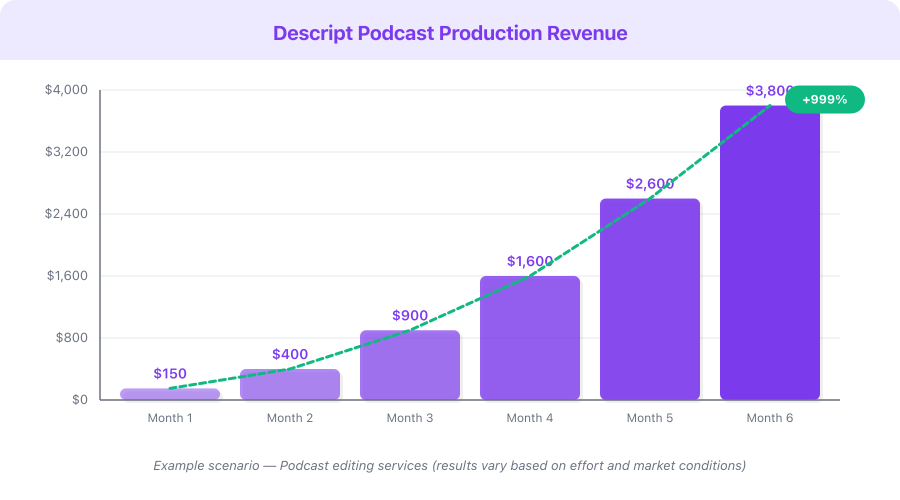
This is a hypothetical example based on publicly available data, not a guarantee of results. Individual results vary significantly.
| Milestone | Timeline | Downloads/Episode | Revenue Sources | Monthly Revenue |
|---|---|---|---|---|
| Launch (episodes 1-10) | Month 1-2 | 25-100 | None (building audience) | $0 |
| Early growth | Month 3-4 | 100-300 | Affiliate links in show notes | $50-200 |
| Consistent audience | Month 5-8 | 300-750 | Affiliate marketing + small sponsors | $200-750 |
| Established show | Month 9-12 | 750-1,500 | Sponsorships + affiliates + own products | $750-3,000 |
| Growing brand | Year 2 | 1,500-5,000 | Premium sponsors + courses + coaching | $2,000-10,000 |
| Authority show | Year 3+ | 5,000-20,000+ | Multiple revenue streams | $5,000-25,000+ |
Monetization Strategies: 5 Ways to Earn with a Podcast
1. Sponsorships and Advertising ($500-10,000+/Month)
Podcast sponsors pay on a CPM (cost per thousand listeners) basis. Typical rates are $18-25 CPM for pre-roll ads (beginning of episode), $25-50 CPM for mid-roll ads (middle of episode). A show with 2,000 downloads per episode can earn $50-100 per ad placement. With 2-3 sponsors per episode and weekly publishing, that is $400-1,200/month.
2. Affiliate Marketing ($100-2,000/Month)
Recommend products and services relevant to your audience and earn commissions on every sale. Include affiliate links in your show notes. Podcasts with engaged audiences convert at 2-5x the rate of blog content because listeners trust your voice. Best niches for podcast affiliate revenue: technology, finance, health supplements, and online tools.
3. Sell Your Own Products or Services ($500-5,000+/Month)
Use your podcast to drive sales of courses, coaching, consulting, templates, or digital products. This is the highest-margin monetization strategy. A business consultant with a podcast can convert listeners into $2,000-5,000 coaching clients. A designer can sell template packs mentioned on the show.
4. Podcast Editing Services ($1,000-5,000/Month)
Use your Descript expertise to edit podcasts for other creators. Charge $75-200 per episode. With Descript's speed, you can edit 4-5 episodes per day in 15-30 minutes each. Five weekly clients at $100/episode generates $2,000/month from roughly 10 hours of editing work.
5. Premium Content and Community ($200-2,000/Month)
Offer bonus episodes, early access, or ad-free listening through Patreon, Apple Podcast Subscriptions, or a private community. Even at $5/month per supporter, 100 paying subscribers generates $500/month of recurring revenue with no advertiser dependencies.
Pricing Breakdown and ROI Analysis
Your Investment
| Tool | Monthly Cost | What You Get |
|---|---|---|
| Descript Free | $0 | 1 hour transcription — enough for 1-2 test episodes |
| Descript Hobbyist | $8/month | 10 hours transcription, filler word removal — covers a weekly show |
| Descript Pro | $24/month | 30 hours, AI voice cloning, advanced Studio Sound — for serious creators |
| USB Microphone | $30-60 (one-time) | Professional audio input that lasts years |
| Podcast Hosting (Buzzsprout) | $0-12/month | Distribution to all major platforms |
| Total (starter) | $8-20/month + mic | Complete production and distribution setup |
ROI Analysis
Individual results vary based on niche, consistency, and audience engagement.
| Scenario | Monthly Cost | Monthly Revenue | Monthly Profit | ROI |
|---|---|---|---|---|
| Hobbyist with affiliate links (500 downloads/ep) | $20 | $200-500 | $180-480 | 9-24x |
| Weekly show with 1 sponsor (1,500 downloads/ep) | $36 | $800-1,500 | $764-1,464 | 21-41x |
| Established show selling own products | $36 | $2,000-5,000 | $1,964-4,964 | 55-138x |
| Podcast editor serving 5 weekly clients | $24 | $2,000-3,000 | $1,976-2,976 | 82-124x |
Affiliate Opportunity
Descript offers a 15% recurring commission (or $25 flat per signup) with a generous 90-day cookie window and 12-month commission duration. If you create content about podcasting and recommend Descript, each referred Pro plan subscriber generates $3.60/month in recurring commissions. Twenty referrals means $72/month in passive affiliate income — enough to cover your own subscription several times over.
Common Mistakes to Avoid
1. Waiting for perfect equipment. Your phone or a $30 USB microphone is enough to start. Descript's Studio Sound compensates for budget recording setups remarkably well. Do not spend $500 on equipment before you know whether you enjoy podcasting. Upgrade with podcast revenue, not savings.
2. Over-editing your episodes. A few "ums" are natural and make you sound human. Descript's filler word removal catches the egregious ones — let a handful of minor verbal tics remain. Listeners want authentic conversation, not a robotic teleprompter reading. Aim for "polished conversational," not "NPR documentary."
3. Publishing inconsistently. A weekly episode on the same day at the same time builds listener habits and algorithmic favor. Monthly or sporadic publishing kills momentum. If weekly feels overwhelming, start with biweekly — but stick to the schedule religiously. One consistent biweekly show outperforms a sporadic "whenever I feel like it" show every time.
4. Ignoring promotion entirely. Publishing an episode and waiting for listeners to find it is like opening a store in an alley with no sign. Every episode needs active promotion: social media clips, email to your list, sharing in relevant communities, and outreach to people mentioned in the episode.
5. Not repurposing content. You already have the transcript in Descript. Turning it into a blog post takes 20-30 minutes and captures search traffic that audio cannot. Cutting 3 short clips for social media takes another 15 minutes. Podcasters who repurpose grow 3-5x faster than those who publish audio only and move on.
6. Skipping show notes and timestamps. Show notes with timestamps, links, and a written summary improve discoverability, provide SEO value through your podcast host's web page, and give listeners a reason to visit your website. They also make your show more accessible.
7. Giving up before episode 20. Most podcasts see meaningful audience traction between episodes 15-30. The first 10 episodes are for finding your voice, refining your format, and building a catalog. Quitting at episode 5 because you only have 30 listeners means quitting right before the growth curve typically begins.
Quick-Start Checklist
- Choose your podcast niche and format (solo, interview, or hybrid)
- Write a 1-paragraph show description explaining who the podcast is for and what they will learn
- Sign up for Descript (free tier to start)
- Buy a USB microphone if you do not already own one ($30-60)
- Record a 15-minute test episode — talk about something you know well
- Edit in Descript: remove filler words, cut mistakes, apply Studio Sound
- Listen back — if you like what you hear, you are ready for your real first episode
- Sign up for a podcast host (Spotify for Podcasters is free)
- Record, edit, and publish your first official episode
- Create show notes using the template in this guide
- Cut 2-3 short clips from the episode and post on social media
- Set a recurring calendar reminder for your weekly recording and publishing schedule
Frequently Asked Questions
How much does it cost to start a podcast?
You can start for $0 using Descript's free tier and Spotify for Podcasters. A more practical startup budget is $38-72: a $30-60 USB microphone plus $8/month for Descript Hobbyist. This gives you professional-quality production capabilities. Do not let budget be your excuse — podcasting has the lowest startup cost of any content medium.
How long should podcast episodes be?
For most niches, 20-35 minutes is the sweet spot. This fits a typical commute or workout session. Interview episodes can run 45-60 minutes if the conversation warrants it. Avoid padding episodes to hit an arbitrary length — 20 focused minutes outperform 60 rambling minutes every time. Listeners subscribe for value density, not duration.
When should I expect to earn money from my podcast?
Most podcasters see their first affiliate revenue around episodes 15-25, typically in months 3-5. Sponsorship opportunities usually begin when you consistently reach 500-1,000 downloads per episode, which takes 6-12 months for most shows. If you sell your own products or services, revenue can come sooner — some business podcasters land consulting clients from their first 5 episodes.
Do I need expensive equipment to sound professional?
No. A $30-60 USB microphone combined with Descript's Studio Sound produces audio quality that is indistinguishable from shows using $500+ setups for most listeners. Recording environment matters more than microphone cost — a quiet room with a budget mic sounds better than an expensive mic in a noisy, echoey space.
Should I do video podcasts or audio only?
Start with audio only. It is simpler to produce, requires no camera or lighting setup, and lets you focus on content quality. Once you have a consistent workflow and 20+ episodes published, consider adding video. Descript supports video editing with the same text-based approach, making the transition straightforward when you are ready.
What is Next
You have everything you need to launch your podcast — the tools, the workflow, and the strategy. The only variable left is whether you press record.
Recommended next steps on income.tools:
- Read our Descript review for a detailed feature breakdown and comparison with alternative editing tools
- Check the Descript pricing guide to understand which plan fits your production needs
- Explore Opus Clip for AI-powered short-form clip generation from your podcast episodes
Your first episode does not need to be perfect. It needs to exist. The podcasters earning $5,000/month today all started with a rough first episode, a basic microphone, and a willingness to improve week by week.
Start free with Descript, record your first episode today, and join the 1.5 million creators already using the platform. Your audience is waiting.