How to Create and Sell Canva Templates for Passive Income
This guide contains affiliate links. If you sign up through our links, we may earn a commission at no extra cost to you. We only recommend tools we've thoroughly researched.
Why Selling Canva Templates Works in 2026
The Canva template economy is one of the most accessible and scalable digital product businesses you can start today, and the market data proves it. Canva has grown to over 265 million monthly active users and surpassed $4 billion in annual recurring revenue. That is not a niche tool — it is a global design platform used by small businesses, solopreneurs, marketers, educators, and content creators in every industry.
The business case for selling templates is straightforward. A Forrester Consulting study commissioned by Canva found that organizations using the platform achieved a 25% reduction in design costs and a 60% faster content production cycle. Those numbers explain why millions of professionals are searching for ready-made Canva templates every month — they need professional designs quickly and affordably, and templates deliver exactly that.
Here is what makes this opportunity compelling in 2026. The number of people starting online businesses, creating social media content, and building personal brands continues to grow. Every one of those people needs graphics — Instagram posts, presentations, ebook covers, media kits, business cards, YouTube thumbnails, email headers, and more. Most of them cannot afford a graphic designer at $50–150 per hour, and they do not want to learn professional design software. A $12 Canva template pack solves their problem instantly.
The economics are outstanding. You create a template once, and it sells indefinitely with zero marginal cost. No inventory. No shipping. No manufacturing. No customer service beyond an occasional setup question. Your time investment is front-loaded — 30–90 minutes to create a template pack — and then it earns passively for months or years. Template sellers on Etsy routinely report $1,000–10,000+ per month from shops with 50–200 products.
The competitive landscape is favorable for focused sellers. While the overall template market has many participants, most sellers create generic templates for broad audiences. Sellers who focus on specific niches — real estate agents, fitness coaches, wedding planners, therapists, podcasters — face dramatically less competition and achieve higher conversion rates. A "Social Media Kit for Real Estate Agents" converts far better than a generic "Instagram Template Pack" because the buyer immediately recognizes it was designed for them.
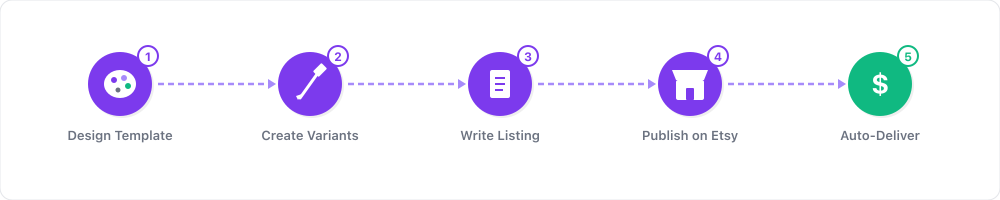
Canva's built-in sharing system makes delivery seamless. You create a template, generate a shareable link, and the buyer gets an instant copy in their own Canva account. No file downloads, no compatibility issues, no tech support headaches. The entire transaction from purchase to product usage takes less than two minutes.
What You Need to Get Started
Setting up properly from the beginning saves you hours of reorganization later. Here is everything you need.
Accounts (all free or low-cost to start):
- Canva account — the free tier works for learning, but Pro ($12.99/month) unlocks premium elements, Brand Kit, background remover, and transparent PNG export that you will need for professional templates
- Etsy seller account — $0.20 per listing fee, no monthly subscription
- Gumroad account — free to create, percentage taken per sale
- Pinterest business account — free, essential for driving traffic
Hardware:
- Any computer with a web browser — Canva runs entirely in the cloud
- Reliable internet connection
- A second monitor helps with productivity but is not required
Skills needed:
- Basic design sense (spacing, color coordination, typography readability)
- Understanding of your target niche's visual preferences and pain points
- Etsy SEO fundamentals (keyword research, tag optimization)
- Willingness to study what top-selling templates look like and why they sell
Optional but valuable:
- Smartmockups or Placeit account for professional listing mockups ($14.95/month)
- Tailwind account for Pinterest scheduling
- eRank or Marmalead for Etsy keyword research
- An email marketing tool (Mailchimp free tier, ConvertKit) for building a subscriber list
Step 1: Choose Your Niche and Template Type

This is the most important decision you will make. A focused shop serving a specific audience outperforms a general template shop in every metric — conversion rate, average order value, repeat purchases, and search ranking.
Most profitable Canva template niches in 2026:
| Niche | Target Buyer | Best Template Types | Price Range | Competition |
|---|---|---|---|---|
| Real estate | Agents, brokerages | Listing presentations, social posts, open house flyers | $10–30/pack | Medium |
| Health and wellness | Coaches, nutritionists, therapists | Social media kits, client intake forms, program brochures | $8–25/pack | Low–Medium |
| Wedding and events | Planners, brides, photographers | Invitations, timelines, seating charts, social posts | $8–20/pack | Medium |
| Course creators | Online educators, coaches | Slide decks, workbooks, lead magnets, social promos | $10–30/pack | Low |
| Podcasters | Podcast hosts, networks | Episode cards, audiograms, media kits, guest guides | $8–20/pack | Low |
| Small business | Local shops, restaurants, salons | Menu templates, promo flyers, social media kits | $5–15/pack | Medium–High |
| Influencers and creators | Content creators, bloggers | Media kits, rate cards, brand pitch templates | $10–25/pack | Medium |
| Corporate teams | Managers, HR, internal comms | Presentations, reports, onboarding docs, newsletters | $15–35/pack | Low |
| Nonprofits | Fundraisers, volunteer coordinators | Donor reports, event flyers, social campaigns | $8–20/pack | Very low |
| Teachers and educators | K-12 teachers, tutors | Worksheets, classroom decor, parent newsletters | $5–15/pack | Medium |
Choose one niche to start. You can expand into adjacent niches once your first shop gains traction. The best niche for you combines three factors: a buyer who actively needs templates, a visual style you enjoy creating, and search demand you can verify on Etsy.
Niche validation process:
- Search your template idea on Etsy (e.g., "real estate social media templates Canva")
- Check the top results — if sellers have hundreds or thousands of sales, demand is proven
- Count how many sellers appear on the first two pages — fewer than 20 strong sellers means low competition
- Read reviews to understand what buyers love and what they complain about — this is your product research
Step 2: Design Templates That Actually Sell
The quality gap between templates that sit unsold and templates that generate consistent daily sales comes down to a few specific design principles. Follow these and you will outperform 80% of template sellers.
Template pack structure that maximizes perceived value:
- 15–25 designs per pack is the sweet spot (10 feels thin, 30+ feels overwhelming)
- Include 3–5 layout variations per design type (different text placements, image sizes)
- Offer 2–3 color palette options (neutral/warm/cool or industry-specific color schemes)
- Add bonus elements: matching story templates, highlight covers, or a brand board template
- Make every single element editable — text, colors, images, icons, backgrounds
Design principles for sellable templates:
-
Use premium fonts, not defaults. Canva's most popular fonts (Canva Sans, League Spartan) are overused and instantly recognizable. Use less common but highly readable fonts like Cormorant Garant, Playfair Display, DM Sans, or Josefin Sans. This alone makes your templates feel more premium.
-
Build with a disciplined color palette. Choose 3–5 colors maximum and use them consistently across the entire pack. Include one primary color, one secondary, one accent, and one or two neutrals. Provide the hex codes so buyers can adjust to their brand colors.
-
Design for the platform dimensions that matter. Instagram feed posts (1080x1080), Instagram stories (1080x1920), Facebook posts (1200x630), Pinterest pins (1000x1500), LinkedIn posts (1200x1200). Your pack should include the dimensions your niche audience actually uses.
-
Leave clear placeholder areas. Every text block should have realistic sample copy, not "Lorem ipsum" or "Your text here." A real estate template should say "Just Listed — 4 Bed, 3 Bath in Oak Park" not "Insert property details." This helps buyers visualize how the template works for their business.
-
Test on mobile. Over 70% of social media consumption happens on phones. If text is too small to read or images are too detailed to parse on a 6-inch screen, your template will not perform well for the buyer, which means bad reviews and fewer sales.
Canva Pro features that matter for template sellers:
- Brand Kit — save your template color palettes and fonts for consistency across products
- Background Remover — essential for creating clean product mockups
- Transparent PNG export — needed for templates with non-rectangular elements
- Premium stock library — access to 100M+ photos and graphics (note: buyers need Canva Pro or must replace premium elements)
- Magic Resize — quickly create the same template in multiple dimensions
Step 3: Create Shareable Template Links and Delivery Files
Canva's template sharing system is what makes this business model work. Understanding how it functions is critical.
How template links work:
- Open your finished template in Canva
- Click "Share" in the top right corner
- Select "Template link" (not "View" or "Edit" link — this is important)
- Copy the generated link
- When a buyer opens this link, Canva creates a complete copy of the template in their own account
- They customize their copy freely. Your original is never modified.
Delivery file setup for Etsy: Create a PDF document (your "digital download") that contains:
- A welcome message thanking the buyer
- Clear, step-by-step instructions for accessing the template (with screenshots)
- All template links organized by category or type
- A note about which Canva plan is needed (free vs Pro) — be transparent about this
- Quick customization tips (how to change colors, swap fonts, replace images)
- Your support email for questions
- A link to your shop for related products (cross-selling opportunity)
Important technical notes:
- Some premium Canva elements (certain stock photos, icons, and graphics) require the buyer to have Canva Pro. Either design with free elements only, or clearly note "Canva Pro recommended" in your listing.
- Template links do not expire and continue working indefinitely
- You can create multiple template links per product for organization (e.g., separate links for posts, stories, and highlight covers)
Step 4: Set Up and Optimize Your Etsy Shop
Your shop setup and listing quality determine whether browsers become buyers. Treat Etsy as a search engine — because that is exactly how buyers use it.
Shop setup checklist:
- Choose a shop name that reflects your niche (e.g., "DesignsForRealtors" or "CoachCreativeShop")
- Write a compelling "About" section explaining your design background and who your templates serve
- Set shop policies: instant digital download, no refunds on digital products (this is standard and Etsy supports it)
- Upload a professional shop banner and profile photo
- Set up Etsy Payments for seamless buyer transactions
Listing optimization — the difference between 0 and 50 sales per month:
Title (140 characters max, use every character): Front-load the highest-volume keywords. Include the template type, platform, niche, and delivery method.
Example: "Real Estate Instagram Templates, Canva Social Media Kit for Realtors, Just Listed Post, Open House Flyer, Agent Marketing, Editable"
Tags (use all 13): Research buyer search terms using Etsy's autocomplete. Type "real estate template" and note every suggestion — those are real buyer searches. Use long-tail tags that match specific intent.
Example tags: real estate templates, canva templates realtor, instagram post real estate, just listed template, open house flyer, agent social media, realtor marketing kit, real estate canva, property listing template, editable real estate, agent branding, social media kit, real estate marketing
Description (250+ words, structured for scanning):
- Open with the buyer's problem and how your template solves it
- List everything included (number of templates, dimensions, variations)
- Explain how to access and customize
- State which Canva plan is needed
- Include 3–4 use cases or scenarios
- End with a link to related products in your shop
Listing images (8–10 per listing):
- Hero image — the best template displayed on a phone or laptop mockup
- Full pack overview — all templates shown in a grid layout
- Individual template close-ups (3–4 images showing different designs in the pack)
- Before/after — show the template with default content, then customized for a real business
- Lifestyle mockup — templates displayed in a real-world context (agent at desk, phone on table)
- What's included — visual checklist of all deliverables
- How it works — 3-step visual guide (purchase, access link, customize)
Etsy Product Listing Template:
TITLE: [Number] [Niche] [Template Type] | Canva Template | [Platform] | [Specific Use Case] | Editable | [Audience] Marketing Kit | Instant Download
DESCRIPTION: Stop spending hours designing [content type] from scratch. This pack of [number] professionally designed [niche] templates gives you everything you need to [specific outcome] — just open in Canva, add your details, and post.
What's included:
- [Number] fully editable Canva templates
- Dimensions: [list all sizes included]
- [Number] color palette variations (neutral, warm, bold)
- Bonus: [matching stories/highlight covers/brand board]
- Step-by-step access and customization guide (PDF)
Perfect for:
- [Niche professionals] who need consistent, on-brand content
- [Specific use case 1] (e.g., promoting new listings)
- [Specific use case 2] (e.g., sharing client testimonials)
- [Specific use case 3] (e.g., announcing open houses or events)
How it works:
- Purchase and instantly download the PDF with your template links
- Click the Canva link — a copy appears in your Canva account
- Replace the sample text and images with your own content
- Download or share directly to [platform] — done in minutes
What you need:
- A free Canva account (Canva Pro recommended for premium elements)
- A [platform] account to post your designs
- 5–10 minutes per template to customize
TAGS: [niche] template, canva [niche], [platform] template, [specific use], editable template, [niche] marketing, [audience] social media, canva social media, [niche] branding, digital download, instant download, [niche] kit, marketing templates
Pricing strategy:
- Individual template packs: $7–12 to start (increase to $12–20 after 15+ reviews)
- Bundle deals (3–5 packs): $25–45 (30–40% discount vs. individual purchase)
- Mega bundles (entire shop collection): $49–89 (highest AOV product)
- Run occasional 20% sales during Etsy sale events to boost visibility
Step 5: Build a Production System and Scale
Once you have your first 10–15 listings live and are seeing initial favorites and sales, shift from ad-hoc creation to systematic production. The sellers who earn $3,000–10,000/month are not 10x more talented than those earning $300 — they have 10x more listings and a consistent production workflow.
Weekly production schedule:
- Monday–Wednesday: Create 2–3 new template packs (60–90 minutes per pack)
- Thursday: Create mockup images and write listing copy for all new products
- Friday: Publish all new listings, schedule Pinterest pins, update shop sections
- Weekend: Review analytics, engage with customer questions, plan next week's products
Scaling strategies that compound:
-
Volume is the primary growth lever. Aim for 50 listings within your first 3 months. Each listing is an independent search result that can generate sales 24/7. More listings mean more search visibility, more shop authority, and more opportunities for bundle cross-sells.
-
Bundle everything. Once you have 5+ packs in the same niche, create a bundle product at 30–40% off the individual total. Bundles have the highest average order value and conversion rate of any product type. A "Complete Real Estate Social Media Kit" at $39 outsells individual $10 packs by total revenue.
-
Seasonal product pushes. Create seasonal templates 6–8 weeks before the event. Valentine's Day templates in December, Back-to-School in June, Black Friday and holiday templates in September. Seasonal search traffic is predictable and significant.
-
Pinterest as your traffic engine. Pin every mockup image with a direct link to your Etsy listing. Pinterest users are actively searching for design inspiration, templates, and visual content. Consistent daily pinning (5–10 pins) for 3–6 months can drive 30–50% of your total shop traffic from Pinterest.
-
Build an email list. Offer a free mini-template pack (3–5 templates) in exchange for email signups through a Gumroad landing page. Email subscribers when you launch new products, offer exclusive discounts, and share design tips. Email converts at 3–5x the rate of social media traffic.
-
Expand into adjacent niches. Once your first niche is established with 30+ listings and consistent sales, replicate the entire system for a related niche. If real estate templates work, try mortgage broker templates. If fitness coach templates sell, try nutrition coach templates.
Design Service Pricing Sheet:
Service Deliverables Price Turnaround Custom Canva template pack (10 templates) 10 on-brand templates, your colors, fonts, and logo $150–300 3–5 days Brand identity kit Logo concepts, color palette, font pairings, social templates, brand board $300–600 5–7 days Full social media setup 30 templates (posts + stories + highlights), content calendar, posting guide $400–800 7–10 days Monthly content package 20 new post templates + 10 story templates + 4 promotional graphics $300–500/month Ongoing Canva training session (1 hour) Live walkthrough of Canva, brand kit setup, template customization training $100–200 Scheduled All packages include:
- Full commercial usage rights
- Shareable Canva template links (buyer keeps forever)
- 2 revision rounds included
- Customization guide document
- 30 days of email support for template questions
Real-World Examples and Case Studies
The Canva template business is not speculative. Here are documented examples and verified data points.
Forrester Consulting Study on Canva ROI: A commissioned Forrester Total Economic Impact study found that organizations using Canva achieved a 25% reduction in overall design costs, 66% less time spent on design tasks, and a 60% faster content production cycle. These efficiency gains explain the explosive demand for Canva templates — businesses realize that template-based design is dramatically more cost-effective than hiring designers or building from scratch. Source: canva.com/case-studies
Canva Platform Scale: Canva has grown to 265 million monthly active users and surpassed $4 billion in annual recurring revenue. The platform processes billions of design creations per year across 190 countries. This massive user base represents the potential buyer pool for your templates — every Canva user who needs professional designs but lacks the time or skill to create them from scratch is a potential customer.
Etsy Template Sellers: Template sellers on Etsy consistently report $1,000–10,000+ per month from shops with 50–200 active listings. The highest earners share common characteristics: they serve a specific professional niche, produce templates that look genuinely custom (not like free Canva templates with minor edits), and optimize aggressively for Etsy search. Shops that reach 100+ five-star reviews see a noticeable acceleration in organic sales as Etsy's algorithm promotes trusted sellers.
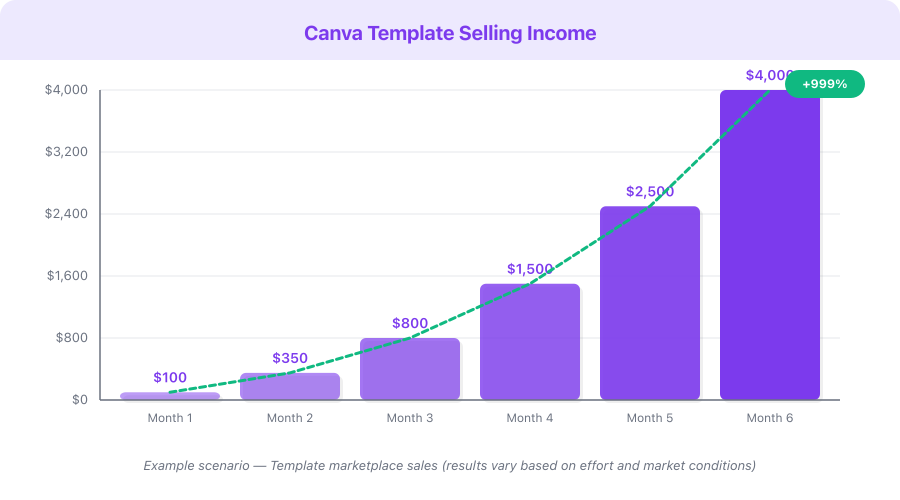
Revenue Projection — Building a Canva Template Shop:

| Month | Listings | Monthly Sales | Avg Price | Monthly Revenue | Monthly Costs |
|---|---|---|---|---|---|
| 1 | 8–15 | 10–25 | $9 | $90–225 | $0–13 (Canva Pro) |
| 2–3 | 25–40 | 30–80 | $10 | $300–800 | $13/month |
| 4–6 | 45–80 | 80–200 | $11 | $880–2,200 | $13/month |
| 7–12 | 80–150 | 200–600 | $12 | $2,400–7,200 | $13/month |
| Year 2 | 150–300 | 600–1,800 | $14 | $8,400–25,200 | $13/month |
This is a hypothetical example based on publicly available data, not a guarantee of results. Individual results vary significantly.
Monetization Strategies
1. Template Pack Sales on Etsy and Gumroad — $500–8,000/month
This is the core passive income model. Create template packs for your niche, list on Etsy and Gumroad, optimize for search, and let the sales accumulate. Revenue scales directly with catalog size, review count, and listing quality.
Dollar range: $7–25 per pack, $25–89 for bundles. Target $500–8,000/month with 50–200+ optimized listings across multiple niches.
2. Custom Template Design Services — $1,000–5,000/month
Offer done-for-you template creation for businesses. A real estate brokerage that wants 30 branded templates for their entire agent team will pay $300–800 for a custom set. Find clients through Fiverr, Upwork, LinkedIn, or direct outreach to businesses in your niche.
Dollar range: $150–800 per project. 5–10 clients per month generates $1,000–5,000. Monthly retainer clients at $300–500/month provide stable recurring revenue.
3. Canva Training and Brand Setup — $500–2,000/month
Many small business owners buy Canva Pro but have no idea how to use it effectively. Offer 1-hour training sessions where you set up their Brand Kit, walk them through the platform, and create a few starter templates. Sell follow-up template packs to every training client.
Dollar range: $100–200 per training session. 5–10 sessions per month plus follow-up template sales generates $500–2,000.
4. Social Media Management Using Templates — $1,500–5,000/month
Use your own templates to offer social media content creation services. You already have the templates — now you customize them for clients and schedule their posts. This combines your template expertise with an ongoing service revenue model.
Dollar range: $300–800 per client per month. 3–8 regular clients generates $1,500–5,000/month with high margins because you are reusing your own template designs.
5. Affiliate Income from Canva Pro Referrals — $200–2,000/month
Canva's affiliate program pays up to $36 per sale with a 30-day cookie window. Every template buyer who does not have Canva Pro is a potential referral. Include your affiliate link in your listing descriptions, delivery PDFs, and tutorial content. Creators who build YouTube channels or blogs about Canva design tips report $200–2,000/month in affiliate commissions alone.
Dollar range: Up to $36 per referral. With a 30-day cookie, even casual recommendations convert over time.
Pricing Breakdown and ROI
| Plan | Monthly Cost | Key Features for Template Sellers | Break-Even Point |
|---|---|---|---|
| Free | $0 | 250K templates, 1M stock photos, 5 GB storage | Already free |
| Pro | $12.99/mo | 610K templates, 100M stock, Brand Kit, background remover, transparent export | 1–2 template sales |
| Teams | $14.99/user/mo | Everything in Pro + team collaboration, 300 Brand Kits | 1–2 template sales per user |
Annual plans save 20–23%: Pro drops to ~$10/month ($119.99/year), Teams to ~$12.49/month per user.
ROI calculation for a template seller on Canva Pro ($12.99/month):
- Monthly cost: $12.99
- Average template pack price: $12
- Sales needed to break even: 1.1 (essentially one sale)
- Realistic monthly sales after 6 months with 60+ listings: 80–200
- Monthly revenue: $960–2,400
- Monthly profit after Etsy fees (~15%) and Canva cost: $803–2,027
- ROI: 6,082–15,504%
Canva affiliate program: Up to $36 per sale, 2-month duration, 30-day cookie. Include your Canva affiliate link in every delivery PDF and tutorial. As your customer base grows, affiliate commissions become a meaningful secondary revenue stream.
Common Mistakes
-
Using Canva's most popular templates as your starting point. Buyers can spot a slightly modified version of a free Canva template instantly. If it looks like something they could find for free, they will not pay for it. Start from blank canvases or heavily customize templates until the original is unrecognizable. Your templates must feel uniquely designed.
-
Not creating lifestyle mockup images. A flat screenshot of your template grid will not sell. Buyers need to see the templates on a phone screen, displayed on a laptop in a styled workspace, or printed and held in someone's hands. Mockup images are the single biggest factor in conversion rate. Invest in Smartmockups or Placeit and create 8–10 mockup images per listing.
-
Pricing too high before accumulating reviews. Social proof drives Etsy conversions more than perceived premium pricing. Start at $7–10 per pack to generate your first 15–20 five-star reviews. Once you have social proof, gradually increase prices to $12–20. A $10 pack with 50 reviews outsells a $20 pack with 0 reviews every time.
-
Creating too few listings and waiting for results. Digital products on Etsy are a volume game. 5–10 listings will not generate meaningful income regardless of quality. 30 listings start showing consistent daily sales. 60+ listings create compounding visibility effects. The most successful sellers treat their first 50 listings as the foundation that everything else is built on.
-
Ignoring Etsy SEO entirely. Etsy is a search engine. If your titles, tags, and descriptions do not match what buyers type into the search bar, your templates are invisible. Spend 15–20 minutes researching keywords before writing each listing. Use Etsy autocomplete, eRank, and competitor analysis to identify the exact phrases your buyers use.
-
Not bundling products for higher average order value. Individual $10 packs are fine, but they leave significant revenue on the table. A "Complete Social Media Kit" bundle at $35–45 (containing 3–4 individual packs at a 30% discount) converts well because it offers clear value. Bundles should always be prominently featured in your shop.
-
Failing to diversify sales channels. Relying entirely on Etsy means you are dependent on their algorithm and fee structure. Cross-list your products on Gumroad for direct sales (higher margins), create a simple website for brand presence, and build an email list for direct customer relationships. If Etsy changes its algorithm, you still have revenue.
Quick Start Checklist
- Sign up for Canva — start with Free, upgrade to Pro when you begin selling
- Choose one niche from the table above (real estate, coaches, and course creators are excellent starting points)
- Validate your niche on Etsy — search for similar templates and confirm demand exists with proof of sales
- Study the top 5 selling template packs in your niche — note what they include, how they are priced, and how their listings are structured
- Design your first template pack with 15–20 templates, 2–3 color variations, and realistic sample content
- Generate shareable template links through Canva's Share feature
- Create a delivery PDF with access instructions, customization tips, and your shop link
- Create 8–10 professional mockup images using Smartmockups or Placeit
- Set up your Etsy shop with a niche-focused name and professional branding
- List your first 3 products with fully optimized titles, all 13 tags, 250+ word descriptions, and mockup images
- Create a Pinterest business account and pin every mockup with a link to your Etsy listing
- Set a weekly production goal: 2–3 new template packs per week for the first 3 months
FAQ
Do I need Canva Pro to sell templates?
You can create and sell templates on the Canva free plan, but Pro ($12.99/month) is strongly recommended once you start selling. Pro gives you access to the full premium stock library, Brand Kit for consistent branding across products, background remover, transparent PNG export, and Magic Resize. The cost is covered by your first template sale each month. Most successful template sellers use Pro because it significantly expands the quality and variety of templates they can produce.
How do buyers access my Canva templates after purchase?
Buyers purchase your product on Etsy or Gumroad and instantly download a PDF file. That PDF contains a Canva template link. When the buyer clicks the link, Canva automatically creates a complete copy of your template in their own Canva account. They customize their copy with their own text, images, and colors. Your original template is never modified. The entire process from purchase to customization takes less than two minutes.
How much money can I realistically earn selling Canva templates?
Earnings vary widely based on niche selection, listing quality, and consistency. Most template sellers earn $100–500/month within their first 3 months with 15–30 listings. Sellers with 60–100 optimized listings typically earn $1,000–3,000/month. Top sellers with 150+ listings and strong reviews report $5,000–15,000/month. The key variables are catalog size, Etsy SEO quality, and niche focus. Template selling rewards consistency over time.
What niches have the least competition for Canva templates?
Underserved niches in 2026 include nonprofit fundraising templates, corporate internal communications (newsletters, reports, onboarding), podcast marketing kits, therapy and mental health practice templates, and veterinary or pet business marketing. These niches have proven buyer demand but fewer established sellers compared to saturated categories like generic Instagram templates or basic resume designs.
Can I sell the same templates on multiple platforms?
Yes. You own the templates you create, and there are no exclusivity requirements on Etsy, Gumroad, or Creative Market. List the same products across all platforms to maximize your reach. Some sellers also sell through their own Shopify stores for the highest profit margins (no marketplace fees). The only consideration is keeping your pricing consistent across platforms so buyers do not feel overcharged on one versus another.
What's Next
You now have a complete system for building a profitable Canva template business. Here are your recommended next steps:
- Read our Canva Review for a detailed look at every feature, AI tools, and honest pros and cons
- Check our Canva Pricing breakdown to understand Free vs Pro vs Teams and choose the right plan
- Explore Kittl if you want to expand into print-on-demand merchandise design with superior typography tools
- Consider Gamma for creating and selling AI-generated presentation templates as an adjacent product line
Start today. Open Canva, pick your niche, and design your first template pack. List it on Etsy this week with optimized keywords and professional mockups. Then create 2–3 more packs next week. The compound effect of consistent listing, growing reviews, and expanding search visibility is how template sellers build $2,000–10,000/month passive income streams.
Get started with Canva — your first template is 30 minutes away.