Best Free AI Tools in 2026: No Card Required
The best AI tools you can start using for free — no credit card required. From design and presentations to music separation and website creation, these platforms offer generous free tiers that let you build, create, and earn without upfront costs.
Affiliate disclosure: Some links on this page are affiliate links, meaning we may earn a commission at no extra cost to you if you purchase through them. We only recommend tools we have personally tested and believe provide genuine value. Our editorial opinions are our own.
TL;DR
You do not need to spend money to start using powerful AI tools. Canva offers the most versatile free creative suite, Gamma is the best free option for AI-generated presentations, and Leonardo AI leads for free AI image generation. Kittl handles design with a focus on print-on-demand, Mixo lets you build landing pages instantly, and LALAL.AI separates vocal and instrumental tracks with impressive accuracy. All six tools let you get started without entering a credit card.
Why Free AI Tools Are a Game-Changer in 2026
The barrier to starting a creative side hustle or small business has never been lower. In previous years, professional-grade design, video, audio, and web development tools came with significant price tags. Today, many of the best AI-powered platforms offer free tiers that are genuinely useful — not just stripped-down trials designed to frustrate you into upgrading.
Free AI tools let you validate ideas, build portfolios, create content, and even generate revenue before spending a single dollar. For students, freelancers, and aspiring entrepreneurs, this means you can test the waters with zero financial risk. The tools on this list were selected because their free plans provide enough functionality to produce real, professional-quality output.
That said, "free" always comes with trade-offs. You will encounter limits on exports, resolution, storage, or usage quotas. The key is knowing which free tier gives you the most runway for your specific use case.
What We Looked For
We evaluated each tool on these criteria:
- Free tier generosity — How much can you actually do without paying?
- No credit card requirement — Can you sign up and start immediately?
- Output quality — Is the free output good enough for professional use?
- Upgrade path — When you do need to pay, is pricing reasonable?
- Ease of use — Can beginners produce results on day one?
Comparison Table
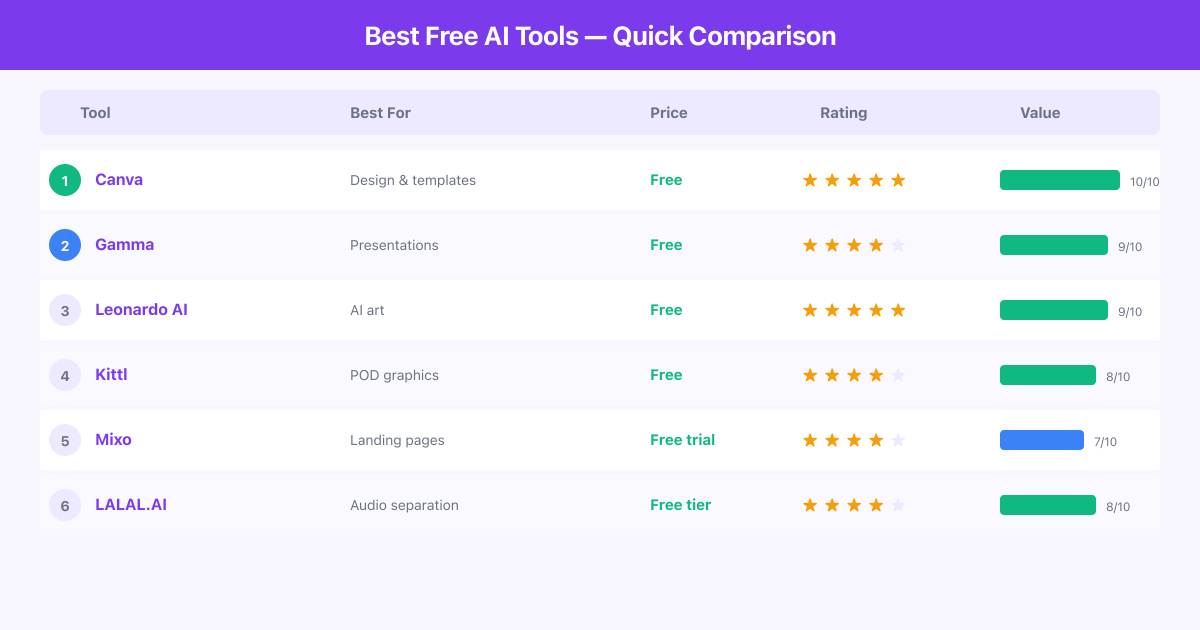
| Tool | Category | Free Tier Limits | Credit Card Required | Best For |
|---|---|---|---|---|
| Canva | Design & content | Generous (thousands of templates) | No | All-around design |
| Gamma | Presentations | Limited credits | No | AI presentations |
| Kittl | Graphic design | Basic exports | No | Print-on-demand design |
| Leonardo AI | Image generation | 150 daily tokens | No | AI art and images |
| Mixo | Website builder | Preview only | No | Landing page testing |
| LALAL.AI | Audio separation | 10 min of processing | No | Vocal/stem splitting |
The 6 Best Free AI Tools in 2026
1. Canva — Best Free All-Around Creative Suite
Canva is the Swiss Army knife of online design. Its free plan includes thousands of templates, stock photos, AI-powered design suggestions, and a drag-and-drop editor that makes professional graphic design accessible to anyone regardless of skill level.
What makes Canva stand out:
- Thousands of free templates for social media, presentations, logos, and print materials
- AI-powered features including Magic Write for text and background removal
- Real-time collaboration so teams can work together on designs
- Export in multiple formats including PNG, JPG, PDF, and MP4 for video
- Massive library of free stock photos, icons, and illustrations
Free tier highlights: The free plan includes over 250,000 templates, 1 million+ stock photos and graphics, 5 GB of cloud storage, and access to basic AI features. You can create unlimited designs and download them without watermarks.
Limitations: The free plan locks you out of premium templates, Brand Kit features, background remover on photos (limited uses), and the full Magic Resize tool. If you need to resize one design into multiple formats frequently, you will feel the friction. The AI image generator also has limited free credits, and premium stock content is gated behind the Pro plan. For teams that need consistent branding across many assets, the free tier becomes limiting quickly.
Bottom line: Canva's free plan is genuinely one of the most generous in the creative tool space. For social media graphics, simple presentations, and basic marketing materials, most solo creators will never need to upgrade.
2. Gamma — Best Free AI Presentation Maker
Gamma uses AI to generate beautiful presentations, documents, and web pages from a text prompt. Describe your topic, and Gamma creates a polished slide deck with layout, content, and visuals — all within minutes.
What makes Gamma stand out:
- Generate complete presentations from a single text prompt
- Modern, visually striking designs that look nothing like traditional slides
- Web-native format so presentations work as shareable web pages
- Embed videos, charts, and interactive elements directly in slides
- Iterative editing — refine sections through conversation with the AI
Free tier highlights: You receive a set of AI credits to generate presentations on sign-up. Generated presentations can be shared and viewed without limits. No credit card is needed to start.
Limitations: Free credits are limited, and once you exhaust them, you need to upgrade to continue generating new presentations with AI. The free plan also includes a Gamma watermark on exported content. Customization of individual slide elements is more restricted than in tools like PowerPoint or Google Slides — you are working within Gamma's design system, which can feel constraining if you have very specific layout requirements. There is also no offline mode, so you need an internet connection to work.
Bottom line: Gamma is the fastest way to create a professional-looking presentation without design skills. The free tier is perfect for occasional use — pitch decks, class projects, or client proposals. Frequent users will likely need the paid plan.
3. Kittl — Best Free Design Tool for Print-on-Demand
Kittl is a graphic design platform focused on creating designs for merchandise, print-on-demand products, logos, and branding. Its AI-powered tools help generate unique designs, text effects, and illustrations optimized for physical products.
What makes Kittl stand out:
- Templates and tools optimized for t-shirt designs, stickers, and merchandise
- AI image and text effect generators for unique design elements
- Professional typography tools with extensive font library
- Vector editing capabilities for scalable, print-ready output
- Direct integration potential with print-on-demand platforms
Free tier highlights: Access to a selection of templates, fonts, and basic AI generation features. You can create and download designs in standard resolution without paying.
Limitations: The free plan restricts you to lower-resolution exports, which may not meet quality standards for large-format printing. Premium templates, fonts, and AI generation credits are limited on the free tier. Commercial licensing for free-tier exports has restrictions that you need to review carefully before selling products. The tool's specialization in print-ready design is both its strength and weakness — it is not ideal for social media content or web design where Canva excels.
Bottom line: If you are starting a print-on-demand side hustle, Kittl's free plan gives you enough to create your first designs and test the market. The design quality for merchandise surpasses what you can easily achieve in general-purpose tools.
4. Leonardo AI — Best Free AI Image Generator
Leonardo AI is an AI image generation platform that produces high-quality visuals from text prompts. It offers multiple AI models, fine-tuning capabilities, and a range of styles from photorealistic to artistic.
What makes Leonardo AI stand out:
- Multiple AI models to choose from, each with different strengths
- 150 daily free tokens for image generation
- Fine-tuning capability to train models on your own style
- Real-time canvas for iterative AI image editing
- Community gallery for inspiration and shared prompts
Free tier highlights: 150 daily tokens that refresh every 24 hours. This is enough to generate roughly 30 to 50 images per day depending on settings. No credit card required, and generated images can be downloaded at reasonable resolution.
Limitations: Free-tier images are generated at lower resolution and with slower processing speeds compared to paid plans. Some of the most advanced AI models are locked behind the premium tier. The daily token limit, while generous, can run out quickly during intensive creative sessions. There is also a queue system during peak hours that can slow down generation times for free users. Commercial usage rights on the free plan require careful review of the terms of service.
Bottom line: Leonardo AI offers the most generous free image generation allowance among major AI art platforms. For content creators who need AI-generated visuals for blogs, social media, or product mockups, the daily free tokens are often sufficient.
5. Mixo — Best Free Tool for Landing Page Testing
Mixo uses AI to generate complete landing pages from a single sentence description. While the full platform requires a paid plan, you can generate and preview sites for free — making it an excellent validation tool.
What makes Mixo stand out:
- Generate a complete landing page in under 30 seconds
- AI handles copywriting, layout, and image selection
- Built-in email collection for list building
- Simple editing interface for tweaking generated content
- Professional-looking output without any design knowledge
Free tier highlights: You can generate and preview your AI-created site before subscribing. This lets you see exactly what Mixo produces before committing any money.
Limitations: The free tier is essentially a preview — you cannot publish or connect a custom domain without upgrading to a paid plan starting at $9/month. This makes Mixo free for testing and validation only, not for running a live site. The customization options are limited compared to full website builders, and there is no way to export the generated site to host elsewhere. For anyone needing more than a simple landing page, Mixo will feel restrictive regardless of the plan.
Bottom line: Mixo's free preview is a risk-free way to see if AI-generated landing pages work for your use case. Generate a site, evaluate the quality, and decide if the $9/month is worth it for your project.
6. LALAL.AI — Best Free Audio Separation Tool
LALAL.AI uses AI to separate audio tracks into individual stems — isolating vocals, drums, bass, guitar, and other instruments from any song or audio file. It is widely used by musicians, content creators, and producers.
What makes LALAL.AI stand out:
- Industry-leading stem separation quality using neural networks
- Separate vocals, drums, bass, guitar, piano, and other instruments
- Support for multiple audio and video file formats
- Fast processing with high-quality output
- Simple upload-and-process workflow with no learning curve
Free tier highlights: You get 10 minutes of free audio processing time. Upload a file, choose what you want to separate, and download the individual stems. No account or credit card required for basic use.
Limitations: The 10-minute free allowance is a hard limit — once used, you must purchase a processing package. Free-tier processing is at standard quality rather than the enhanced quality available to paid users. There is no subscription model; you buy processing minutes in packages, which can be more expensive per minute than competing subscription services. The tool is also narrowly focused on audio separation — it does not offer mixing, mastering, or other production features. If you need ongoing stem separation, the pay-per-use model adds up quickly.
Bottom line: LALAL.AI's free tier is perfect for testing whether AI stem separation meets your quality standards. Musicians creating remixes, content creators extracting vocal samples, and podcasters removing background music will all find the free minutes valuable for evaluation.
Frequently Asked Questions
Are free AI tools actually good enough for professional work?
Yes, for many use cases. Canva's free plan produces social media graphics and presentations that are indistinguishable from paid output. Leonardo AI generates images at quality levels that work for blog posts, social content, and prototyping. The main trade-offs are resolution limits, watermarks, and usage caps rather than quality differences in the output itself.
Will I hit a wall with free tiers quickly?
It depends on your usage intensity. Casual creators who need a few designs or images per week will find most free tiers sufficient for months. Power users who create content daily will likely need to upgrade within the first few weeks. The tools on this list were selected because their free tiers offer genuine utility beyond a basic trial.
Can I use free AI tool output commercially?
Each platform has its own terms for commercial usage on free plans. Canva allows commercial use of free content with some restrictions on standalone resale. Leonardo AI and Kittl have specific licensing terms you should review. Always check the current terms of service before selling products or content created with free-tier tools.
What is the best free AI tool for complete beginners?
Canva is the most beginner-friendly option on this list. Its interface is intuitive, templates handle the design work, and the learning curve is minimal. For a more specific task like creating presentations, Gamma is equally easy — just type your topic and the AI does the rest.
Do free AI tools sell my data?
Reputable platforms like the ones on this list have standard privacy policies. Most use your input data to improve their AI models unless you opt out. If data privacy is a concern, review each platform's privacy policy and look for options to opt out of data training. Paid plans sometimes offer enhanced privacy protections.
Which free AI tool has the most generous free tier?
Canva offers the most functionality without paying — thousands of templates, millions of stock assets, and unlimited design creation. For AI-specific generation, Leonardo AI's 150 daily tokens provide the most generous allowance among AI image generators.
Verdict
The best free AI tool depends entirely on what you need to create. For general design work, Canva is the clear winner with its enormous free template library and versatile editor. For AI presentations, Gamma saves hours of slide-building time. Leonardo AI gives you the most free AI image generation credits of any major platform. Kittl is your best bet for print-on-demand design, Mixo lets you test AI-generated landing pages risk-free, and LALAL.AI is unmatched for audio stem separation.
Start with one tool that matches your most pressing need, master the free tier, and only upgrade when you hit a limit that genuinely blocks your workflow. In 2026, there is no reason to pay for AI tools before you have proven they work for your use case.
All Free AI Tools Tools

Mixo
AI Website Builder — Launch a Site in 30 Seconds

Gamma
AI Presentation Builder — Create Decks, Docs & Microsites in Minutes

Kittl
AI Design Platform for Print-on-Demand — Logos, T-Shirts & More

Canva
All-in-One Design Platform — Create and Sell Templates, Graphics & More

Leonardo AI
AI Image Generator — Create Stunning Visuals for Digital Products

LALAL.AI
AI Stem Splitter — Separate Vocals, Drums & Instruments from Any Track