5 Best AI Video Generators in 2026 (Reviewed)
The best AI video generators that help creators produce professional videos from text, scripts, and audio with minimal editing experience required.
Affiliate disclosure: Some links in this guide are affiliate links. If you purchase through them, we may earn a commission at no extra cost to you. We only recommend tools we have personally tested and believe in.
TL;DR
If you need to create professional-looking videos without a film crew or years of editing experience, AI video generators are the fastest path from idea to finished product. After hands-on testing, ElevenLabs leads for audio-first video workflows, Opus Clip dominates repurposing long-form content, and Fliki offers the best all-in-one experience for beginners. Read on for our full breakdown including pricing, pros, cons, and real output comparisons.
The Best AI Video Generators in 2026: A Buyer's Guide
The AI video generation landscape has matured significantly over the past year. What used to mean janky, obviously-robotic clips now means polished, broadcast-ready content that can fool even trained eyes. Whether you are a solo content creator, a marketing team, or a small business owner who needs video for ads, social media, or internal training, there is a tool here that fits your workflow.
When evaluating AI video generators, we focused on five key factors:
- Output quality — Does the video look professional enough to publish without heavy editing?
- Speed — How fast can you go from an idea or script to a rendered video?
- Ease of use — Can a non-technical creator figure out the interface quickly?
- Pricing and value — What do you actually get for the money?
- Flexibility — Does the tool handle multiple formats, styles, and use cases?
Comparison Table
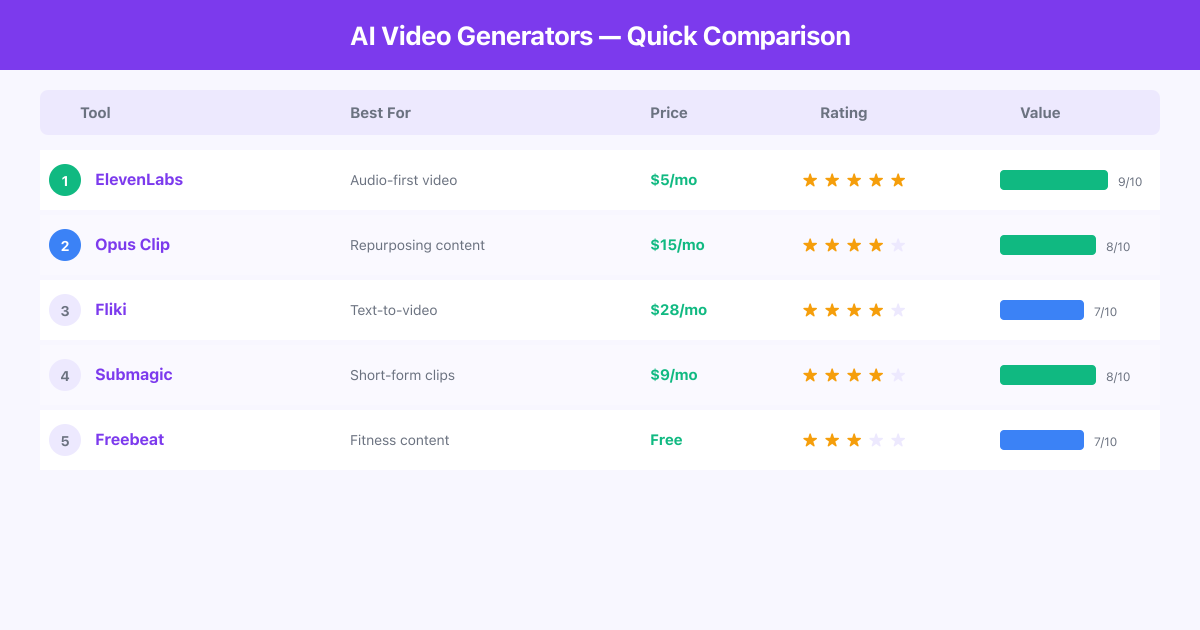
| Tool | Best For | Starting Price | Free Plan | Key Strength |
|---|---|---|---|---|
| ElevenLabs | Audio-driven video & voiceovers | $5/mo | Yes (limited) | Industry-leading voice AI |
| Freebeat | Fitness & lifestyle video content | $0 (free tier) | Yes | Niche fitness focus |
| Submagic | Short-form social media clips | $9/mo | Yes (limited) | Auto-captions & hooks |
| Opus Clip | Repurposing long-form to clips | $15/mo | Yes (limited) | AI virality scoring |
| Fliki | Text-to-video for beginners | $28/mo | Yes (limited) | Full text-to-video pipeline |
Ranked Reviews
1. ElevenLabs — Best for Audio-First Video Workflows
ElevenLabs started as a voice synthesis platform and has expanded into one of the most capable AI media tools available. Their voice cloning technology remains unmatched, and when combined with their video capabilities, you get a workflow that treats audio as a first-class citizen rather than an afterthought.
The platform excels at creating narrated video content where the voiceover quality matters. If you are producing explainer videos, documentary-style content, or any format where the voice carries the story, ElevenLabs gives you output that sounds genuinely human. The voice library includes dozens of pre-built voices across multiple languages, and the custom voice cloning needs only a few minutes of sample audio to produce a usable replica.
Pros:
- Voice quality is noticeably ahead of every competitor we tested
- Supports 29+ languages with natural-sounding output
- Custom voice cloning is fast and accurate
- API access makes it easy to integrate into existing workflows
- Generous free tier for testing
Cons:
- Video generation features are still maturing compared to dedicated video-only platforms; you may need to pair it with another tool for complex visual editing
- Higher-tier plans get expensive quickly if you need high volume
Pricing: Free tier available. Paid plans start at $5/month for the Starter plan, scaling up to $99/month for the Scale plan.
Best for: Creators who prioritize audio quality, podcasters adding video, and anyone producing voiceover-heavy content.
2. Opus Clip — Best for Repurposing Long-Form Content
Opus Clip solves a very specific problem brilliantly: turning long videos into short, shareable clips. Upload a podcast, webinar, Zoom recording, or YouTube video, and Opus Clip uses AI to identify the most compelling moments, add dynamic captions, and reframe everything for vertical formats.
What sets Opus Clip apart is its AI Virality Score. The algorithm analyzes your content and predicts which segments are most likely to perform well on social media. In our testing, the clips it flagged as high-potential consistently outperformed randomly selected segments. The auto-reframing from horizontal to vertical is smooth, and the caption styling is customizable enough to match any brand.
Pros:
- AI virality scoring actually works and saves hours of manual review
- Auto-reframing from landscape to portrait is seamless
- Caption customization with multiple style templates
- Batch processing lets you generate dozens of clips from one upload
- Direct publishing to TikTok, YouTube Shorts, and Instagram Reels
Cons:
- Only works with existing video content; you cannot create videos from scratch or from text
- The AI sometimes picks segments that lack context when viewed standalone, so you still need to review clips before posting
Pricing: Free plan with limited monthly processing. Paid plans start at $15/month.
Best for: Podcasters, YouTubers, webinar hosts, and anyone sitting on long-form video assets who wants to maximize their reach on short-form platforms.
3. Fliki — Best All-in-One for Beginners
Fliki is the most approachable AI video generator we tested. Paste a blog post URL, type a script, or just describe what you want, and Fliki turns it into a fully produced video with voiceover, stock footage, and background music. The entire process can take under five minutes for a two-minute video.
The platform includes a built-in library of AI voices, stock media, and music tracks. You can customize everything from the visual style to the pacing, and the editor is intuitive enough that someone with zero video experience can produce decent content on their first try. Fliki also supports converting articles directly into videos, which makes it a strong fit for content marketers who want to repurpose written content.
Pros:
- Easiest learning curve of any tool on this list
- Blog-to-video feature saves significant time for content teams
- Built-in stock library, AI voices, and music tracks
- Multiple aspect ratio support for different platforms
- Template library helps you get started quickly
Cons:
- Output can feel formulaic if you rely too heavily on templates; customizing beyond the defaults requires more effort
- AI voice quality is decent but noticeably behind ElevenLabs
Pricing: Free tier with watermarks. Paid plans start at $28/month for the Standard plan.
Best for: Bloggers, content marketers, small business owners, and anyone who wants a simple "type and publish" video workflow.
4. Submagic — Best for Short-Form Social Clips
Submagic focuses on making short-form content pop. Its standout feature is AI-powered captions that automatically generate trendy, animated text overlays in styles you have seen from top creators on TikTok and Instagram. Beyond captions, Submagic also generates hooks, adds B-roll, and suggests cuts to keep viewer attention.
The tool is laser-focused on sub-60-second content. If that is your primary format, the specialization pays off. The caption styling options are extensive, covering everything from the classic "Hormozi style" bold text to more subtle designs. Auto-generated hooks are a nice touch that actually improves completion rates in our testing.
Pros:
- Caption styling is best-in-class with dozens of trendy templates
- AI-generated hooks improve viewer retention
- Auto B-roll insertion fills visual gaps intelligently
- Quick turnaround, most clips process in under two minutes
- Affordable entry point
Cons:
- Heavily focused on short-form only, so it is not useful if you need anything longer than about 90 seconds
- Limited language support compared to tools like ElevenLabs or Fliki
Pricing: Free tier with limited exports. Paid plans start at $9/month.
Best for: Social media managers, short-form creators, and anyone producing TikTok, Reels, or Shorts content at scale.
5. Freebeat — Best for Fitness & Lifestyle Creators
Freebeat occupies a unique niche in the AI video space. Rather than trying to be everything for everyone, it focuses on fitness and lifestyle content, offering AI-powered workout video generation and interactive fitness experiences.
The platform combines AI video generation with fitness content creation, making it possible to produce workout tutorials, exercise demonstrations, and lifestyle content without a production studio. Its gamified approach and integration with fitness hardware sets it apart from general-purpose video tools.
Pros:
- Unique specialization in fitness and lifestyle content
- Interactive and gamified video experiences
- Integrated with fitness hardware ecosystem
- Free tier available for basic use
- Community features encourage engagement
Cons:
- Very niche; if you are not creating fitness or wellness content, this tool has limited value for you
- Video customization options are far more restricted than general-purpose tools
Pricing: Free tier available. Premium plans vary based on hardware and subscription bundles.
Best for: Fitness influencers, wellness coaches, and lifestyle content creators who want AI-assisted workout video production.
Frequently Asked Questions
Can AI video generators replace a human video editor?
For simple projects like social media clips, explainer videos, and repurposed content, yes. For complex narrative work, brand films, or anything requiring creative direction, you will still want a human editor. Most creators find the sweet spot is using AI for the first draft and volume work, then bringing in human editing for hero content.
Are AI-generated videos good enough for paid advertising?
Several of these tools produce output that performs well in paid social campaigns. Opus Clip and Submagic clips regularly appear in high-performing ad accounts. The key is matching the tool to the ad format. AI-generated UGC-style clips often outperform polished studio content in direct-response campaigns.
How much does it cost to get started with AI video generation?
Every tool on this list offers a free tier or trial. You can test all five without spending a dollar. For serious production, expect to spend between $9 and $50 per month depending on volume and feature needs.
Which AI video generator is best for YouTube content?
For full YouTube videos, Fliki offers the most complete text-to-video pipeline. For repurposing YouTube content into Shorts, Opus Clip is the clear winner. ElevenLabs is ideal if you need high-quality narration for your YouTube content.
Do these tools work with languages other than English?
Yes, though support varies. ElevenLabs supports 29+ languages with high quality. Fliki covers 75+ languages. Submagic and Opus Clip have more limited but growing language support. Always test with your target language before committing to a paid plan.
Final Verdict
There is no single "best" AI video generator because the right choice depends entirely on your workflow. ElevenLabs is the pick if audio quality drives your content. Opus Clip is unbeatable for repurposing existing long-form videos. Fliki is where beginners should start. Submagic owns the short-form caption game. And Freebeat is the go-to for fitness creators who need a specialized tool.
Our recommendation: start with the free tiers of your top two picks, run them through your actual use case, and upgrade whichever one fits your workflow best. The paid plans are affordable enough that even combining two tools is cheaper than hiring a freelance video editor.
All AI Video Generators Tools

Fliki
AI Video Creator — Turn Text Into Videos in 80+ Languages

Opus Clip
AI Video Clipping — Turn Long Videos into Viral Shorts

ElevenLabs
AI Voice Generator & Voice Cloning Platform

Submagic
Automated Video Editor — Create Viral Shorts in Seconds

Freebeat
AI Music Video Generator — Turn Tracks into Visuals