Best AI Design Tools in 2026 (Free & Paid)
The best AI-powered design tools for creating graphics, presentations, logos, and visual content without traditional design skills.
Affiliate disclosure: Some links in this guide are affiliate links. If you purchase through them, we may earn a commission at no extra cost to you. We only recommend tools we have personally tested and believe in.
TL;DR
AI design tools have made professional-quality graphics accessible to everyone, regardless of design experience. After extensive testing, Leonardo AI is the best choice for AI image generation and creative assets, Canva remains the all-around design workhorse with the best AI integration, Kittl is the specialist pick for print-on-demand and merchandise designers, and Gamma revolutionizes presentations with AI-powered slide creation. Here is the detailed breakdown.
The Best AI Design Tools in 2026: A Buyer's Guide
Design used to require years of training with complex software like Photoshop and Illustrator. That barrier has collapsed. Today's AI design tools let you describe what you want, refine the output, and export production-ready assets in minutes. The shift is not just about speed — it is about enabling people who think visually but lack technical design skills to bring their ideas to life.
The tools in this guide span different design needs. Some generate images from text prompts. Others help you lay out complete designs with templates and brand systems. A few specialize in specific formats like presentations or merchandise. What they share is an AI-first approach that handles the heavy lifting while giving you creative control over the result.
We evaluated each tool on:
- AI capability — How effectively does the AI assist with design tasks?
- Output quality — Are the results professional enough to use without heavy refinement?
- Template and asset library — Does the tool provide enough starting points and resources?
- Ease of use — Can someone without design training produce good work quickly?
- Pricing and value — What do free and paid tiers actually include?
Comparison Table
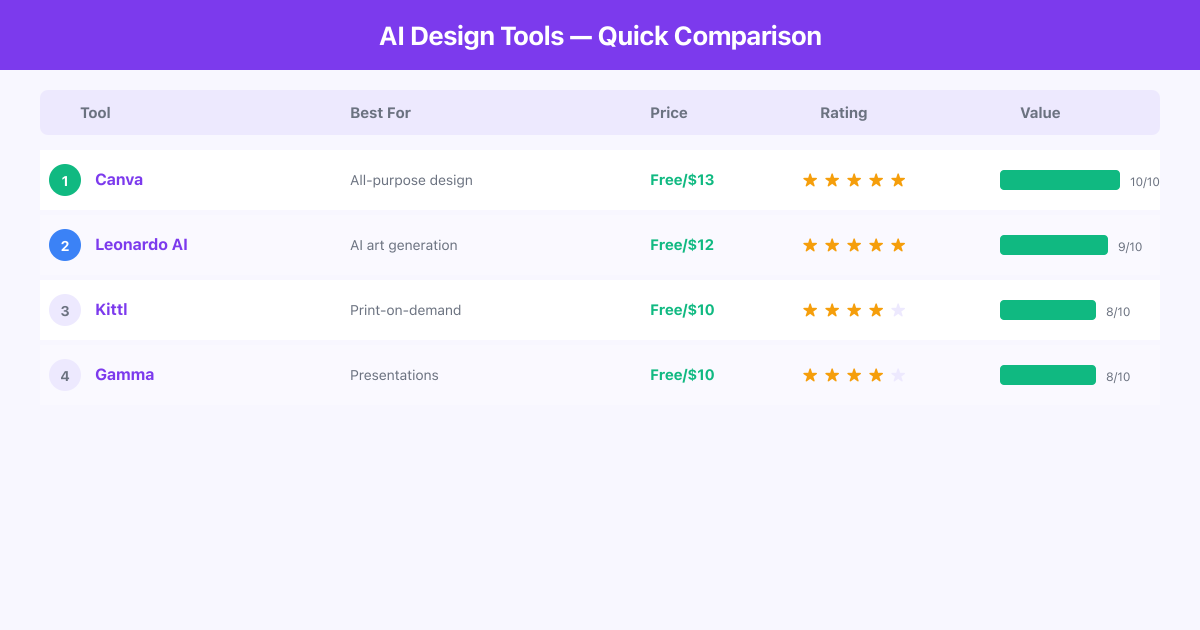
| Tool | Best For | Starting Price | Free Plan | Key Strength |
|---|---|---|---|---|
| Leonardo AI | AI image generation | $9.99/mo | Yes (150 daily tokens) | High-quality AI art generation |
| Canva | All-purpose design | $0 (free) / $12.99/mo Pro | Yes (robust) | Largest template library |
| Kittl | Print-on-demand & merch | $10/mo | Yes (limited) | Typography & vector design |
| Gamma | AI presentations | $8/mo | Yes (limited) | One-prompt slide decks |
Ranked Reviews
1. Leonardo AI — Best for AI Image Generation
Leonardo AI is a powerhouse for generating original images, illustrations, and creative assets using AI. The platform offers multiple generation models, each optimized for different styles, from photorealistic imagery to anime, concept art, digital illustration, and texture generation.
What separates Leonardo from basic AI image generators is the level of control it provides. You can fine-tune outputs with ControlNet, use image-to-image transformation, train custom models on your own art style, and adjust parameters like guidance scale and sampling steps. For designers who need consistent visual styles across projects, the ability to train and save custom models is invaluable.
The platform also includes a Canvas editor that lets you composite, extend, and edit AI-generated images directly in the browser. Need to extend a background, remove an object, or blend multiple generations together? The Canvas handles it without requiring you to export to Photoshop.
Leonardo's real-time generation mode is worth highlighting. It renders images as you type and adjust parameters, giving you instant visual feedback. This dramatically speeds up the ideation process compared to tools where you submit a prompt and wait 30-60 seconds.
Pros:
- Multiple AI models optimized for different visual styles
- Custom model training lets you create consistent brand imagery
- Canvas editor for compositing and in-browser editing
- Real-time generation for instant feedback during ideation
- Generous free tier with 150 daily tokens
Cons:
- The learning curve is steeper than other tools on this list; getting the best results requires understanding prompting techniques, model differences, and parameter tuning
- Generated images occasionally have anatomy issues with hands and complex poses, though this has improved significantly
Pricing: Free plan with 150 daily tokens. Apprentice plan at $9.99/month, Artisan at $24/month, and Maestro at $48/month.
Best for: Content creators, digital artists, marketing teams needing original imagery, and anyone who wants high-quality AI-generated visuals with fine-grained control.
2. Canva — Best All-Around Design Tool
Canva hardly needs an introduction, but its AI capabilities in 2026 deserve attention. What started as a simple drag-and-drop design tool has become a comprehensive creative platform with AI features woven into nearly every workflow.
Magic Studio is Canva's AI hub. It includes Magic Design (describe what you want and get a complete design), Magic Write (AI copywriting within designs), Magic Eraser (remove objects from photos), Magic Expand (extend images beyond their original borders), and Magic Animate (add motion to static designs). Each feature works well individually, but the real power is how they combine within Canva's existing ecosystem of templates, brand kits, and collaboration tools.
The template library remains Canva's biggest advantage. With millions of professionally designed templates across every conceivable format — social media posts, presentations, posters, business cards, videos, websites — you always have a strong starting point. The AI features enhance these templates rather than replacing them, which makes for a less intimidating experience than pure AI generation tools.
Pros:
- Massive template library covering virtually every design format
- Magic Studio AI features are well-integrated and intuitive
- Brand kit system keeps designs consistent across teams
- Generous free plan that covers most casual design needs
- Collaborative features rival dedicated project management tools
- Export options include print-ready files, animated formats, and website publishing
Cons:
- The AI image generation quality, while convenient, does not match dedicated tools like Leonardo AI for creative or artistic work
- Pro features are increasingly required for the best AI capabilities, and the gap between free and paid tiers is widening
Pricing: Free plan with substantial features. Pro plan at $12.99/month (or $119.99/year). Teams plan at $14.99/month per person.
Best for: Everyone. Seriously. Whether you are a solo entrepreneur, a marketing team, a teacher, or a student, Canva's breadth makes it the Swiss army knife of design. It is the first tool we recommend to anyone who asks "what should I use for design?"
3. Kittl — Best for Print-on-Demand & Merchandise Design
Kittl is a design tool built specifically for creating designs that end up on physical products — t-shirts, mugs, posters, stickers, and other merchandise. While Canva and Leonardo are generalists, Kittl is a specialist, and that focus shows in every feature.
The platform excels at typography-heavy designs. Its text effects engine produces results that would take significant skill in Illustrator: distressed textures, vintage letterpress effects, chrome and metallic finishes, and complex text paths. These are not basic filters — the quality is genuinely impressive and immediately usable for commercial products.
Kittl's AI features include text-to-image generation optimized for product design (think illustrations that work well on merchandise), AI background removal, and AI-powered vectorization that converts raster images into clean, scalable vector files. The vectorization is particularly useful for print-on-demand sellers who need files that scale to any product size without quality loss.
The template library is curated for merchandise categories. Instead of generic social media templates, you get designs organized by product type and aesthetic: retro t-shirt graphics, minimalist poster layouts, vintage badge designs, and similar categories that align with what actually sells in print-on-demand.
Pros:
- Typography and text effects are the best of any tool in this guide
- AI vectorization produces clean, scalable files ready for print
- Templates designed specifically for physical products and merchandise
- Direct export to print-on-demand platforms
- The aesthetic quality targets what actually sells in the merch space
Cons:
- Much narrower in scope than Canva or Leonardo; if you need social media graphics, presentations, or web design, Kittl is not the right tool
- The free plan is quite restricted in export resolution and the number of projects you can save
Pricing: Free plan with limited exports. Pro plan at $10/month. Expert plan at $24/month for higher resolution exports and more AI credits.
Best for: Print-on-demand sellers, merchandise designers, brand designers who work heavily with typography, and anyone creating designs intended for physical products.
4. Gamma — Best for AI-Powered Presentations
Gamma reimagines presentations from the ground up using AI. Instead of the traditional slide-by-slide approach of PowerPoint or Google Slides, Gamma lets you describe your presentation topic and generates a complete, visually polished deck in seconds. The output is not just a wall of bullet points on bland backgrounds — Gamma produces genuinely attractive layouts with relevant imagery, smart formatting, and a cohesive visual flow.
The AI understands content hierarchy and structures information logically. Give it a topic like "Q3 marketing results" with a few bullet points, and it creates sections with headers, supporting visuals, data placeholders, and a natural narrative arc. You can then edit any element, swap images, adjust the design theme, and refine individual slides.
Beyond generation, Gamma's presentation format is interactive. Slides are actually nested card layouts that viewers can click through, expand, and explore. This makes Gamma decks feel more like interactive documents than traditional slide shows. For internal presentations, pitches, and stakeholder updates, this format is more engaging than a standard slideshow.
Gamma also supports embedding live content — charts, videos, websites, and interactive elements — directly into slides. This means your presentation can include a live dashboard, a product demo, or a video walkthrough without leaving the deck.
Pros:
- AI generation produces complete, visually polished presentations from a text prompt
- Interactive card-based format is more engaging than traditional slides
- Live content embedding (charts, websites, videos) keeps presentations dynamic
- Beautiful default themes that look professional without customization
- Fast iteration: regenerate or restyle entire sections in seconds
Cons:
- Less control over precise layout positioning compared to PowerPoint or Keynote; if you need pixel-perfect slide designs, Gamma's card-based system can feel restrictive
- Exporting to traditional slide formats (PPTX, PDF) loses some of the interactive features that make Gamma distinctive
Pricing: Free plan with limited AI credits. Plus plan at $8/month. Pro plan at $15/month.
Best for: Startup founders creating pitch decks, consultants building client presentations, teams producing internal reports, and anyone who dreads the hours spent formatting slides in PowerPoint.
Frequently Asked Questions
Can AI design tools replace a professional graphic designer?
For routine design tasks like social media graphics, basic presentations, and templated materials, yes. AI tools handle these faster and cheaper than hiring a designer for each piece. However, for strategic brand work, complex illustrations, packaging design, and anything requiring original creative thinking, a skilled human designer still delivers better results. Many professional designers now use these AI tools to accelerate their own workflows.
Which tool is best for someone with zero design experience?
Canva. Its combination of templates, drag-and-drop editing, and integrated AI features makes it the most accessible option. Gamma is a close second if your primary need is presentations. Leonardo AI requires more learning to use effectively, and Kittl is best if you already know what kind of merchandise design you want to create.
Are AI-generated designs safe to use commercially?
All four tools on this list grant commercial usage rights on their paid plans. Canva Pro and Leonardo's paid plans explicitly include commercial licenses. Kittl's plans are designed for commercial merchandise. Always check the specific terms of service for your plan tier, as free plans sometimes have different licensing terms than paid plans.
Can I maintain brand consistency across these tools?
Canva's Brand Kit is the most comprehensive solution for brand consistency, letting you save colors, fonts, logos, and templates. Kittl offers similar brand asset management. Leonardo AI lets you train custom models to maintain visual style consistency. Gamma supports custom themes. If brand consistency is critical, Canva's ecosystem is the most mature.
How do AI design tools handle copyright?
The tools generate original outputs based on trained models. Canva's stock library is fully licensed. Leonardo AI's generated images are owned by you under their terms of service. Kittl's designs and templates are licensed for commercial use. The legal landscape around AI-generated art continues to evolve, so stay current with developments in your jurisdiction.
Final Verdict
Each of these tools excels in a different design context. Leonardo AI is the top pick for generating original creative imagery with fine-grained control. Canva is the best all-around platform that handles virtually any design task with an unmatched template library and well-integrated AI features. Kittl is the clear choice for print-on-demand sellers and anyone focused on typography-heavy merchandise design. Gamma is the future of presentations, turning a text prompt into polished, interactive decks.
For most people, starting with Canva's free plan covers 80% of design needs. Add Leonardo AI if you need original AI-generated imagery, Kittl if you sell physical products, or Gamma if presentations are a major part of your work. All four offer free tiers, so test before you commit.
All AI Design Tools Tools

Gamma
AI Presentation Builder — Create Decks, Docs & Microsites in Minutes

Kittl
AI Design Platform for Print-on-Demand — Logos, T-Shirts & More

Canva
All-in-One Design Platform — Create and Sell Templates, Graphics & More

Leonardo AI
AI Image Generator — Create Stunning Visuals for Digital Products