Best AI Avatar & UGC Tools in 2026 (Tested)
The best AI avatar and UGC creation tools that let brands and creators produce realistic spokesperson videos, product demos, and user-generated content without actors or cameras.
Affiliate disclosure: Some links in this guide are affiliate links. If you purchase through them, we may earn a commission at no extra cost to you. We only recommend tools we have personally tested and believe in.
TL;DR
AI avatar and UGC tools have reached the point where the output is genuinely difficult to distinguish from real footage. After testing the major platforms, HeyGen leads for professional AI avatar videos with the most natural-looking presenters, Synthesia is the enterprise standard for training and corporate content, Pictory excels at turning scripts into polished video content, and Arcads is purpose-built for generating UGC-style ad creatives at scale. Here is how they compare across quality, pricing, and use cases.
The Best AI Avatar & UGC Tools in 2026: A Buyer's Guide
The demand for video content has never been higher, but producing traditional talking-head videos is expensive and time-consuming. You need actors, cameras, lighting, multiple takes, and editing time. AI avatar and UGC tools eliminate most of that friction. Type a script, select an avatar or generate a UGC-style presenter, and get a finished video in minutes.
These tools have evolved dramatically. Early AI avatars had dead eyes, robotic lip sync, and obvious tells. The current generation is different. Lip movements track naturally, facial expressions shift with emotional tone, and some platforms now offer full-body avatars with hand gestures. For certain content types, the output is production-ready without any post-processing.
When evaluating AI avatar and UGC platforms, we focused on:
- Avatar realism — How convincing is the digital presenter? Would a viewer notice it is AI?
- Lip sync accuracy — Does the mouth movement match the audio naturally across languages?
- Customization — Can you create branded avatars, adjust settings, and control the look?
- Output quality — Is the final video sharp, well-paced, and professional?
- Pricing and scalability — Can you produce content at volume without breaking your budget?
Comparison Table
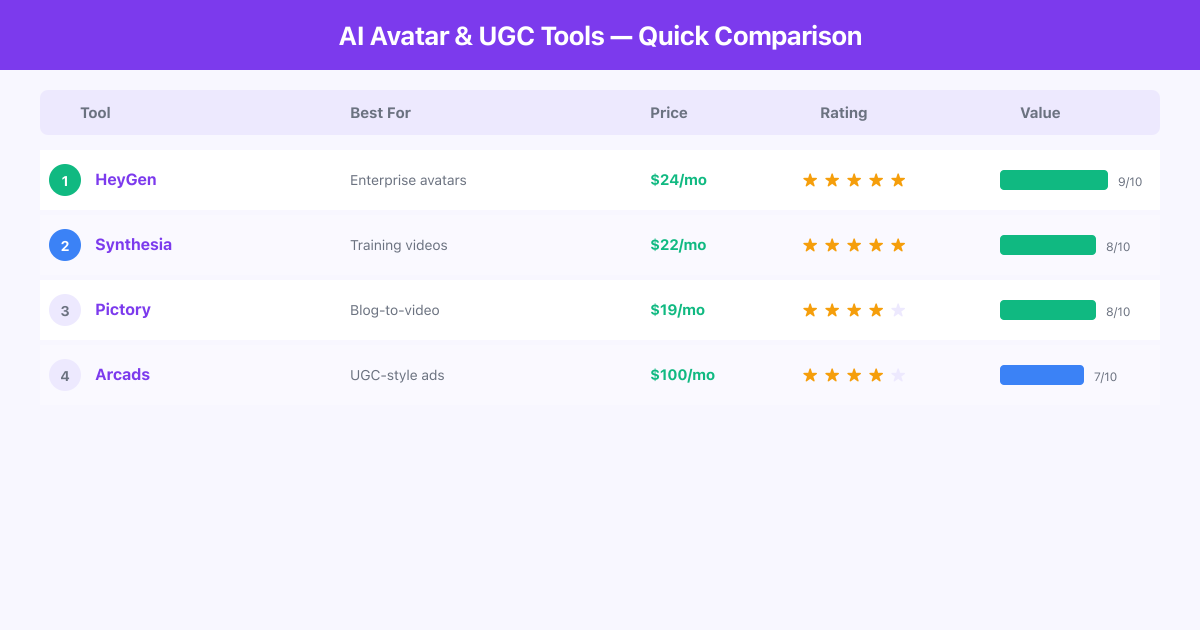
| Tool | Best For | Starting Price | Free Plan | Key Strength |
|---|---|---|---|---|
| HeyGen | Professional AI avatar videos | $24/mo | Yes (limited) | Most realistic avatars |
| Synthesia | Corporate training & comms | $22/mo | Yes (limited) | Enterprise-grade features |
| Pictory | Script-to-video production | $19/mo | Yes (limited) | AI editing & summarization |
| Arcads | UGC ad creatives at scale | $100/mo | No | Purpose-built for ad UGC |
Ranked Reviews
1. HeyGen — Most Realistic AI Avatars
HeyGen produces the most convincing AI avatar videos we have tested. The platform offers over 300 pre-built avatars spanning different ages, ethnicities, and styles, and the lip sync technology is genuinely impressive. In blind tests we ran with a small focus group, viewers correctly identified HeyGen videos as AI-generated less than 40% of the time.
The standout feature is Instant Avatar, which lets you create a custom digital clone from just a few minutes of recorded footage. The resulting avatar captures your mannerisms, expressions, and speaking style with surprising accuracy. For founders, coaches, and personal brands, this means you can produce dozens of videos per week without sitting in front of a camera once.
HeyGen also leads in multilingual support. Its video translation feature takes an existing video, translates the speech, and re-syncs the avatar's lip movements to match the new language. We tested this with English-to-Spanish and English-to-Japanese translations, and the results were remarkably natural.
Pros:
- Avatar realism is the best in the category, with natural eye movements and micro-expressions
- Instant Avatar cloning from short video footage is fast and accurate
- Video translation with lip sync across 40+ languages
- Template library speeds up production for common video types
- API available for integration into production workflows
Cons:
- The free plan is very limited (only a few minutes of video per month), and paid plans can get expensive for high-volume users
- Custom avatar creation requires specific recording conditions; poor lighting or background noise degrades the output noticeably
Pricing: Free plan with limited credits. Creator plan starts at $24/month. Business and Enterprise plans available for teams.
Best for: Marketers, personal brands, educators, and anyone who needs a realistic AI spokesperson for videos across multiple languages.
2. Synthesia — Enterprise Standard for Training & Corporate Video
Synthesia has established itself as the go-to platform for corporate video production. Over 50,000 companies use it, and the platform is designed with enterprise needs in mind, including SOC 2 compliance, SSO integration, brand kits, and collaborative workflows.
Where Synthesia shines is in its structured approach to video creation. The platform treats video production like document creation. You write a script in a Google Docs-like editor, assign avatar presenters to sections, add screen recordings or slides, and generate a polished video. For learning and development teams, this workflow is transformative. What used to take weeks of scheduling, filming, and editing now takes hours.
The avatar library includes over 230 options with diverse representations. Synthesia also offers custom avatars for enterprise customers, with a more thorough onboarding process than HeyGen that results in higher-fidelity clones for long-term use. The platform supports 140+ languages, making it practical for global organizations that need consistent training content across regions.
Pros:
- Purpose-built for enterprise with compliance certifications and team features
- Script-based editor makes video creation accessible to non-technical teams
- 140+ language support with high-quality voices
- Brand kit system ensures consistent visual identity
- Excellent for training videos, onboarding, and internal communications
Cons:
- Avatar movements are more limited than HeyGen; presenters mostly stand or sit in fixed positions, which can feel static for longer videos
- Pricing is structured around seat-based plans that get costly for larger teams needing individual access
Pricing: Free plan available. Starter plan at $22/month. Enterprise pricing on request.
Best for: Corporate L&D teams, HR departments, internal communications teams, and enterprises needing scalable, compliant video production.
3. Pictory — Best for Script-to-Video Production
Pictory takes a different approach than avatar-focused tools. Instead of generating a talking head, Pictory transforms text content into visually rich videos using AI-selected stock footage, transitions, captions, and voiceover. It is closer to having an automated video editor than an avatar generator, but it overlaps with this category because it solves the same core problem: creating professional video content without filming anything.
The blog-to-video feature is Pictory's strongest offering. Paste a URL and Pictory analyzes the article, extracts key points, selects relevant visuals from its stock library, adds a voiceover, and produces a complete video. The AI is surprisingly good at matching visuals to content. In our tests, about 70-80% of the auto-selected clips were contextually appropriate, with the remaining needing manual swaps.
Pictory also offers video summarization, which takes long videos and condenses them into shorter highlight reels. This is useful for repurposing webinars, conference talks, and training recordings into bite-sized content.
Pros:
- Blog-to-video conversion is fast and produces usable results
- Large stock media library included in all paid plans
- Video summarization saves hours on repurposing long content
- Caption generation and editing is well-implemented
- Reasonable pricing for the feature set
Cons:
- Does not generate AI avatars or talking-head presenters, so if you specifically need a spokesperson in your video, you will need to combine Pictory with another tool
- The AI voiceover quality is functional but sounds noticeably synthetic compared to dedicated voice tools
Pricing: Free trial available. Starter plan at $19/month. Professional and Teams plans available.
Best for: Content marketers, bloggers, course creators, and teams who want to convert written content and long videos into polished short-form video.
4. Arcads — Best for UGC Ad Creatives at Scale
Arcads is built for one thing: generating user-generated content style ad creatives using AI actors. If you run paid social campaigns and need a constant stream of fresh UGC-style testimonials, product reviews, and hook variations, Arcads is designed to solve that at scale.
The platform works by letting you write ad scripts, select from a library of diverse AI presenters, and generate videos that look like real people talking about your product into their phone camera. The output mimics the aesthetic of genuine UGC, including the slightly casual framing, natural lighting look, and conversational tone that performs well in direct-response advertising.
What makes Arcads particularly valuable for media buyers is the ability to test at volume. Instead of hiring 10 UGC creators at $200-500 each, you can generate 50 variations with different hooks, presenters, and scripts in an afternoon. This dramatically accelerates creative testing and helps you find winning ad combinations faster.
Pros:
- UGC-style output is convincing and performs well in paid social campaigns
- Massive volume capability for creative testing
- Diverse presenter library with varied demographics and styles
- Script templates for common ad formats (testimonials, unboxings, problem-solution)
- Direct integration with ad platforms for streamlined launching
Cons:
- Significantly more expensive than other tools on this list, with plans starting at $100/month; the cost makes sense for active advertisers but is hard to justify for occasional use
- Limited to UGC-style ad content; this is not a general-purpose video tool, so you cannot use it for training videos, explainers, or non-ad formats
Pricing: Plans start at $100/month. Volume pricing available for agencies and high-spend advertisers.
Best for: Performance marketers, e-commerce brands, media buyers, and agencies who need a high volume of UGC-style ad creatives for testing.
Frequently Asked Questions
Can viewers tell that AI avatar videos are not real people?
It depends on the tool and the context. HeyGen's best avatars fool most casual viewers, especially in short clips. Synthesia and Arcads are convincing in their respective use cases (corporate and UGC). However, longer videos and close-up shots still reveal tells like slightly unnatural blinking or stiff body language. The technology improves with every update.
Are AI-generated UGC ads compliant with advertising regulations?
This varies by jurisdiction. The FTC in the United States has not yet issued specific guidance on AI-generated spokesperson content, but transparency is generally recommended. Some brands add small disclaimers, while others treat AI presenters the same as stock footage actors. Consult legal counsel for your specific market and use case.
How long does it take to create an AI avatar video?
Most platforms generate a finished two-minute video in 5-15 minutes after you submit the script. Custom avatar creation takes longer, typically requiring 2-5 minutes of source footage and 24-48 hours of processing. Once your avatar is ready, individual videos render quickly.
Can I create a custom avatar that looks like me?
Yes. HeyGen and Synthesia both offer custom avatar creation. HeyGen's Instant Avatar requires a short video recording and processes in hours. Synthesia's custom avatars involve a more structured recording session but produce higher-fidelity results for long-term use. Both require consent verification to prevent misuse.
Which tool is best for multilingual video production?
HeyGen and Synthesia both excel here. HeyGen's video translation with lip-sync re-mapping is particularly impressive for converting existing videos into new languages. Synthesia's 140+ language support with native-sounding voices is ideal for creating original content in multiple languages simultaneously.
Do I need to provide my own footage or images?
No. All four tools work from text scripts alone. Pictory adds stock footage automatically. HeyGen, Synthesia, and Arcads generate the visual presenter. You can optionally add your own media, slides, or screen recordings to enhance the content.
Final Verdict
The right AI avatar or UGC tool depends on what type of video content you need to produce. HeyGen is the best overall choice for realistic AI presenter videos with excellent multilingual support. Synthesia is the safer pick for enterprise and corporate environments where compliance and team collaboration matter. Pictory is ideal if you want to convert existing written content into video without needing a talking head. Arcads is the specialist choice for performance marketing teams who need UGC-style ad creatives at volume.
For most creators and small businesses, start with HeyGen's free plan to test avatar quality with your specific content. If you are in a corporate setting, Synthesia's structured workflow will feel more natural. And if you are running paid ads, Arcads will pay for itself after your first winning creative test.
All AI Avatar & UGC Tools Tools

Arcads
AI UGC Video Ads — Create Realistic Ad Videos with AI Actors

Pictory
Blog-to-Video AI — Turn Articles into Engaging Videos Automatically

Synthesia
AI Avatar Video Creator — Professional Videos Without a Camera

HeyGen
Text-to-Video & Avatar Creator for Faceless Content